
Claude Code vs GitHub Copilot: Autonomous Agent or In-Editor Assistant?
Claude Code delegates the whole task; Copilot assists every keystroke: which you need depends on who you want in the driver's seat.
Claude Code is an autonomous terminal agent that runs a plan → edit → run → verify loop across your entire codebase; GitHub Copilot is primarily an in-editor AI assistant built around inline autocomplete and chat, with agent features that are newer and still maturing. Both are powerful, both help you ship code faster, but they operate from fundamentally different models of what "AI help" means, and the right choice depends on whether you want AI to assist your editing or do a task on your behalf.
What Each Tool Actually Is
GitHub Copilot
GitHub Copilot launched in 2021 as an autocomplete layer inside your IDE. You type, Copilot predicts your next line (or block), and you tab to accept. That's still its dominant interaction pattern in 2026, and it's genuinely excellent at it: the completions are fast, context-aware, and good enough that many developers call it the highest-ROI AI tool they use daily.
Beyond autocomplete, Copilot has expanded into:
- Copilot Chat: a side panel in VS Code, JetBrains, and other editors where you can ask questions, explain code, get refactor suggestions, or ask for tests. The AI reads the files you have open and the current selection.
- Copilot Agent Mode: a newer mode (generally available in VS Code as of early 2025) where Copilot can make multi-file edits across your workspace, run terminal commands, and iterate. GitHub says this brings "autonomous editing" to Copilot. It's real and useful, but it's operated from inside the editor. You're still watching it work and approving changes in your familiar GUI.
- Copilot Workspace: a task-level planning environment where you open an issue and Copilot proposes a plan, diffs, and code changes before you approve and implement. It's designed for GitHub issues-to-code flows and is still in iterative preview as of mid-2026.
The mental model for Copilot, even in Agent Mode, is augmentation. You stay in the driver's seat. The AI suggests, you accept or reject, you guide. The loop is tight and human-driven.
Claude Code
Claude Code is Anthropic's agentic coding tool. It runs in your terminal (with an optional VS Code extension for viewing diffs), and its design premise is fundamentally different: you give it a goal, and it executes, reading your repo, forming a plan, editing multiple files, running commands and tests, checking outputs, and looping until the task is done. Then it reports back.
Anthropic's docs describe it as a tool for "agentic coding tasks that require planning and execution across many files." The key phrase is agentic: Claude Code doesn't wait for you to approve each line. It runs the loop (plan → edit → run → verify) autonomously and hands you a completed diff to review. You interact with output, not with the process.
Claude Code also runs headlessly. You can call it with a -p flag and a task description in a shell script, a CI pipeline, a pre-commit hook: no human at the keyboard required. That's architecturally distinct from any editor-based tool.
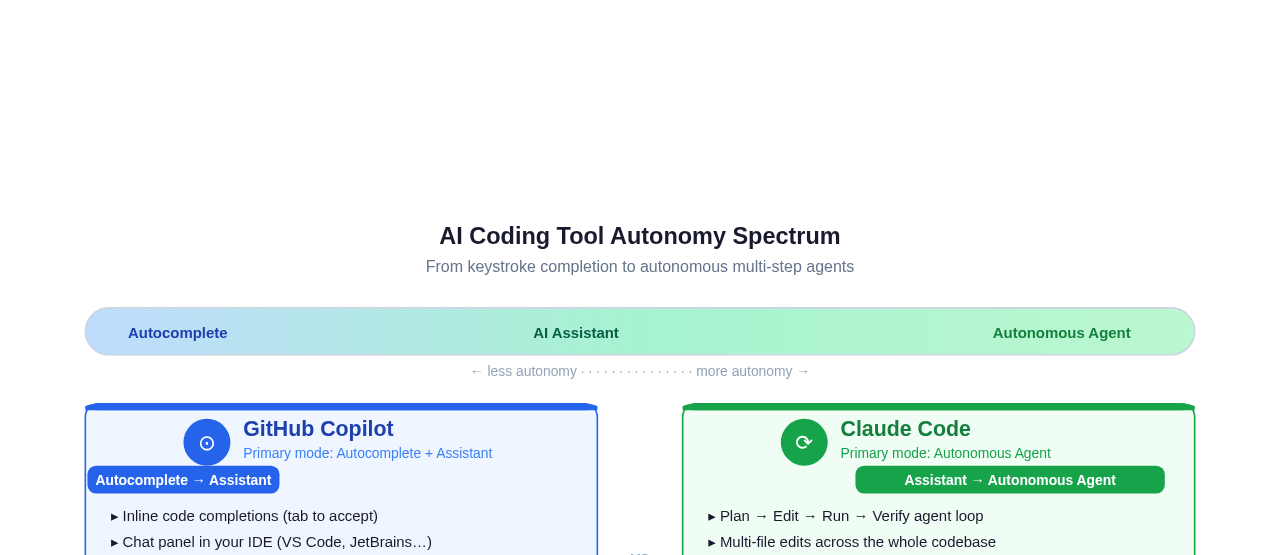 Copilot's default experience sits in the autocomplete-to-assistant band. Claude Code's default is autonomous agent: you delegate a task and review the result.
The Autonomy Model: The Real Dividing Line
This is the crux. It's not just about IDE vs terminal, or Anthropic vs GitHub. It's about where the human is in the loop.
Copilot keeps you in a tight review cycle. Every completion is a suggestion. Every chat response is advisory. Even in Agent Mode, you're watching edits land in your editor and you can interrupt, redirect, or reject. The developer is continuously exercising judgment, which is exactly what many developers want, especially for sensitive codebases, unfamiliar tasks, or work where they want to learn by doing.
Claude Code delegates the cycle to the agent. You describe the outcome: "refactor this module to use the new API," "add integration tests for the auth service," "fix the three failing tests in CI and explain why they broke." Claude Code reads the codebase, makes a plan, executes it, runs the tests, loops back if something fails, and returns a completed result. You review a diff, not a sequence of suggestions. This is faster for well-defined, large tasks, and riskier if you haven't described the task clearly or haven't set up proper guardrails.
The practical consequence: Claude Code is often better for tasks you can specify precisely and want handled end-to-end. Copilot is often better for tasks where you're thinking through the problem as you code, want to stay hands-on, or want the AI to give you material you'll heavily edit.
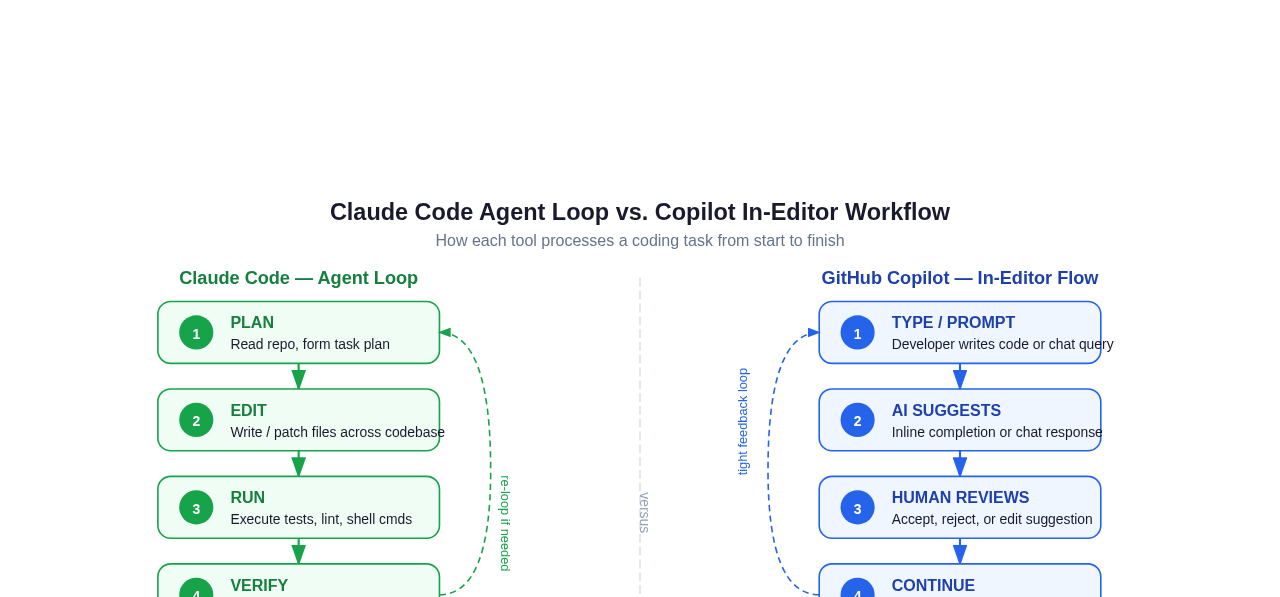 Claude Code's loop runs autonomously to completion. Copilot's loop turns over with every human action: the developer is the scheduler.
Multi-File and Agentic Tasks
This is where the tools diverge most visibly in practice.
Claude Code was built for multi-file, multi-step work. Give it a task like "extract the payment logic into a separate service, update all the imports, add unit tests, and make sure the existing suite still passes," and it will read the relevant files, execute the refactor, run the tests, fix what broke, and surface the result. It has access to the full repo context it needs and can run any shell command.
A concrete example: if you have a 30-file Node.js project and want to migrate from CommonJS to ES Modules, Claude Code can plan the changes across every file, execute them, run your test suite, and handle the edge cases, all in one session, without you watching each file update. The same task in Copilot Chat or Agent Mode would require more hand-holding: you'd be asking it to work on one module, reviewing, then asking it to do the next.
GitHub Copilot has improved significantly at multi-file work through Agent Mode, but the interaction model still puts you at the center. In Agent Mode, Copilot can open files, make edits, and run terminal commands, but GitHub's own documentation frames it as the user approving and directing each step. It's designed for developers who want visibility and control at each stage, not for truly unattended execution.
Copilot Workspace is the most "agentic" product GitHub has shipped: it takes an issue, proposes a plan with file-by-file diffs, and lets you review the entire change before applying. But as of mid-2026, it's a separate preview environment tied to GitHub.com, not embedded in the terminal or CI the way Claude Code is.
For a deeper look at how Claude Code compares to another agentic coding tool, see Claude Code vs Codex.
Context Window and Codebase Awareness
Claude Code runs on Anthropic's Claude models, which offer large context windows (Claude 3.5 and later support 200K tokens, with extended context available). In practice, Claude Code indexes and reads the relevant parts of your repo dynamically: it doesn't stuff the whole codebase into one prompt, but it navigates files intelligently as it works.
GitHub Copilot's context is scoped to what's open in your editor and what Copilot can index (Copilot can be connected to your entire repository on GitHub for chat context). For most daily coding (writing a function, explaining a class, generating tests for the current file), this is more than sufficient. For "touch 40 files across the repo" tasks, it's a constraint.
Neither tool is magic at very large monorepos, but Claude Code's agentic architecture means it goes looking for what it needs. Copilot works with what you've surfaced.
IDE vs Terminal: Interface and Workflow
GitHub Copilot lives in your editor. If you use VS Code, JetBrains IDEs, Neovim (via a plugin), or any of the supported editors, Copilot meets you there. You don't change your workflow. It layers on top of it. For developers who are most productive inside a GUI editor with split panes, file trees, and visual diff views, this is a genuine advantage.
Claude Code lives in your terminal. There's a VS Code extension that shows diffs in the editor panel, but the primary interface is a CLI. For developers who are already comfortable in a terminal, or who run Claude Code as part of scripts and pipelines, this is natural. For developers who rarely leave their editor, there's a learning curve.
It's worth noting: the terminal-vs-editor split is less about capability and more about fit. Claude Code's headless mode is something Copilot can't match: you can run Claude Code in a GitHub Actions workflow, triggered by a failing test, and have it propose a fix as a pull request. That use case doesn't exist in an editor-native tool. You can read more about how Claude Code works on the web if the local setup is a barrier.
Claude Code also supports hooks: lifecycle callbacks that let you inject custom logic at key points in the agent loop (before edits, after tool use, on completion). This composability is part of what makes it suited to CI and automation workflows.
Pricing
GitHub Copilot, per GitHub's published plans, offers:
- Free plan: a limited monthly allotment of completions and chat requests
- Copilot Pro: $10/month, for individual developers
- Copilot Business: $19/user/month, adds organization management and audit logs
- Copilot Enterprise: $39/user/month, adds Copilot Workspace, custom fine-tuning, and deeper GitHub integration
GitHub also states Copilot is free for verified open-source maintainers and students. (Always check GitHub's plans page for current figures; vendor pricing changes.)
Claude Code is available through Anthropic's plans:
- Claude Pro subscription ($20/month), comes with Claude Code access at the standard rate
- Claude Max (higher monthly tiers), higher usage limits for heavier Claude Code use
- API usage: pay per token for programmatic/CI use via the Anthropic API
The pricing structures serve different usage patterns. Copilot's flat subscription is predictable for continuous, daily editor use. Claude Code's token-based pricing can be very economical for targeted, high-value autonomous tasks, but heavy use in agentic loops adds up quickly. For teams running Claude Code in CI pipelines at scale, the Anthropic API model makes costs auditable per task.
A direct cost comparison isn't clean because the tools are used differently: Copilot's value is in the constant drip of completions across every hour of coding; Claude Code's value is concentrated in big tasks it completes autonomously.
Decision Table
| Dimension | GitHub Copilot | Claude Code |
|---|---|---|
| What it is | In-editor AI assistant with growing agent features | Autonomous terminal coding agent |
| Primary interaction | Inline autocomplete + chat | Delegate a task; review the result |
| Multi-file autonomy | Growing (Agent Mode); human drives each step | Native; agent plans and executes independently |
| Interface | Editor (VS Code, JetBrains, etc.) | Terminal / CLI + VS Code diff view |
| Headless / CI use | No | Yes, scriptable with -p flag |
| Context scope | Open files + indexed repo | Full repo, dynamically navigated |
| Model | OpenAI + Anthropic + Google (switchable) | Anthropic Claude models |
| Best task size | Line-to-function-level, exploratory work | Feature-to-PR-level, well-specified tasks |
| Human in the loop | Continuously, at each suggestion | At the end, reviewing completed diff |
| Learning curve | Low, meets you in your editor | Higher, terminal comfort helps |
| Pricing | Flat subscription from $10/month | Token-based; subscription or API |
| Open-source maintainers | Free tier available | Available via Claude Pro |
When to Pick Copilot
- You spend most of your time inside a GUI editor and don't want to change that workflow.
- Your tasks are frequent, small, and exploratory: you're writing as you think.
- You want to review and approve AI suggestions at a fine-grained level rather than reviewing a completed diff.
- Your organization already has GitHub Enterprise or a GitHub contract: Copilot integrates with GitHub pull requests, issues, and code review natively.
- You want a single subscription that covers daily completions across all your projects at a flat, predictable cost.
- You're newer to AI-assisted coding and want training wheels: see the suggestion, accept or reject, stay in control.
When to Pick Claude Code
- You have a well-defined, multi-step task (a refactor, a feature, a test suite) and would rather delegate it than supervise it keystroke by keystroke.
- You work primarily from the terminal or are comfortable there.
- You want to run the agent in CI, automation scripts, or pipelines with no human present.
- You need the agent to touch many files across a repo in a single session without you guiding each one.
- You want the largest possible context and the deepest reasoning on complex architectural tasks.
- You want to configure the agent's behavior with hooks and lifecycle callbacks (see Claude Code hooks).
The honest version: if you mostly write code with AI helping in real time, Copilot is hard to beat at $10/month. If you want to assign whole tasks to an autonomous agent and review the result, Claude Code is the purpose-built tool. Plenty of developers use both: Copilot for daily in-editor work, Claude Code for larger, specified tasks.
Can You Use Both?
Yes, this is a common pattern in 2026, and it makes sense. The tools don't overlap as much as their marketing might suggest. Copilot is always-on background assistance for every editing session. Claude Code is a task executor you invoke when you have something to delegate.
Think of it like a staff augmentation model: Copilot is the ever-present pair programmer watching you code; Claude Code is the autonomous contractor you brief with a task and come back to when it's done.
For teams running Claude Code at scale across CI and PR workflows, see how it compares to OpenAI's equivalent in Claude Code vs Codex, or how it stacks up against the editor-native Cursor in Claude Code vs Cursor.
Feel the Autonomy Difference Before You Commit to a Terminal
If you're reading this, odds are you already use Copilot every day and you've never actually delegated a whole task to an agent: you've only ever accepted suggestions one at a time. The hardest part of this comparison to grasp from a blog post is what that delegation feels like. The refactor that takes ten Copilot suggestion cycles (accept, adjust, accept, fix the import, accept again) is the same refactor you hand an autonomous agent as a single sentence and review once when it's done. Reading about that gap and feeling it are different things.
Happycapy lets you feel it without setting up anything. It runs a Claude Code-style autonomous agent in a secure cloud sandbox: pick from 150+ models, describe a multi-file task, and watch the plan → edit → run → verify loop play out on a visual desktop, all in a browser tab. No CLI to install, no API keys to manage, no locked-down-laptop problem. It's the fastest way to A/B the two philosophies this article describes: keep Copilot open in your editor for the suggestion drip, and run the same task as a delegated job here to see what concentrated autonomy actually buys you.
Start free at happycapy.ai and hand it the next refactor you'd otherwise click through suggestion-by-suggestion: the contrast is the whole point.
The Bottom Line
GitHub Copilot and Claude Code aren't really competing for the same job. Copilot is an in-editor assistant that makes you faster keystroke by keystroke; it's the highest-ROI choice for continuous, everyday coding, especially inside a GitHub-centric workflow. Claude Code is an autonomous agent that takes a whole task off your plate and runs a plan → edit → run → verify loop to completion; it wins when the work is a discrete, multi-file job you'd rather delegate than babysit. If your team already lives in GitHub Enterprise, Copilot is the path of least resistance. If you keep wishing your AI would just do the task instead of suggesting the next line, that's the signal you want an agent. Most serious developers will end up using both: Copilot in the editor, an agent for the big jobs.
Frequently Asked Questions
Q: Is Claude Code better than GitHub Copilot?
Neither is universally better. They're optimized for different workflows. Copilot is better for continuous in-editor assistance where you want to stay hands-on with every change. Claude Code is better for delegating complete, multi-step tasks to an autonomous agent. The right choice depends on your task type, not a global ranking.
Q: What is the main difference between Claude Code and GitHub Copilot?
The core difference is autonomy and interaction model. Copilot assists your editing: it suggests, you accept or reject, you stay in control throughout. Claude Code takes over a task: it plans, edits, runs, and verifies autonomously, then hands you a completed result to review. One is a copilot; the other is more like an autopilot for coding tasks.
Q: Can GitHub Copilot do agentic tasks like Claude Code?
Copilot has made real progress here with Agent Mode (multi-file edits, terminal commands) and Copilot Workspace (issue-to-code planning). However, these features still keep the human directing each step in the editor. Claude Code's autonomy runs deeper: it executes multi-step tasks without human intervention in the loop, and it can run completely headlessly in CI pipelines. The gap is narrowing, but the architectural difference remains significant as of mid-2026.
Q: Which has a bigger context window, Copilot or Claude Code?
Claude Code runs on Anthropic's Claude models with up to 200K token context windows. GitHub Copilot uses a mix of models (including GPT-4o and Claude 3.5/3.7 Sonnet in some tiers) and its practical context for chat and agent tasks is scoped to what's available in your open editor files and indexed repository. For tasks requiring deep, holistic understanding of a large codebase, Claude Code's architecture gives it an advantage.
Q: Does GitHub Copilot support CI pipeline automation?
Not in the same way Claude Code does. Copilot Agent Mode and Workspace are designed for interactive, editor-based workflows. Claude Code can be invoked with a -p flag from any shell, making it scriptable for GitHub Actions, pre-commit hooks, cron jobs, and other unattended automation. Anthropic's documentation covers the headless mode explicitly.
Q: How does GitHub Copilot's model selection compare to Claude Code's?
Copilot (on Pro and above) lets you choose between multiple models, including GPT-4o, Claude 3.5 Sonnet, Claude 3.7 Sonnet, and Gemini variants, depending on your plan. Claude Code uses Anthropic's Claude models exclusively. If model flexibility matters to you, Copilot's switcher is a genuine advantage. If you specifically want Anthropic's most capable Claude reasoning applied to an autonomous agent loop, Claude Code delivers that directly.
Q: Is Copilot free?
GitHub offers a Copilot Free tier with a limited monthly allotment of completions and chat messages, with Copilot Pro at $10/month (GitHub's plans). Claude Code requires at least a Claude Pro subscription ($20/month) or API usage charges (Anthropic's pricing). For light, exploratory use, Copilot's free tier is a compelling starting point, but for heavy agentic workloads, Claude Code's pricing structure scales differently. Check both vendors' pages for current numbers.
Q: Can I use Claude Code without installing anything locally?
Yes, platforms like Happycapy run Claude Code-style agents in a browser-based cloud sandbox. This removes the local CLI requirement entirely and is useful for teams who want the agentic model without the setup overhead. See running Claude Code on the web for more on browser-based approaches.
Q: Which tool is better for a large refactor across 50 files?
Claude Code is significantly better suited for this. You describe the refactor once ("migrate all our API calls from axios to fetch, update error handling to match the new pattern, and make sure tests pass") and Claude Code executes it autonomously across the entire codebase, running tests along the way. In Copilot, you would guide it file by file, reviewing at each step. For tasks like this, the autonomous model saves substantial time.
Related guides
- The Best GitHub Copilot Alternatives in 2026, Grouped by What You Actually Need
- Claude Code vs Cursor: Which AI Coding Tool Should You Use? (2026)
- Build Autonomous Agents with the Claude Code SDK: A Practical Developer's Guide
- How Claude Code Review Actually Works: Diffs, Hooks, and What the Agent Catches