The Best GitHub Copilot Alternatives in 2026, Grouped by What You Actually Need
Not one winner: the right Copilot alternative depends entirely on how you work.
The Best GitHub Copilot Alternatives in 2026, Grouped by What You Actually Need
The best GitHub Copilot alternatives in 2026 are Cursor and Windsurf for developers who want a smarter in-editor experience, Claude Code and Aider for those who prefer terminal-native agentic workflows, and Happycapy for teams who want a cloud-native platform that runs any model without installing anything locally. Which one is right depends less on head-to-head benchmark scores and more on how you actually work.
This is a multi-tool roundup organized by job-to-be-done, not a general best-editors list (for that, see Top AI-Powered Code Editors in 2026) and not a binary head-to-head (for a deep Claude Code vs Copilot comparison, see our dedicated post). If you're evaluating several options to replace Copilot in your workflow, this guide is built for you.
What GitHub Copilot Is (and Why Developers Are Looking Elsewhere)
GitHub Copilot launched in 2021 and defined the category: an AI assistant embedded directly into your editor, suggesting completions as you type. At its best it's frictionless: it lives inside VS Code or JetBrains, understands your open file, and produces plausible code before you finish the thought.
At its worst, it's a glorified autocomplete that misses context from other files, occasionally suggests confidently wrong code, and (after GitHub's June 2026 switch to usage-based AI Credits) can be more expensive than expected for power users. That pricing change pushed a meaningful number of developers to re-evaluate alternatives.
The reasons developers seek Copilot alternatives cluster around a handful of real complaints:
- Context window limits. Copilot's suggestions are largely scoped to the open file or immediate context. Larger refactors across many files require manual prompting.
- No true agent mode. Copilot can now suggest multi-step changes via Copilot Workspace, but it's not the same as running an autonomous loop that edits files, runs tests, and fixes failures.
- Model choice. You use whatever model Microsoft/GitHub have integrated. If you want Claude, Gemini, or a local model, Copilot doesn't give you that choice.
- Privacy. Code sent to GitHub's servers can be a blocker for regulated industries or teams with strict IP requirements.
- Cost. Post-credits-reset, heavy usage on Copilot Enterprise can climb quickly.
The alternatives market has matured around these exact pain points, which is why it's now worth thinking in categories rather than picking the single "best" tool.
How to Think About This: Three Categories of Alternatives
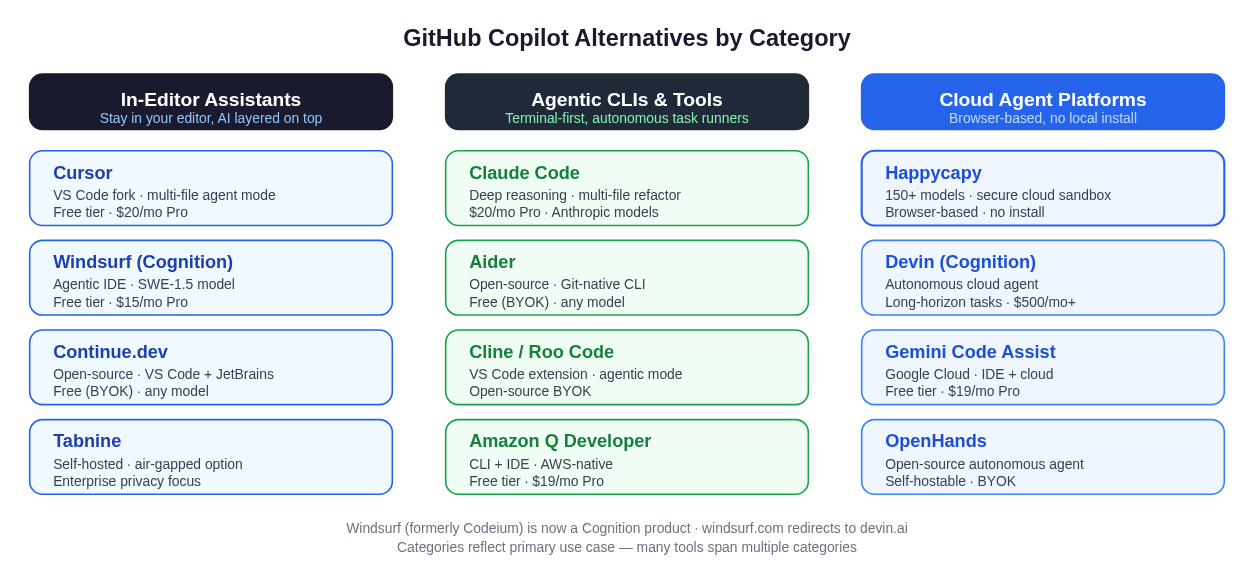 Three categories of Copilot alternatives: in-editor AI assistants, agentic CLIs and tools, and cloud agent platforms. Most developers land in the first two; the third serves a different workflow entirely.
The field breaks into three groups, each solving a different problem:
- In-editor assistants: You stay in an IDE (or IDE fork), but get dramatically more intelligence. Cursor and Windsurf are the headline entries here.
- Agentic CLIs and tools: You work from the terminal or let a tool run autonomously through a codebase. Claude Code, Aider, and Cline belong here.
- Cloud agent platforms: Browser-based, no local install, 150+ model options. Built for teams or individuals who've outgrown the editor-assistant paradigm. Happycapy fits here.
Not every developer needs to jump categories. If you love VS Code and just want better inline AI, an in-editor assistant is the right call. If you're orchestrating long-running autonomous tasks, a cloud platform or agentic CLI is worth the switch.
Category 1: In-Editor Assistants
Cursor
Cursor is a VS Code fork that ships its own AI layer on top. It's widely regarded as the closest like-for-like Copilot replacement that's actually better in almost every dimension that matters to daily development.
The core difference from Copilot: Cursor has genuine multi-file awareness. Its Composer (agent mode) can open, edit, and connect changes across your whole project, not just the open tab. You can describe a feature at a high level and Cursor will propose the diff across every affected file.
Pros:
- Inherits VS Code's extension ecosystem; your keybindings and plugins carry over
- Multi-file agent mode (Composer) handles real refactors
- Multi-model access: Claude, GPT-4o, Gemini, and its own cursor-small model
- Free tier; $20/month Pro
Cons:
- It's a fork, not an extension: you're locked into Cursor's editor
- Some enterprise security teams are cautious about a fork of VS Code
- Autocomplete latency can be perceptible on very large repos
Best for: Daily development, developers moving from VS Code who want a genuine upgrade without a steep learning curve.
Windsurf (by Cognition)
A note on naming: Windsurf was originally built by Codeium. In December 2025, Cognition AI (the maker of the autonomous coding agent Devin) acquired Windsurf for approximately $250 million. The product continues under the Windsurf brand and is now developed by Cognition. The domain windsurf.com redirects to devin.ai, but Windsurf itself remains a distinct IDE with its own download and product identity.
As of mid-2026, Windsurf has shipped its SWE-1.5 proprietary coding model (co-designed with Windsurf's Fast Context retrieval system), Codemaps (visual codebase graphs), and embedded Devin agents for long-running tasks. Pro pricing is $15/month, undercutting Cursor Pro.
Pros:
- Supports 40+ IDE plugins including JetBrains, Vim, and Xcode: more flexibility than Cursor
- SWE-1.5 model is reportedly very fast for code edits
- Embedded Devin for autonomous long-horizon tasks
- Free tier available
Cons:
- Ongoing product integration following the acquisition creates some uncertainty
- Cascade, the original local agent, is being deprecated (end-of-life July 1, 2026). Existing users need to migrate to Devin Desktop
- Independent benchmarks for SWE-1.5 are still emerging
- The Windsurf → Devin transition means the product roadmap is in flux
Best for: Developers comfortable with a product in active transition, JetBrains users who can't use Cursor, and those who want access to Devin's autonomous mode from within an IDE.
For a direct comparison of these two editors, see Cursor vs Windsurf.
Continue.dev
Continue is an open-source extension for VS Code and JetBrains that functions as a Copilot replacement using whatever model you provide. You bring your own API key: Anthropic, OpenAI, Gemini, Ollama, or anything else.
Pros:
- Free to use; you pay only for the API tokens you consume
- Works inside your existing VS Code or JetBrains setup, no fork
- Model-agnostic: swap providers without changing your editor
- Strong privacy story: code leaves only for the model provider you choose
Cons:
- Requires managing API keys and understanding token costs
- No polished "just works" experience out of the box
- Community-supported; depth of agent mode is still catching up to Cursor
Best for: Budget-conscious developers, privacy-focused teams, and anyone who wants to experiment with different models without a subscription commitment.
Tabnine
Tabnine is one of the oldest AI code assistants and remains the leading choice for enterprise teams with strict data-governance requirements. It offers genuine on-premises and air-gapped deployment. Your code never touches a third-party server.
Pros:
- On-premises and air-gapped deployment options
- SOC 2 Type II and ISO 27001 certified
- Supports all major IDEs
- Trained on only permissively licensed code; IP indemnification available
Cons:
- More expensive than most alternatives (starting ~$39/month for full enterprise features)
- Coding intelligence lags behind Cursor and Windsurf on pure capability benchmarks
- Less of an "agent" and more of an enhanced autocomplete
Best for: Regulated industries (finance, healthcare, defense), teams with strict IP policies, and enterprises that need code to stay entirely on-premises.
Category 2: Agentic CLIs and Tools
Claude Code
Claude Code is Anthropic's terminal-based agentic coding tool. It's the entry in this roundup that comes closest to a fully autonomous coding agent running in your local environment. Claude Code excels at the kind of work where you describe a complex task and let the agent work through it: reading files, writing code, running tests, and iterating until the task is done.
For those specifically evaluating Copilot versus Claude Code, there's a deep head-to-head in the Claude Code vs GitHub Copilot comparison. The short version: Copilot wins on moment-to-moment editor integration; Claude Code wins on reasoning depth and complex multi-step tasks.
Pros:
- Deep reasoning capability (Claude Opus 4.8 for the hardest tasks)
- Genuine autonomous agent loops: runs tests, reads error output, iterates
- Strong multi-file refactoring and debugging
- Tight Git integration; understands your entire repo
- $20/month Pro, or pay-as-you-go via API
Cons:
- Requires local installation and a terminal-comfortable workflow
- Not the right tool if you want inline completions as you type
- API token costs can add up on large autonomous runs
- You need to trust the agent with write access to your codebase
Best for: Developers who work in the terminal, complex debugging and refactoring, large codebase analysis, and anyone who needs a reasoning-heavy agent rather than an autocomplete assistant. For a browser-based version that removes the installation requirement, see Claude Code in the browser.
Aider
Aider is an open-source terminal tool for pair programming with AI. It's been around since before most of these alternatives and has built a loyal following among developers who live in the terminal. You run it from the command line, add files to the context, and give it instructions. It handles the Git commits for you.
Pros:
- Genuinely free (BYOK: bring your own API key)
- Excellent Git integration: creates commits, can browse history
- Model-agnostic: works with Claude, GPT, Gemini, local models
- Active open-source community, frequent updates
Cons:
- No GUI; requires terminal comfort
- Context management is manual: you add files explicitly
- Less polished than commercial alternatives
- Cost still exists via API token consumption
Best for: Open-source contributors, developers on a budget, and anyone who wants full control over their AI tooling with no subscription.
Cline / Roo Code
Cline (and its fork Roo Code) are open-source VS Code extensions that give you an agentic coding assistant inside the editor with your own API key. Unlike Cursor, you keep your existing VS Code setup. Cline is installed as an extension, not a fork.
Pros:
- Stays inside VS Code, not a fork
- Open-source with full transparency
- BYOK: full model flexibility
- Agent mode with file reading, terminal access, browser control
Cons:
- API cost management requires attention
- Less polished than Cursor for day-to-day autocomplete
- Configuration can be involved
Best for: VS Code users who want agent capabilities without switching editors or paying a subscription.
Amazon Q Developer
Amazon Q Developer is Amazon's AI coding assistant, deeply integrated with AWS services. It covers both IDE assistance (VS Code, JetBrains) and a CLI agent mode. For teams building on AWS, it has contextual knowledge of your infrastructure that no other tool matches.
Pros:
- Native AWS service awareness (IAM, Lambda, CloudFormation)
- Free tier available; $19/month Pro
- IDE extension + CLI agent
- Security scanning built in
Cons:
- Much less useful outside the AWS ecosystem
- IDE experience lags behind Cursor and Windsurf for general coding
- Focused on AWS patterns, not general software engineering
Best for: AWS-heavy engineering teams building and operating cloud infrastructure.
Category 3: Cloud Agent Platforms
Happycapy
Happycapy is the option for developers and teams who have outgrown the editor-assistant paradigm and want a browser-based, cloud-native agent environment without installing anything locally.
Where Cursor or Windsurf are local IDE forks and Claude Code is a locally installed CLI, Happycapy runs entirely in the browser. You open it like a web app, pick from 150+ models (Claude, GPT, Gemini, Mistral, and dozens more), and work in a secure cloud sandbox. The whole compute environment is in the cloud: no local runtime, no Docker setup, no API key juggling per tool.
This is an honest framing: Happycapy is not the right choice if you want deeply integrated inline autocomplete while you type. Cursor and GitHub Copilot are better for that. Happycapy suits developers who:
- Work across multiple machines and don't want to reinstall tooling
- Want to run powerful models without managing local GPU or API key rotation
- Need a cloud-sandboxed environment for security or compliance reasons
- Are evaluating many models and want them all in one interface
- Have moved toward agentic workflows that don't require an editor running locally
Pros:
- Zero installation; browser-based
- 150+ models in one interface
- Secure cloud sandbox: code runs in an isolated environment
- No per-model API key management
- Suited to teams who want consistent tooling without local setup
Cons:
- Not the right tool for real-time inline autocomplete as you type
- Requires internet access (cloud-dependent by design)
- Those invested in VS Code's extension ecosystem will feel the switch
- Pricing structure differs from per-seat editor subscriptions
Best for: Developers transitioning from editor-assistant workflows to cloud-native agent workflows, multi-model experimentation, and teams that want reproducible sandboxed environments.
Comparison Table
| Tool | Category | Price | Best For | Local Install? |
|---|---|---|---|---|
| Cursor | In-editor | Free / $20/mo | Daily dev, VS Code users | Yes (editor fork) |
| Windsurf | In-editor + agent | Free / $15/mo | JetBrains users, agentic IDE | Yes (IDE) |
| Continue.dev | In-editor | Free (BYOK) | Budget, privacy, model flexibility | Extension only |
| Tabnine | In-editor | ~$39/mo+ | Enterprise privacy, air-gapped | Yes / Self-hosted |
| Claude Code | Agentic CLI | $20/mo Pro | Complex tasks, terminal devs | Yes (CLI) |
| Aider | Agentic CLI | Free (BYOK) | Terminal devs, OSS contributors | Yes (CLI) |
| Cline / Roo Code | Agentic VS Code ext | Free (BYOK) | VS Code, no fork | Extension only |
| Amazon Q Dev | CLI + IDE | Free / $19/mo | AWS teams | Extension + CLI |
| Happycapy | Cloud platform | Varies | Browser-first, multi-model | No |
| Devin (Cognition) | Cloud agent | $500/mo+ | Long-horizon autonomous tasks | No |
Which Should You Pick? A Decision Guide
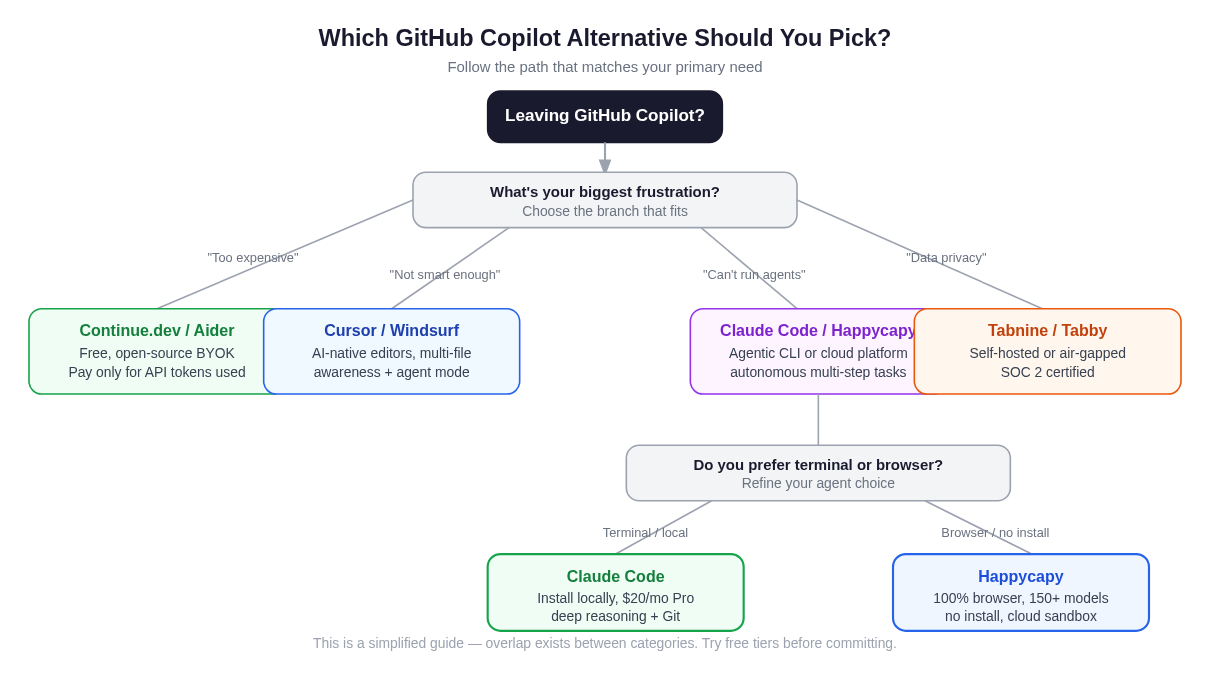 Follow the branch that matches your biggest frustration with Copilot. Most developers end up in the in-editor column; the cloud platform path suits a different workflow.
"Copilot is too expensive now, but I want something similar" Start with Continue.dev (free, open-source, bring your own API key) or Cline. These give you a Copilot-like experience inside VS Code without a subscription, though you'll pay for API tokens based on usage.
"I need better code quality and multi-file understanding" Cursor is the clearest upgrade path. It inherits VS Code's interface and substantially improves multi-file awareness, agent mode, and model quality. Windsurf is also worth evaluating, especially if you use JetBrains.
"I want to run autonomous coding agents, not just get suggestions" Claude Code if you're comfortable in the terminal; Happycapy if you prefer a browser-based environment. For comparing the range of options in this space, the OpenClaw alternatives post covers several more agentic tools in detail.
"My company has strict data privacy requirements" Tabnine is the first call. It's been in enterprise environments the longest, has the certifications to match, and supports genuine air-gapped deployment. Tabby is the open-source self-hosted alternative if you want to run it on your own infrastructure.
"I'm on AWS and want infrastructure awareness" Amazon Q Developer. Nothing else understands AWS context as natively.
"I want to experiment with many different models without managing API keys" Happycapy. You get 150+ models in one browser interface without setting up separate API keys for each provider.
Caveats and Honest Notes
A few things worth stating plainly before you choose:
Most benchmarks are publisher-run. Performance claims about SWE-bench, MMLU, or internal coding evaluations should be treated skeptically unless third-party verified. Independent third-party benchmarks for the newest models (SWE-1.5, Claude Opus 4.8) are still sparse.
Windsurf is in the middle of a product transition. The Cognition acquisition is real, the integration is ongoing, and the original Cascade local agent is EOL. If stability matters to your team, watch the product trajectory before going all-in.
Free tiers have limits. Most tools offer meaningful free tiers, but the limits are real. Continue.dev is genuinely free but requires careful API cost management. Windsurf's free tier has a credit cap. Evaluate against your actual usage volume.
The "best" tool changes fast. This market moved dramatically between 2024 and 2026. Evaluations from six months ago may be outdated. Run your own trial before committing to a paid plan.
FAQ
Is GitHub Copilot still worth it in 2026? For developers who want a low-friction, works-everywhere autocomplete inside VS Code, JetBrains, or Visual Studio, Copilot still makes sense, especially if your company has a GitHub Enterprise license. The June 2026 credits-based pricing change made heavy usage more expensive, which is the main reason developers are re-evaluating. Copilot's tight GitHub integration (PR summaries, issue linking, repo context) remains genuinely useful.
What is the closest Copilot replacement? Cursor is the closest like-for-like replacement that most reviewers rank as an upgrade. It inherits VS Code's interface, installs your existing extensions, and meaningfully improves the AI layer. Continue.dev is the closest if your priority is staying free.
Can I use Claude Code instead of GitHub Copilot? Yes, but they do different things. Claude Code is a terminal-based agentic tool; Copilot is primarily an inline editor assistant. If you type code in an editor and want AI completions as you work, Copilot (or Cursor) is a better fit. If you want to describe a task and have an agent work through it autonomously, Claude Code is more capable. Many developers use both.
Is Windsurf still called Windsurf after the Cognition acquisition? Yes, as of mid-2026 the IDE product continues under the Windsurf brand, now developed by Cognition (the makers of Devin). Windsurf.com redirects to Devin.ai, and Cognition is positioning Windsurf as the IDE interface for Devin's autonomous agents. The product exists and is actively developed, but the underlying Cascade agent is being deprecated and replaced by Devin Desktop.
What's the best free GitHub Copilot alternative? Continue.dev and Aider are the strongest free options: both are open-source, model-agnostic, and require only an API key. Windsurf and Cursor also have free tiers with meaningful usage limits if you prefer a managed product. Cline is free inside VS Code with your own API key.
Do any of these alternatives work with JetBrains? Yes: Windsurf, Tabnine, Continue.dev, Amazon Q Developer, and Codeium all support JetBrains IDEs. Cursor does not. It's a VS Code fork only.
What is Happycapy? Happycapy is a browser-based AI agent platform with 150+ models in a secure cloud sandbox. It's built for developers and teams who want agentic coding capabilities without installing any local tooling. It's a genuine alternative to Claude Code for cloud-native workflows, not a drop-in Copilot replacement. It suits a different set of workflows. See happycapy.ai for current pricing.
Should I switch from Copilot to Cursor or Claude Code? If your main frustration is completion quality and multi-file context, try Cursor: the migration is easy since it inherits VS Code. If your frustration is that Copilot can't run autonomous agent tasks, try Claude Code or Happycapy. If you're not frustrated with Copilot, there may not be a compelling reason to switch right now.
How do I evaluate these tools without committing? Most have meaningful free tiers. Try Cursor free for a week on a real project. Run Claude Code on one complex debugging task with the Pro trial. Use Continue.dev for a month with a small API credit allocation. Real-world usage beats benchmark reading every time.
The alternatives space is genuinely diverse in 2026, and that's good news. There isn't one winner for every workflow. The right answer depends on whether you're optimizing for inline editor experience, autonomous agent capability, privacy, cost, or model flexibility.
How to Actually Switch From GitHub Copilot (Migration Checklist)
Reading about alternatives is one thing; making the switch without disrupting your daily workflow is another. Most developers stall at the "I'll try it someday" stage because the friction of migration feels higher than it is. Here is a practical checklist based on the most common transition paths.
Step 1: Export your Copilot settings and keybindings before you touch anything
In VS Code, open the Settings Sync panel (Ctrl+Shift+P → "Settings Sync: Show Settings") and confirm your settings are backed up to your GitHub account. Export your keybindings.json and settings.json manually as a local backup (~/.config/Code/User/ on Linux, ~/Library/Application Support/Code/User/ on macOS). This takes two minutes and means you can restore your exact setup if the trial does not stick.
Step 2: Run your chosen alternative in parallel for one to two weeks; do not uninstall Copilot yet
The parallel trial approach consistently works better than a hard cutover. Install Cursor, Continue.dev, or Cline alongside your existing Copilot subscription. Disable Copilot's inline suggestions temporarily (VS Code setting: "github.copilot.editor.enableAutoCompletions": false) without removing the extension. This lets you compare on real work without pressure.
For Claude Code, the parallel approach is even easier. It is a terminal tool, so it does not conflict with your editor setup at all. Run it on one non-trivial task (a debugging session, a refactor, a new feature) and compare the outcome to what Copilot would have produced.
Step 3: Migrate keybindings explicitly if you are moving to Cursor
Cursor imports your VS Code profile on first launch, but keybinding conflicts sometimes arise, particularly around Copilot's Tab accept and Alt+\ trigger shortcuts. Open Cursor's keybindings editor (Ctrl+K Ctrl+S) and search for "copilot" to confirm no ghost bindings remain. The top AI-powered code editors in 2026 post covers Cursor's profile import flow in more detail.
Step 4: Decide on your model and billing setup
- Cursor Pro ($20/month): Claude, GPT, and Gemini models pooled, no separate API keys needed.
- Continue.dev or Cline (BYOK): Set a monthly spend cap in your Anthropic or OpenAI billing dashboard before you start. A modest credit balance covers substantial usage for most individual developers.
- Happycapy: Handles model access centrally, so no per-provider API key rotation, useful if you are trialing multiple models at once.
Step 5: Cancel Copilot after 30 days if the replacement sticks
GitHub Copilot bills monthly. Most developers know within two weeks whether a tool has genuinely changed their workflow. If it has not, restore your Copilot settings and continue, no harm done.
Copilot Alternative by Pain Point (Quick Reference)
| Your main frustration | Best first alternative to try |
|---|---|
| Cost after the Copilot pricing changes | Continue.dev or Cline (free, BYOK) |
| Weak multi-file context | Cursor (Composer handles cross-file refactors) |
| No real agent mode | Claude Code or Happycapy |
| Privacy / code leaving your servers | Tabnine (on-prem) or Continue.dev with a local model |
| Locked to one AI model | Cursor, Continue.dev, or Cline: all support multiple providers |
| Poor JetBrains support | Windsurf or Tabnine |
For a direct comparison of the two leading in-editor alternatives, see Cursor vs Windsurf.
FAQ: Switching From Copilot
What is the best GitHub Copilot alternative?
There is no single best. It depends on your workflow. For most VS Code developers who want an upgrade in the same paradigm, Cursor is the most consistently recommended alternative: it imports your existing setup, adds genuine multi-file agent mode, and offers multi-model access at the same $20/month price point. For developers who need an autonomous agent rather than inline completions, Claude Code is the stronger tool. For teams who want browser-based access to many models without any local install, Happycapy suits a different workflow entirely. Start with Cursor if you are unsure: its free tier lets you validate before committing.
Is there a free alternative to GitHub Copilot?
Yes, several. Continue.dev and Aider are fully open-source; you pay only for the API tokens you consume (typically a few dollars per month at moderate usage). Cline and Roo Code are free VS Code extensions with bring-your-own-key model support. Cursor and Windsurf both offer free tiers with meaningful usage limits before requiring a paid plan. The trade-off with BYOK tools is that you manage your own API keys and cost controls. There is no managed subscription to cap surprise bills.
Can I trial a Copilot alternative without uninstalling Copilot first?
Yes, and this is the recommended approach. Disable Copilot's inline completions in VS Code settings without removing the extension, then install your trial tool alongside it. After two weeks of real use on actual projects, you will have a clearer picture than any benchmark can provide. Claude Code runs entirely in the terminal and never conflicts with editor extensions, making it an especially low-friction addition to an existing Copilot setup. For a full feature comparison of the two, see Claude Code vs GitHub Copilot.