
Cursor vs Windsurf: The Honest 2026 Head-to-Head
Control vs flow: the real trade-off between the two best AI code editors of 2026, now that Windsurf is part of Cognition's Devin.
Cursor vs Windsurf: The Honest 2026 Head-to-Head
Cursor and Windsurf are the two most popular AI-native code editors right now, and choosing between them comes down to one core trade-off: granular control vs. seamless flow. Both are local VS Code forks with powerful agentic modes, broad model support, and fast-growing user bases, but they make meaningfully different design bets that suit different kinds of developers.
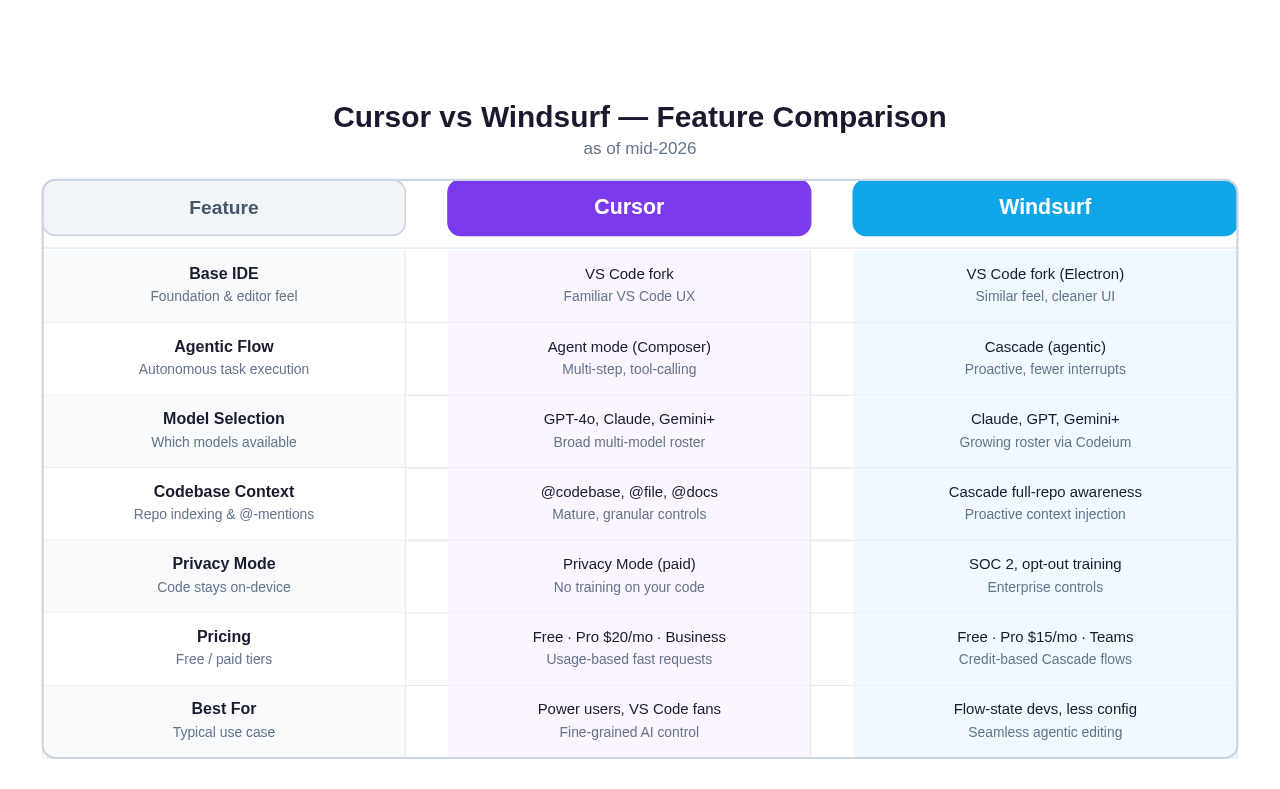 Feature comparison: Cursor vs Windsurf across the categories that matter most for day-to-day development work.
What They Actually Are
Cursor is an AI-first IDE built as a fork of VS Code by Anysphere, a well-funded San Francisco startup. It launched in 2023 and became the dominant paid AI editor for professional developers through a combination of deep VS Code compatibility, a highly configurable AI integration, and an aggressive feature cadence.
Windsurf started life as Codeium, an AI autocomplete plugin (available in 70+ editors) before pivoting to ship its own standalone IDE and rebranding to Windsurf in late 2024. The big change since then: in December 2025, Cognition, the company behind the autonomous coding agent Devin, acquired Windsurf for roughly $250 million (Cognition's announcement; TechCrunch). The Windsurf brand continues under Cognition's ownership, and the two products have been merging: Devin's long-running autonomous agent is now embedded directly inside the Windsurf IDE, so you can dispatch a background agent without leaving the editor. (This is a fast-moving corner of the market: treat corporate and pricing details here as a mid-2026 snapshot and verify current specifics before a procurement decision.)
That acquisition matters for this comparison because it changed Windsurf's trajectory. Post-deal, Cognition shipped SWE-1.5, a proprietary coding model co-designed with Windsurf's retrieval system (Cognition claims it is dramatically faster than general frontier models on agentic tasks), which lets Windsurf lean less on third-party models and push prices down. It also added Codemaps, an AI-annotated visual graph of your codebase for tracing data flow through unfamiliar code. So the honest framing in 2026 is: Cursor is the independent, configurable power tool; Windsurf is the Cognition-backed, agent-forward IDE with Devin built in.
Both still sit in the same market category: AI-first local desktop IDEs. Neither requires a subscription to start (both offer free tiers), and both let you bring your own API keys if you want direct model access. The competition between them is real and the gap has narrowed substantially over the past year.
Editor Model and UX
Cursor
Cursor's interface will feel immediately familiar to anyone coming from VS Code. The keyboard shortcuts, extension ecosystem, settings format, and general layout are essentially identical to stock VS Code: the AI layer sits on top rather than replacing the editor fundamentals. This is a deliberate product decision: Cursor's bet is that developers want VS Code with AI woven in, not a new editor built from scratch.
The AI features in Cursor live in a few places. There is inline autocomplete (Tab), a chat panel (Ctrl+L or Cmd+L), and, most importantly, the Composer (Ctrl+I or Cmd+I), which is Cursor's multi-file, multi-step agent mode. The Composer can read, write, and create files across your project, run terminal commands, and iterate on changes based on test output or error messages.
One of Cursor's distinguishing UX features is its granular context controls. You can manually specify @file, @folder, @codebase, @docs, @web, or even @git as context sources in any prompt. The .cursorrules file (now called cursor.rules) lets you encode project-specific instructions that persist across sessions. This level of control is genuinely useful on large monorepos where indiscriminate context injection creates noise.
The downside is configuration overhead. Getting Cursor set up well (choosing the right model per task, tuning context windows, managing fast vs. slow request modes, handling .cursorignore files) takes meaningful time. First-time users often feel a gap between what Cursor can do and what they actually know how to configure.
Windsurf
Windsurf's UX philosophy is closer to "opinionated and smooth." The interface is slightly more polished and contemporary than Cursor's, even though it's also a VS Code fork. The biggest difference is in how the AI layer presents itself.
Windsurf's standout feature is Cascade, its agentic system. Cascade is designed to be proactive: it doesn't just respond to prompts, it watches what you're doing, understands your goal, and takes action without requiring you to manually manage context. In practice this means Windsurf often just does the right thing without you specifying @this or @that: Cascade automatically reads relevant files, checks for errors, and runs follow-up commands as part of a single coherent flow.
The trade-off: less explicit control. Users coming from Cursor sometimes find Windsurf's context injection opaque. You can see what Cascade included but you have less easy control over it. For developers who find Cursor's controls empowering, Windsurf's smoother hand can feel like it's hiding things. For developers who found Cursor's settings exhausting, Windsurf feels like relief.
Windsurf also ships a feature called Flows, which bundles multi-step agentic tasks (including web searches, code generation, terminal commands, and browser previews in some configurations) into a single tracked run with credits consumed per action rather than per token. This pricing model makes long-running tasks more predictable.
Agent Mode: Composer vs. Cascade
This is where the most substantive difference lives, so it deserves its own section.
Cursor's Agent Mode (Composer)
Cursor's Composer in agent mode is a fully autonomous multi-step engine. It can read files, write to them, execute terminal commands, and loop on output, continuing until a task is complete or it runs into an error it can't resolve. Users who have worked extensively with it describe it as highly capable but "chatty": it tends to show its thinking, ask for confirmation on ambiguous steps, and require more steering than Windsurf on longer tasks.
Cursor recently added Background Agents (still rolling out as of mid-2026), which let you run Composer tasks in the background without blocking your active editing session. This addresses one of the main friction points with agent mode: the need to babysit a running task.
Cursor also supports MCP (Model Context Protocol) servers, allowing the agent to connect to databases, APIs, external tools, and custom data sources. This is a significant capability for teams building in complex environments.
Windsurf's Cascade
Cascade is Windsurf's full agentic mode, and it is arguably the more polished end-user experience of the two. Cascade maintains a persistent understanding of your codebase between sessions, indexes your repo on open, and routes tasks through a planning layer before touching code. It tends to make fewer stops for confirmation, handling ambiguous situations by making a reasonable decision and explaining it afterward.
Cascade also tracks "write" actions and "tool call" actions separately (visible in the Cascade sidebar), which gives users a useful audit trail for what the agent actually did during a session. This transparency has been a selling point for teams adopting Windsurf at scale.
Like Cursor, Windsurf supports MCP integrations. Codeium has also been expanding Cascade's tool suite: web search, file system operations, and browser interactions are all available in the current release.
The practical comparison: if you want to tell an AI what to do and have it execute with minimal interruption, Cascade generally wins. If you want to direct the agent precisely and see every decision, Cursor's Composer gives you more dials.
Model Choice and Quality
Both editors support a wide range of frontier models. As of mid-2026:
Cursor supports: Claude Sonnet 4 and Opus 4, GPT-4o and o-series models, Gemini Pro and Flash, Grok, and a growing list of others. Cursor introduced Max Mode for its most capable model calls, which bypasses fast-request limits but costs more credits. You can also supply your own API key and route requests directly to providers, which effectively removes Cursor's per-seat model limits for power users.
Windsurf supports: Claude models, GPT-4o and variants, Gemini Pro, and others via Codeium's model routing layer. Windsurf's pricing ties more closely to Cascade credits than to specific model usage, which simplifies the math for most users but makes it harder to compare apples-to-apples with Cursor's fast-request model.
Neither tool has a significant model-quality edge because they're routing to the same underlying frontier models. The meaningful difference is in how efficiently they use context: which models they select by default for which tasks, how they handle long context windows, and how they manage costs on agentic runs.
One note: Cursor lets you switch models per-prompt relatively easily. Windsurf's model selection exists but is more abstracted. Cascade often picks the model internally based on task type. This is a feature or a bug depending on your perspective.
Codebase Indexing and Context
Cursor
Cursor builds a local semantic index of your codebase on first open and maintains it incrementally. The @codebase context source queries this index in a RAG (retrieval-augmented generation) pattern, pulling the most relevant chunks for a given query. You can also manually add @file or @folder references to fine-tune context.
The .cursorrules / cursor.rules system lets you define persistent instructions ("always use TypeScript strict mode," "our API uses REST not GraphQL," "tests live in /spec") that Cursor injects into every prompt automatically. Experienced users treat this as essential setup for any serious project.
Cursor's approach rewards users who invest in configuration. A well-tuned Cursor setup with good rules files and explicit context management outperforms a default setup by a wide margin.
Windsurf
Windsurf's Cascade indexes your repo automatically and maintains a live understanding of it throughout your session. The key distinction is that Cascade performs this indexing more aggressively and uses it more proactively: it doesn't wait for you to type @codebase, it reads relevant files as part of every planning step.
Windsurf also ships with a global context feature where you can define project-level instructions (similar to .cursorrules), but the system tends to be less granular. Users report that Windsurf does a better job for medium-complexity tasks where "just figure it out" is a reasonable instruction, while Cursor's explicit context system is more reliable for edge cases where you need precise control.
Pricing
| Tier | Cursor | Windsurf |
|---|---|---|
| Free | Limited fast requests, slow unlimited | Limited Cascade flows, autocomplete free |
| Pro | ~$20/month, generous fast requests | ~$15/month, ~500 credits/month |
| Business | ~$40/user/month, team features | Contact for enterprise |
| BYOK | Yes, use your own API keys | Yes, via API key settings |
Pricing is directional; both vendors have revised their plans multiple times (Windsurf's billing has shifted between credit- and quota-based models more than once post-acquisition). Check cursor.com and the Windsurf product pages (now under Cognition / Devin) for current rates before deciding.
The practical difference: Cursor's Pro tier has felt more generous for high-volume users who make many small AI calls (autocomplete, quick fixes). Windsurf's credit model can feel more limiting if you run long Cascade sessions, but its lower base price is attractive for lighter users. Both offer reasonable free tiers to try before committing.
For teams, both have business tiers with SSO, centralized billing, and usage controls. Codeium (Windsurf's parent) has a longer track record with enterprise customers from its plugin days, which shows in Windsurf's SOC 2 posture and privacy documentation.
Privacy and Data Handling
Both vendors have faced the same developer concern: "is my code being used to train models?"
Cursor offers a Privacy Mode on paid plans that disables code storage and training use. Without Privacy Mode, Cursor may store code snippets to improve its models. Their privacy page describes the specifics.
Windsurf / Codeium has a similar opt-out and has generally had a stronger privacy-first reputation among enterprise buyers, partly because Codeium built its enterprise product (sold to companies with strict IP policies) before Windsurf existed. Codeium reports SOC 2 compliance for its products; verify the current certification scope on its security/trust page if compliance is a buying factor for you.
Both tools send code to third-party model providers (Anthropic, OpenAI, Google) when you use their hosted model tiers. This is unavoidable unless you use BYOK with on-premises models. If your codebase is highly sensitive, BYOK with a self-hosted model is the realistic option regardless of which tool you choose.
What Each Tool Does Better
Cursor is better for:
- Developers who want explicit control over what context the AI sees
- Large monorepos where noise reduction matters
- Teams who want to configure precise rules per project
- Power users comfortable tuning AI behavior
- Anyone who wants to route to specific models per task
- Background agents that don't interrupt active sessions
Windsurf is better for:
- Developers who want to stay in flow and minimize AI overhead
- Smaller projects where "just figure it out" is a reasonable prompt
- Users coming fresh to AI-assisted coding who want an opinionated ramp
- Tasks where the overall objective is clearer than the steps
- Teams who value Codeium's enterprise privacy track record
If you switched between the two tomorrow, you'd likely be productive in both within a day. The differences are real but not dramatic. Both are genuinely good tools.
Who Each Tool Is NOT For
This matters and usually goes unsaid.
Neither Cursor nor Windsurf is ideal if you:
- Need a persistent agent that keeps running after you close your laptop
- Want to kick off a long autonomous task and check back hours later
- Need an agent that can spin up a full Linux environment, browse the web, install packages, and run tests in a clean sandbox
- Work primarily in a browser or on a remote machine where a local IDE is inconvenient
- Want to access 150+ models from a single interface without managing multiple API keys or IDE configurations
Both Cursor and Windsurf are, at their core, local desktop applications. The agent runs on your machine, in your environment. That's the right choice for a lot of developers, but it's a meaningful constraint for others.
For users who have bumped into that ceiling, the comparison shifts to a different category entirely.
The Third Option: Cloud-Native Agent Platforms
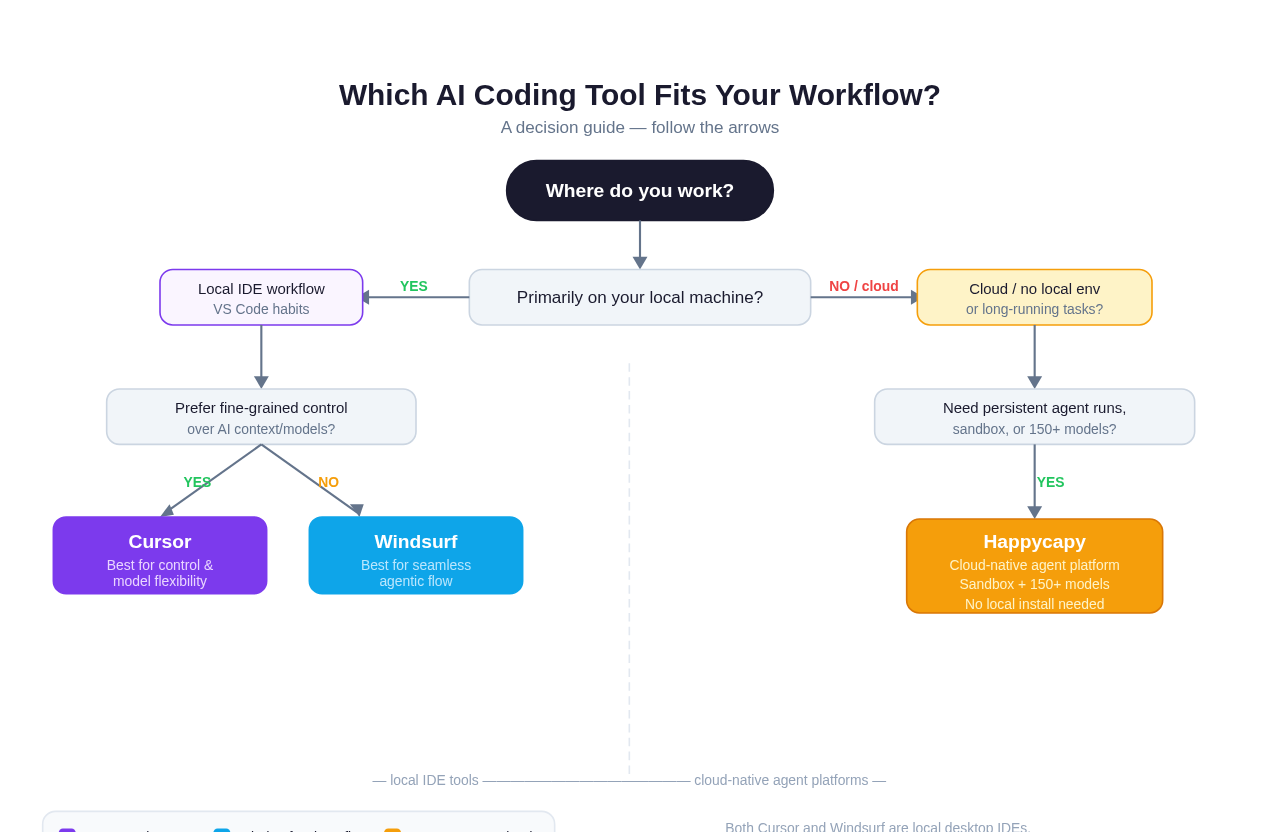 Decision guide: the right tool depends on whether you need a local IDE or a persistent cloud agent environment.
If you've outgrown local IDEs, or if you never needed one in the first place, there's a different category worth knowing about.
Happycapy is a browser-based AI agent platform. It's not an IDE alternative in the traditional sense: there's no download, no local environment to configure, and no agent loop that stops when you close a tab. Happycapy runs an agent in a secure cloud sandbox with a visual desktop, a full Linux environment, browser access, and access to 150+ models, all in your browser.
The use cases that fit Happycapy and not Cursor or Windsurf:
- Long autonomous tasks you want to run overnight or in the background
- Agents that need to spin up a browser, navigate web UIs, or interact with external services
- Workflows where you want to switch models mid-task without reconfiguring an IDE
- Teams where some members don't have a development machine (or don't want one)
- Prototyping AI agent workflows without local environment setup
To be direct about the positioning: Happycapy is not trying to replace an IDE for developers who love writing code in VS Code with AI assistance. Cursor and Windsurf are genuinely good at that job. Happycapy is for when the job is "run an agent that does a complex, multi-hour task" rather than "help me write code."
If you've been frustrated by Cursor's agent timing out, Windsurf's Cascade stopping when your MacBook sleeps, or the overhead of keeping a local sandbox clean, that frustration is what Happycapy is designed for.
For more on how Happycapy compares to IDE-based tools, see our Happycapy vs Cursor comparison and our piece on Claude Code on the web.
Which Should You Choose? Decision Guide
Choose Cursor if:
- You're already a VS Code power user and want AI as a deeply integrated layer
- You work on large codebases and want precise control over what context the AI sees
- You value being able to switch models per prompt or per task
- You want background agents that don't interrupt your active session
- You're comfortable spending time on configuration to get the best results
Choose Windsurf if:
- You want AI that mostly gets out of your way and does the right thing
- You prefer a slightly cleaner, more opinionated UX over maximum flexibility
- You work on projects where "understand the codebase and fix this" is a complete instruction
- You want a lower base price and Codeium's enterprise privacy track record
- You found Cursor overwhelming or time-consuming to configure
Consider a cloud agent platform (like Happycapy) if:
- You need agents to run persistently (hours or overnight) without a local machine
- You want a sandboxed environment that resets cleanly between tasks
- You need access to a large model roster without IDE-level configuration
- You work in a browser-first or remote-first environment
- You're building and testing AI agent workflows rather than writing traditional application code
Also worth reading: our Claude Code vs Cursor comparison if you're weighing the terminal-first approach as an alternative to either IDE.
Quick Summary Table
| Cursor | Windsurf | |
|---|---|---|
| Foundation | VS Code fork | VS Code fork |
| Agent system | Composer (agent mode) | Cascade |
| Context control | Very granular | More automatic |
| Model flexibility | High (BYOK, per-prompt) | High (abstracted) |
| UX philosophy | Control-first | Flow-first |
| Free tier | Yes | Yes |
| Pro pricing | ~$20/mo | ~$15/mo |
| Best for | Power users, large codebases | Flow-focused devs, clean UX |
| Persistence | Local (machine-bound) | Local (machine-bound) |
FAQ
Q: Can I use Cursor and Windsurf at the same time? Yes, though it's unusual. Some developers keep both installed and use each for different project types: Cursor for complex codebase work, Windsurf for greenfield projects. Both can coexist on the same machine without conflict since they're separate VS Code forks.
Q: Which has better autocomplete? Windsurf's autocomplete (powered by Codeium's autocomplete engine, which predates Windsurf and has been refined over several years) is frequently cited in developer forum comparisons as slightly more accurate and faster than Cursor's for line-level completions. For multi-line and whole-block suggestions, the gap is smaller. Neither is dramatically better. Both are genuinely good, and your own mileage on a given codebase is the only test that matters.
Q: Can I bring my own Anthropic or OpenAI API key? Yes, both tools support BYOK (bring your own key). This lets you bypass per-seat model limits and use your own billing relationship with model providers. It's especially useful if your company already has enterprise agreements with Anthropic or OpenAI.
Q: Is Cursor or Windsurf better for Python / TypeScript / Rust / (language)? Neither has a language-specific advantage. Both work with all languages that VS Code supports. Language server support, syntax highlighting, and linting all come from VS Code's extension ecosystem, which is available in both.
Q: What happened to GitHub Copilot? GitHub Copilot (now Copilot in VS Code and Visual Studio) is still widely used, especially in enterprise environments with existing Microsoft/GitHub agreements. It's a different product category: more of an embedded plugin than a full IDE replacement. Cursor and Windsurf both offer meaningfully deeper AI integration for users who want to make AI the center of their coding workflow rather than a feature alongside other features.
Q: Who owns Windsurf now, and is it still independent? No. After a period of acquisition interest (including reported talks involving OpenAI and a talent-and-licensing arrangement with Google DeepMind for Windsurf's leadership), Cognition, the maker of the autonomous coding agent Devin, acquired Windsurf in December 2025 for roughly $250 million (Cognition, TechCrunch). The Windsurf brand and IDE continue under Cognition's ownership, with Devin's autonomous agent now integrated into the editor. This is a fast-moving situation, so check current news before making a procurement decision.
Q: Can these tools run agents in the background, overnight? Both Cursor and Windsurf have made progress on background and asynchronous agent runs, but fundamentally both rely on your local machine staying on and connected. Cursor's Background Agents feature is the most direct attempt to address this. For genuinely persistent, machine-independent agent runs, a cloud platform is the practical answer.
Q: What if I want to run an agent that controls a browser or uses a GUI? Neither Cursor nor Windsurf is designed for computer-use or browser-automation tasks. Their agent modes operate on code files and terminal commands. For browser automation, visual interaction, or desktop computer-use tasks, you need a different category of tool: one with a cloud sandbox and visual desktop access.
Q: How does either compare to using Claude Code in the terminal? Claude Code is a terminal-first agentic coding tool from Anthropic that has a different philosophy from both Cursor and Windsurf: less IDE, more shell. Our Claude Code vs Cursor comparison covers that in detail if you're weighing the terminal approach.
The Bottom Line
Cursor and Windsurf are both excellent. Choosing between them in 2026 is genuinely a matter of working style rather than capability gap.
If you want maximum control and you're willing to invest in configuration, Cursor is the more powerful tool. If you want to spend less time managing AI behavior and more time building, Windsurf's flow-first design delivers a notably smoother experience.
Both are local IDEs, and both eventually hit the same ceiling: the agent stops when your machine stops, and the sandbox is your own filesystem. That's fine for most development work, but it's worth knowing where the ceiling is.
So here's the honest tell for when neither Cursor nor Windsurf is the answer: you've watched an agent task die because your laptop slept, or you've wanted to kick off a long refactor and close the lid and have it keep going, or you've wished the AI worked in a clean throwaway environment instead of your actual project directory. Those frustrations aren't bugs in Cursor or Windsurf. They're the boundary of the local-IDE model itself. A local editor's agent lives and dies with your machine.
Happycapy is built for the other side of that boundary: a cloud-native agent that runs persistently in a secure, disposable sandbox (not your filesystem) with 150+ models, from a browser tab, no laptop required to keep it alive. It's not an IDE replacement for the suggestion-and-edit work Cursor and Windsurf are great at; it's for the jobs you'd rather delegate and walk away from.
Start free at happycapy.ai: if "the agent stopped when my machine slept" is a frustration you recognize, run that same job here and watch it finish without you.