Build Autonomous Agents with the Claude Code SDK: A Practical Developer's Guide
The official library that turns Claude Code's agentic engine into a programmable building block for CI, automation, and multi-agent systems.
Build Autonomous Agents with the Claude Code SDK: A Practical Developer's Guide
The Claude Code SDK, officially called the Agent SDK, is a Python and TypeScript library that lets you drive Claude Code's full agentic engine programmatically: no terminal, no human at the keyboard, just your application calling an async query() function and streaming back every step of the agent's work. If you have used Claude Code interactively, the SDK gives you that same read-files / edit-code / run-commands loop as a composable library you can embed in CI pipelines, code-review bots, multi-agent orchestrators, or any backend service.
What the Agent SDK Is, and Why It Exists
Claude Code is well known as a terminal tool. You type a prompt, the agent reasons over your codebase, calls built-in tools (Read, Edit, Bash, Grep, and others), and writes results back to you. But the moment you want to automate that loop (trigger a review on every pull request, fan out to multiple specialized sub-agents, or build a product on top of it), the interactive CLI is the wrong abstraction. You need a library.
The Agent SDK fills that gap. According to Anthropic's official documentation, it exposes "the same tools, agent loop, and context management that power Claude Code, programmable in Python and TypeScript." That is not marketing language; it is the literal architecture. The SDK spawns the Claude Code CLI binary as a managed subprocess, communicates with it over stdio, and surfaces everything as an async stream of typed message objects your code can consume and react to.
This distinction matters for a few reasons:
Same engine, different interface. When you switch from the CLI to the SDK, you are not moving to a lesser or simpler tool. The SDK inherits every capability in the CLI: MCP server connectivity, hooks lifecycle, skill files, CLAUDE.md memory, sub-agent delegation, and the full tool roster.
The SDK does tool execution for you. If you use the Anthropic Client SDK (the lower-level anthropic Python/JS package) and want Claude to call tools, you must implement the tool loop yourself: call the API, detect a tool use response, execute the tool, feed the result back, repeat until Claude stops. The Agent SDK collapses that entire loop into a single async for message in query(...): Claude handles which tools to call, executes them inside its subprocess, and keeps looping until the task is done. You just consume the stream.
Headless by design. The CLI's permission prompts ("allow this bash command?") block on human input. The SDK replaces them with a permissionMode option and a set of permission modes (for example acceptEdits to auto-approve file edits and bypassPermissions to run everything without prompting in a sandboxed CI environment), plus a programmatic approval callback for custom flows. The exact mode names and behaviors are documented in Anthropic's SDK reference (check it for the current list), but the effect is the same: your automation never hangs waiting for a keypress.
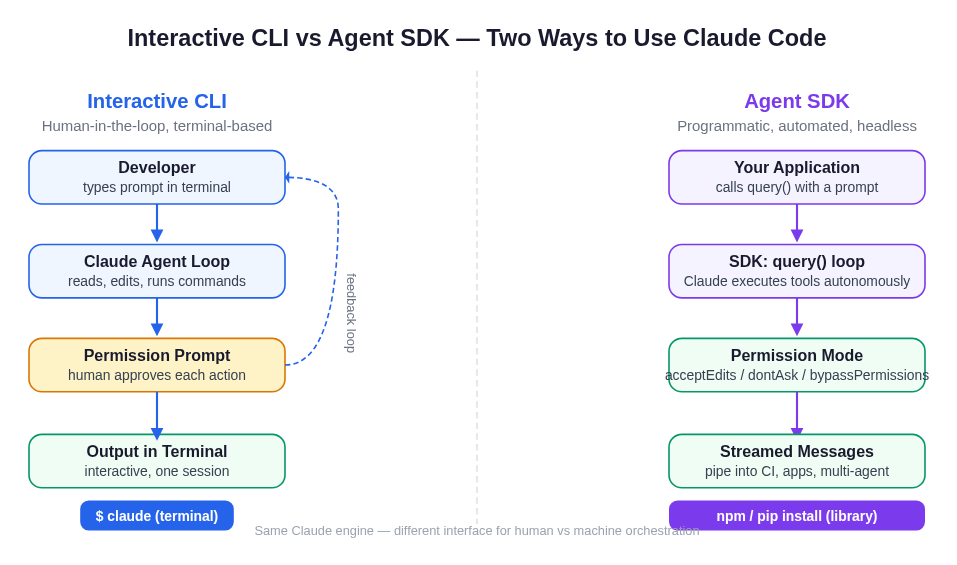 The same Claude Code engine, two interfaces: the interactive CLI for human-in-the-loop work, the Agent SDK for programmatic, headless automation where your application controls the prompt and a permission mode replaces the approval dialog.
Installing the SDK
Anthropic publishes two packages:
- TypeScript:
@anthropic-ai/claude-agent-sdk(npm) - Python:
claude-agent-sdk(pip; requires Python 3.10+)
The TypeScript package bundles a native Claude Code binary for your platform, so no separate CLI install is needed. Authentication is via an ANTHROPIC_API_KEY environment variable obtained from the Anthropic Console. The SDK also supports Amazon Bedrock, Google Vertex AI, and Microsoft Azure AI Foundry. See Anthropic's docs for the relevant environment-variable patterns.
Core Concepts
Understanding four concepts covers the vast majority of real-world SDK usage.
1. The query() Function and the Async Message Stream
Every SDK interaction starts with query(). You pass a prompt string and an options object; in return you get an async iterator that yields typed message objects as the agent works. The loop ends when the agent finishes or hits an error.
The messages you receive include:
- AssistantMessage: Claude's reasoning text and tool call descriptions
- ToolResultMessage: the output of each tool execution
- ResultMessage: the final outcome, with a
subtypefield indicating success or failure - SystemMessage: session lifecycle events (the
initsubtype carries thesession_id)
In most production code you filter for ResultMessage to extract the final output and optionally log AssistantMessage blocks to trace what the agent did.
2. Tools and allowedTools
The SDK's built-in tool roster maps directly to Claude Code's capabilities:
| Tool | What it does |
|---|---|
| Read | Read any file in the working directory |
| Write | Create new files |
| Edit | Make precise edits to existing files |
| Bash | Run terminal commands, git operations, scripts |
| Glob | Find files by pattern (**/*.ts, src/**/*.py) |
| Grep | Search file contents with regex |
| WebSearch | Search the web |
| WebFetch | Fetch and parse a web page |
| AskUserQuestion | Ask the user a clarifying question (interactive flows) |
| Agent | Spawn a sub-agent defined in your options |
The allowedTools option pre-approves a subset of these, effectively granting the agent permission to call them without any additional gate. A read-only audit agent might list only ["Read", "Glob", "Grep"]; a full automation might include ["Read", "Edit", "Bash", "Glob", "Grep"].
3. Permission Modes
Permission modes control what happens when the agent wants to use a tool that is not pre-approved in allowedTools:
acceptEdits: auto-approves file edits and common filesystem operations; prompts for everything else. Best for trusted development workflows.dontAsk: silently denies anything not inallowedTools. Best for locked-down headless agents.bypassPermissions: runs every tool without gating. Use only inside a sandboxed environment.
The SDK also exposes a programmatic approval callback so you can implement fully custom approval logic, and the available mode names may expand over time; consult Anthropic's SDK reference for the authoritative, current list and the exact behavior of each. In CI, you will almost always use a tightly-scoped, deny-by-default configuration or bypassPermissions inside a container sandbox you control.
4. Sessions, Resumption, and Context
Each call to query() creates (or resumes) a session. The session's session_id arrives in the first SystemMessage with subtype === "init". You can capture it and pass it as resume: sessionId in a subsequent call to pick up exactly where the conversation left off: same file reads, same reasoning history, same context window.
This is how you build multi-turn agents: one query() call analyzes a module, captures the session_id, and a second query() (with resume) references "it" or "the file you just read" without re-explaining. Session transcripts are written to local disk by default; for production you can attach a SessionStore adapter backed by S3, Redis, or Postgres so sessions survive container restarts.
Build Pattern 1: A CI Code-Review Bot
This is the canonical "headless automation" use case. On every pull request, a CI job checks out the branch, runs an agent that reads the changed files, and posts a review comment.
The flow:
- PR event triggers a GitHub Actions workflow (or GitLab CI job).
- The runner checks out the branch and runs your review script.
- Your script calls
query()with a review prompt,allowedTools: ["Read", "Glob", "Grep", "Bash"], andpermissionMode: "dontAsk". - Claude reads the diff, searches for patterns, reasons over the findings.
- The
ResultMessagecarries the review text; your script posts it to the PR via the GitHub API.
The key design choice is using dontAsk with a read-only tool list. The agent cannot write files or make network calls beyond what the tools allow, so your CI job cannot accidentally merge commits or call external APIs. A maxTurns cap (set in options) bounds the agent's depth so runaway loops do not consume budget.
For the illustrated architecture of this flow, see the diagram below.
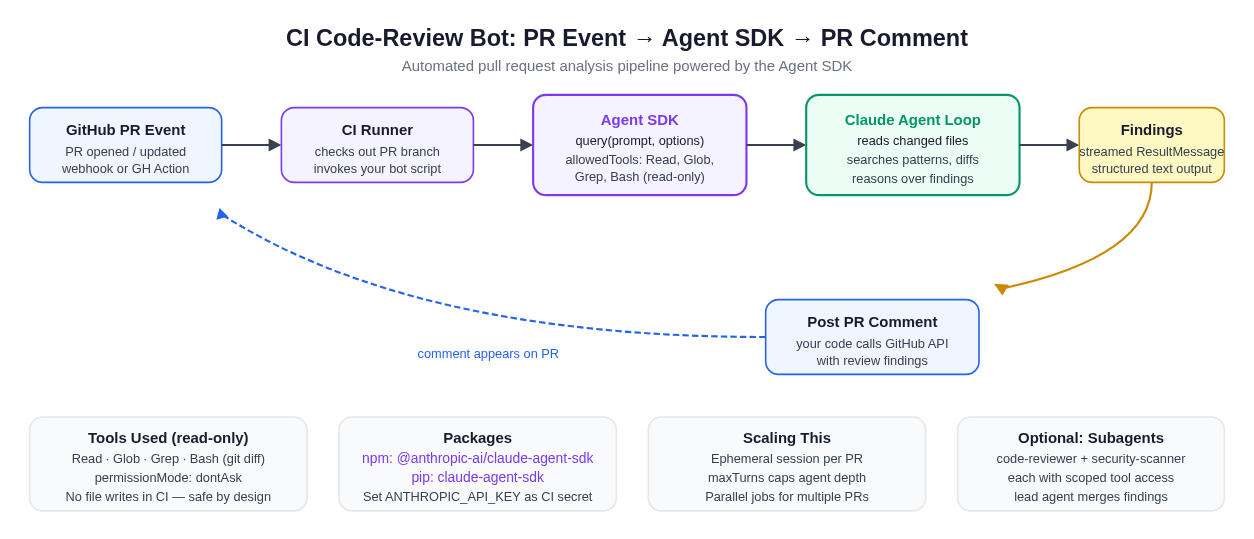 A fully automated code-review pipeline. The SDK agent runs inside a CI container with a read-only tool list; findings stream back as a
 ResultMessage and your code posts them as a GitHub PR comment. The agent never writes files, never leaves the container.
You can extend this pattern with hooks (an SDK feature covered in our Claude Code hooks deep-dive) to log every tool call to an audit file, block specific file paths from being read, or emit structured telemetry alongside the review.
Build Pattern 2: Multi-Agent Tool Chains
The SDK's agents option lets you define named sub-agents, each with its own system prompt, tool list, and permissions. Your main agent delegates work to them via the built-in Agent tool. Sub-agent messages include a parent_tool_use_id field so you can trace exactly which delegation produced each piece of output.
A practical example: a security-audit agent chain where a code-scanner sub-agent finds potential vulnerabilities using Grep and Glob, a dependency-checker sub-agent runs Bash to query your package metadata, and a coordinator agent synthesizes both reports into a unified audit. Each sub-agent has the minimum tool access needed for its role, limiting blast radius if a sub-agent hallucinates a dangerous command.
Multi-agent chains work well for tasks that decompose naturally: one agent per concern, each with a tight tool list, orchestrated by a coordinator that only needs Read and Agent. For a broader look at how multi-agent architectures compose with Claude Code features like CLAUDE.md memory and skill files, see our harness engineering guide.
Build Pattern 3: Headless Automation Pipelines
Beyond code review, the SDK excels at any recurring automation where the agent is a step in a larger pipeline:
Nightly dependency audits. A cron job calls query() with a prompt to check for outdated packages, run security scanners, and produce a structured report. The Bash tool runs npm audit or pip check; Read inspects lock files. The ResultMessage feeds a Slack notification.
Translation and i18n on PR merge. When a PR merges, a webhook triggers an agent that reads changed string files with Glob and Read, produces translated versions with Write, and opens a new PR via Bash (running gh pr create).
Log anomaly detection. Pipe recent log output into a query() prompt. The agent reads additional context files if needed, reasons over the logs, and emits a structured finding. No file writes required; a read-only tool list suffices.
Documentation sync. After PRs merge, an agent reads updated source files and rewrites corresponding docs pages, then commits the changes. The permissionMode: "acceptEdits" handles file writes without prompting.
The common thread: query() replaces a bespoke LLM integration. You do not implement a tool loop, manage context windows manually, or parse model output to decide what to execute next. The agent handles orchestration; you supply the prompt and consume the result.
A Worked Illustrative Example: A Bug-Fixing Agent
The official quickstart demonstrates this pattern cleanly (the code below follows the documented API; verify exact syntax in Anthropic's quickstart docs):
Illustrative Python (verify exact API in official docs):
# Illustrative - confirm exact import paths and option names in official docs
import asyncio
from claude_agent_sdk import query, ClaudeAgentOptions, AssistantMessage, ResultMessage

async def run_bug_fixer(file_path: str):
    async for message in query(
        prompt=f"Review {file_path} for bugs that would cause crashes. Fix any issues.",
        options=ClaudeAgentOptions(
            allowed_tools=["Read", "Edit", "Glob"],
            permission_mode="acceptEdits",
        ),
    ):
        if isinstance(message, AssistantMessage):
            for block in message.content:
                if hasattr(block, "text"):
                    print(block.text)
        elif isinstance(message, ResultMessage):
            print(f"Completed: {message.subtype}")

asyncio.run(run_bug_fixer("src/utils.py"))
Illustrative TypeScript (verify exact API in official docs):
// Illustrative - confirm exact import paths and option names in official docs
import { query } from "@anthropic-ai/claude-agent-sdk";

for await (const message of query({
  prompt: "Review src/utils.ts for crash-causing bugs and fix them.",
  options: {
    allowedTools: ["Read", "Edit", "Glob"],
    permissionMode: "acceptEdits",
  },
})) {
  if (message.type === "assistant" && message.message?.content) {
    for (const block of message.message.content) {
      if ("text" in block) console.log(block.text);
    }
  }
  if (message.type === "result") console.log("Done:", message.subtype);
}
What happens when this runs: Claude reads utils.py (or .ts) using the Read tool, reasons over the code, identifies edge cases, then calls Edit to insert defensive handling. You see the reasoning and tool calls stream by as AssistantMessage objects; the final ResultMessage signals completion. The entire agent loop, including re-reading the file to verify the edit, is managed by the SDK.
This is what makes the SDK different from calling the Anthropic models API directly: you do not implement the tool execution layer. Claude decides when to call Read, calls it, gets the file content back, and continues reasoning. The loop is autonomous.
Permissions, Sandboxing, and Production Safety
Running autonomous agents in production requires thinking carefully about what they can touch. The SDK provides several layered controls.
Tool scoping is the first line of defense. If an agent does not need Bash, do not include it in allowedTools. An agent with only ["Read", "Glob", "Grep"] cannot modify files, run shell commands, or make network calls regardless of what its prompt says.
Permission modes provide a second gate. dontAsk ensures that anything outside allowedTools is silently denied rather than prompting. This is critical in headless environments: a prompt that hangs waiting for user input will stall your pipeline.
The cwd option scopes the agent's filesystem access to a specific directory. In multi-tenant environments, pass a per-session working directory so agents from different tenants cannot read each other's files.
Tenant isolation requires additional steps: set settingSources: [] so no filesystem settings leak across tenants; set CLAUDE_CODE_DISABLE_AUTO_MEMORY=1 to prevent auto-memory from loading; point CLAUDE_CONFIG_DIR at a per-tenant path. These are documented in detail in Anthropic's hosting guide.
Container sandboxing is the outer shell. For production agents that need Bash access, run the SDK inside a container with network egress restricted to the domains you explicitly allow. Providers like Modal, E2B, Cloudflare Sandboxes, Fly Machines, and Vercel Sandbox are called out in Anthropic's documentation as options for sandboxed SDK deployments.
maxTurns caps the number of tool-use round trips, bounding both cost and runaway loops. Set it based on the expected complexity of your task: a simple file-read review might need 5 to 10 turns; a complex multi-file refactor might need 30 to 50.
For teams building production hooks and permission flows, our Claude Code hooks guide covers the PreToolUse and PostToolUse hook lifecycle in detail, including how to write hook callbacks that block, transform, or log tool calls before they execute.
MCP: Connecting the Agent to External Systems
The SDK fully supports the Model Context Protocol (MCP), which lets you connect your agent to any external system that exposes an MCP server: databases, browser automation, Jira, Slack, GitHub, and hundreds of community-built servers.
You configure MCP servers in the mcpServers option; each entry specifies a command to run and optional arguments. The SDK starts those servers as subprocesses, and the agent can call their tools the same way it calls built-in tools. This is how you give a code-review agent access to your issue tracker, or connect a documentation agent to your company knowledge base.
The permission model applies to MCP tool calls too: allowedTools can include MCP tool names, and permissionMode governs what happens for unlisted tools.
Gotchas and Common Pitfalls
Sessions are subprocess-local by default. Session transcripts live on the host's local disk under ~/.claude/projects/. In containerized or horizontally-scaled deployments, this means session state is lost on restart or node reassignment. Use a SessionStore adapter for any session you need to resume across containers.
The subprocess model has memory implications. Each running session is a separate subprocess. Running fifty concurrent sessions means fifty Claude Code processes. The official guidance is roughly 1 GiB RAM per agent as a starting point, but real-world memory usage depends on session length and tool activity. Size your containers accordingly and set maxTurns to limit session depth.
Large sub-agent fanouts hit rate limits. If your orchestrator delegates to twenty sub-agents simultaneously, you will likely hit Anthropic's API rate limits. Break wide fanouts into batches and add a small delay between dispatches.
bypassPermissions requires a real sandbox. This mode skips all permission gates. It is designed for fully controlled environments like CI containers where you own the entire execution context. Using it on a developer's machine (where the agent has access to SSH keys, cloud credentials, and arbitrary filesystem paths) is a security risk.
The TypeScript SDK bundles the Claude Code binary; Python does not require it separately. But both SDKs pin to a specific CLI version. When you upgrade the SDK package, you upgrade the underlying CLI. Review the changelog before minor upgrades; breaking behavior changes are announced there.
Prompt text and tool inputs are not included in OTEL exports by default. This is intentional privacy behavior. If you need prompt-level tracing for debugging, you must opt in explicitly via environment variables documented in Anthropic's observability guide.
Older SDK versions may not support newer models. Anthropic's docs note that recent models can require a recent SDK version due to changes in the thinking-parameter API, so an outdated SDK may fail against a new model. Always check the changelog and pin a known-good version when adopting new models.
The SDK vs. the CLI: Which Do You Need?
For most developers, the answer is both, and that is by design.
The interactive CLI is the right tool for day-to-day development: exploring an unfamiliar codebase, working through a complex bug interactively, or running a one-off refactor. The SDK is the right tool for anything that needs to run without a human present: CI, scheduled tasks, application features, and multi-agent pipelines.
The SDK and CLI are not competing products. The workflows you develop interactively with the CLI translate directly to SDK automation: same tools, same permission concepts, same CLAUDE.md memory and skills system. A review workflow you prototype with claude in your terminal today becomes an SDK-powered CI bot tomorrow.
For teams using the web version of Claude Code (covered in our Claude Code on the web guide), the SDK opens the door to mixing web sessions with programmatic orchestration: kick off a long-running task from the web, then hook into it programmatically from your backend.
Frequently Asked Questions
What is the Claude Code SDK (Agent SDK) exactly?
It is a Python (claude-agent-sdk) and TypeScript (@anthropic-ai/claude-agent-sdk) library that exposes Claude Code's full agentic engine (tools, permissions, session management, sub-agents, MCP) as a programmable async API. You call query(), pass a prompt and options, and stream back the agent's work as typed message objects.
Do I need Claude Code installed to use the SDK?
For the TypeScript SDK, no: the package bundles a native Claude Code binary. For the Python SDK, the claude-agent-sdk package handles the dependency. You do need an Anthropic API key from the Anthropic Console.
Can I use the SDK with models other than Claude on Anthropic's API?
Yes. The SDK supports Amazon Bedrock, Google Vertex AI, Microsoft Azure AI Foundry, and Claude Platform on AWS via environment variables. You can also route requests through a custom proxy by setting ANTHROPIC_BASE_URL.
How do I use the SDK in a GitHub Actions workflow?
Add your ANTHROPIC_API_KEY as a GitHub Actions secret, check out the PR branch in your workflow, install the SDK package, and run your agent script. Use permissionMode: "dontAsk" with a read-only allowedTools list so the agent cannot modify files in your CI environment. Anthropic's docs also cover a dedicated GitHub Actions integration that automates PR review and issue triage without writing custom SDK code.
What is the difference between the Agent SDK and Managed Agents? The Agent SDK is a library that runs the agent loop inside your own process and infrastructure. Managed Agents is a hosted REST API where Anthropic runs the agent and sandbox; you send events and stream results back. The SDK is better for local prototyping and agents that work directly on your filesystem; Managed Agents is better for production when you do not want to operate container infrastructure.
How do I limit what the agent can access?
Use allowedTools to restrict which tools are available, permissionMode: "dontAsk" to deny anything outside that list, and cwd to scope filesystem access to a specific directory. For multi-tenant deployments, additionally set settingSources: [] and CLAUDE_CODE_DISABLE_AUTO_MEMORY=1.
Does the SDK support streaming output?
Yes, the async iterator from query() streams messages in real time. If you do not need live output (for background jobs or CI pipelines where you only care about the final result), Anthropic's docs describe a single-turn mode that collects all messages before returning. See Streaming vs. single-turn mode in the official docs.
Can I run multiple agents in parallel?
Yes. Each query() call spawns an independent subprocess. You can run N concurrent sessions, but each is a separate process, so provision memory accordingly and be mindful of API rate limits. For concurrent sub-agent fanouts from a single orchestrator, batch your dispatches to avoid hitting rate limits.
What happens if the session crashes mid-task?
By default, session transcripts are local to the container and lost on restart. To survive restarts, configure a SessionStore adapter (S3, Redis, or Postgres) and pass it in options. You can then resume the session by session_id on a fresh container.
Running Agents Without a Local Setup
The SDK's value proposition is automation, but getting that automation running requires real infrastructure: a Python or Node runtime, an API key, a container strategy, a sandboxing decision, and time spent on permission modeling before your first production deploy.
For developers who want to iterate on agent ideas without that setup overhead, Happycapy runs Claude Code-style agents directly in the browser. There is no local install, no subprocess management, and no container provisioning. You bring a prompt, Happycapy handles the execution environment, with access to 150+ models and a secure cloud sandbox. It is a fast path for prototyping the agent behavior you will later productionize with the SDK.