How Claude Code Review Actually Works: Diffs, Hooks, and What the Agent Catches
Run the same agentic review your senior engineer would, straight from the diff, without the mental overhead.
Claude Code Review: The Practical Guide to Agentic PR Reviews
Claude Code can review a pull request or local diff the way a thorough senior engineer would, reading changed files, tracing call sites, checking tests, and returning severity-ranked findings with suggested fixes. This guide is specifically about using Claude Code (Anthropic's agentic CLI tool) for code review: how to trigger it, how to prompt it well, how to automate it on every commit or PR, and how to wire it into a team pipeline.
What "Claude Code Review" Actually Means
There are two very different things people call "Claude code review." The first is asking Claude in a chat interface to look at a code snippet you paste. The second, and the subject of this guide, is running Claude Code, Anthropic's agentic CLI, against a real diff or pull request inside your actual repository.
The distinction matters enormously. When Claude Code reviews a diff, it is not reasoning in isolation about a pasted excerpt. It is an autonomous agent that can open files, follow imports, read your CLAUDE.md project instructions, check adjacent tests, and understand the full context of a change before it issues a single finding. That cross-file awareness is what makes the output genuinely useful rather than generic.
Claude Code is available as a CLI you install locally (npm install -g @anthropic-ai/claude-code), or as an agent running in a cloud sandbox. More on both approaches later. Anthropic's official documentation covers installation and initial setup.
The /review Workflow Step by Step
Claude Code ships with a /review slash command designed specifically for this task. Here is the full workflow from diff to actionable output.
Step 1: Point Claude Code at the Diff
You have several ways to feed it the changes you want reviewed.
Staged changes (the /review command):
/reviewInside the Claude Code session, the /review slash command kicks off a review of your changes. This is the most common local workflow: stage your work, run /review, and see findings before you commit. (Exact command behavior evolves; check Anthropic's Claude Code docs for the current syntax.)
A specific git range:
You can also just ask the agent in natural language, for example, "Review the diff between main and this branch and flag any bugs or regressions." Because Claude Code can run git commands itself, it will produce the diff for the range you name and review it. This is handy when reviewing a feature branch before opening a PR, and it avoids depending on any exact flag syntax.
A GitHub pull request URL:
If your project has GitHub CLI configured, Claude Code can fetch the PR diff directly. You provide the PR URL or number in your prompt, and the agent uses gh to pull the diff along with the PR description, which gives it intent context alongside the code.
Step 2: Context Loading
Before issuing findings, Claude Code reads context it needs to evaluate the diff properly:
CLAUDE.md: your project's instruction file, which can define review focus areas, banned patterns, architecture rules, or team conventions. This is your primary lever for customizing what the agent pays attention to.- Imported modules and callers: if a changed function is called from ten places, the agent reads those call sites to check whether the change is backward-compatible.
- Existing tests: it reads test files to understand the intended contract of the changed code, and to notice when new logic lacks coverage.
- Configuration files:
eslint,tsconfig,pyproject.tomland similar files help the agent understand what linting rules are already enforced at CI, so it does not repeat findings your tooling already catches.
Step 3: Analysis
Claude Code's analysis passes cover several dimensions simultaneously:
- Correctness: logic bugs, off-by-ones, null dereferences, incorrect algorithm assumptions
- Security: injection risks, exposed credentials, unsafe deserialization, missing authorization checks
- Reliability: missing error handling, unhandled promise rejections, uncaught edge cases
- Maintainability: duplicate logic, unclear naming, missing documentation for non-obvious behavior
- Test coverage: code paths added without corresponding tests
The agent does not just flag a line; it explains why the finding matters and what the impact would be if it were shipped.
Step 4: Structured Findings
The output is a list of findings, each with:
- A severity label (typically: critical / warning / suggestion)
- The file and line reference
- A plain-English explanation of the problem
- A suggested fix: often a ready-to-apply code snippet
By default findings go to the terminal. For team use you can redirect them: pipe to a file, post them as PR comments via gh pr comment, or use a hook to write them to a shared review log.
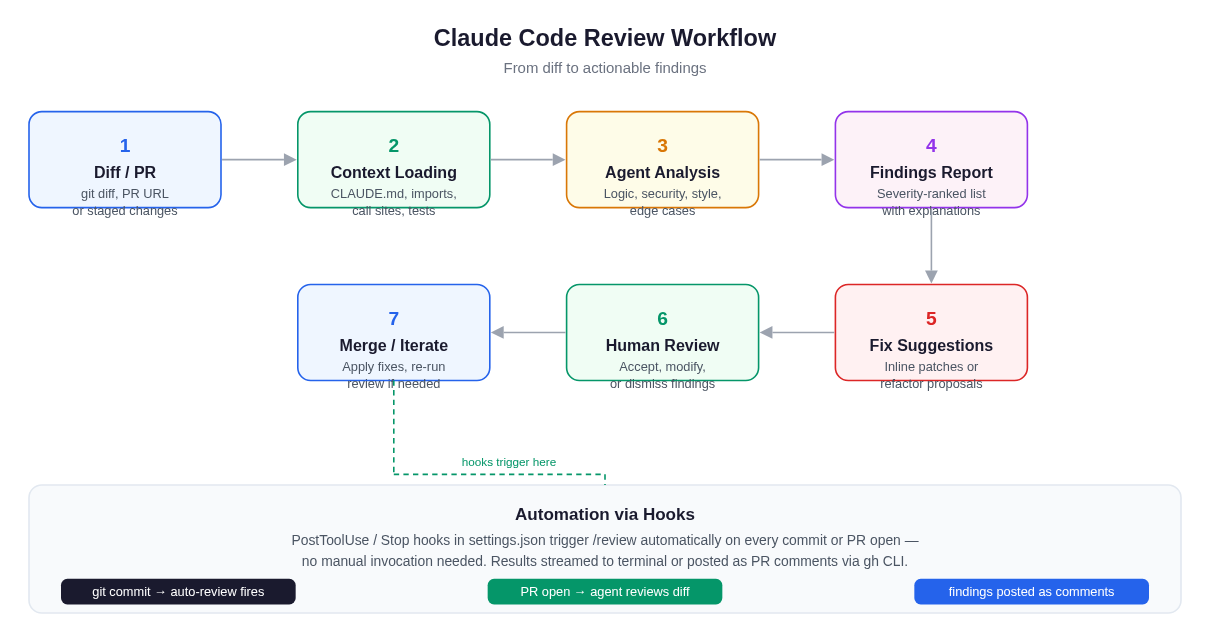 Claude Code review follows a structured pipeline, from diff input through context loading and analysis to ranked findings and fix suggestions, with hooks enabling full automation.
A Worked Example: Real Diff, Real Review
To make this concrete, here is a minimal Python diff and what a Claude Code review surfaces.
The diff:
# Before
def get_user(user_id):
    result = db.query(f"SELECT * FROM users WHERE id = {user_id}")
    return result[0]

# After (in PR)
def get_user(user_id):
    result = db.query(f"SELECT * FROM users WHERE id = {user_id}")
    if result:
        return result[0]
    return None
What the PR author thought they fixed: a KeyError when no user is found.
What Claude Code surfaces in review:
-
Critical: SQL Injection (line 2): The f-string interpolates
user_iddirectly into the query. A value like1; DROP TABLE users;--would execute. Fix: use parameterized queries,db.query("SELECT * FROM users WHERE id = ?", (user_id,)). -
Warning: Implicit
Nonereturn propagation: Callers ofget_userthat don't check forNonewill now fail at a distance. Review three call sites (listed by file) that assume a user object is always returned. -
Suggestion: Typing annotation missing: The return type should be
Optional[User]so IDEs and type checkers can catch theNonecase at call sites automatically. -
Suggestion: Test added but incomplete: The new test
test_get_user_not_foundonly checks thatNoneis returned; it does not verify behavior whenuser_idis0or a non-integer.
The original author patched the KeyError but introduced a silent None-propagation risk and did not notice the pre-existing SQL injection. Claude Code caught both, and found them because it read the call sites, not just the diff.
Prompting Claude Code for Better Reviews
The quality of a review is directly proportional to the quality of the context you give the agent. These prompts and techniques produce consistently better output.
Use CLAUDE.md to Set Standing Instructions
The most leverage is in your project's CLAUDE.md file. Add a ## Review Guidelines section:
## Review Guidelines
- We use parameterized queries everywhere. Flag any string interpolation in SQL.
- All public functions must have return-type annotations (Python) or JSDoc (JS).
- Security findings should always be severity: critical, not warning.
- We prefer explicit error returns over exceptions in the data layer.
- Do not flag import ordering - Black handles that automatically.
This instructs the agent once, and every review in the project inherits these rules without requiring you to re-prompt.
Provide Intent in the Prompt
When invoking a review interactively, tell the agent what the PR is trying to accomplish:
/review This PR migrates our auth flow from JWT to session cookies. Focus on
session fixation, secure cookie attributes, and any places we might be leaking
the old JWT validation logic.
Intent context lets Claude Code prioritize relevant findings rather than generating a uniform checklist across all dimensions.
Ask for a Severity-Only Pass First
For large diffs, a two-pass approach is efficient:
/review Pass 1: list only critical and warning severity findings with file+line.
No suggestions yet.
Then, once you have the critical list, ask for fix details on specific findings. This avoids the problem of a 200-line review output where the critical bug is buried between style suggestions.
Ask for Confirmation of Understanding
For complex changes:
Before reviewing, summarize what this diff is trying to do in two sentences,
then proceed with the review.
If the summary is wrong, you know the agent has misread the diff and you can correct it before wasting time on misguided findings.
Automating Reviews with Hooks
Running /review manually is useful, but the real productivity gain is making review automatic, so every commit or every opened PR triggers it without a human remembering to do so. Claude Code's hooks system makes this possible. (The hooks system is covered in depth in the Claude Code hooks guide; this section focuses specifically on the review use case.)
Auto-Review on Every Commit
In your project's .claude/settings.json, add a Stop hook:
{
  "hooks": {
    "Stop": [
      {
        "matcher": "",
        "hooks": [
          {
            "type": "command",
            "command": "claude -p 'Review the diff from the last commit (git diff HEAD~1 HEAD) and list any bugs, security issues, or regressions.'"
          }
        ]
      }
    ]
  }
}
With this in place, every time Claude Code completes a task (including coding tasks that end in a commit), the hook fires and reviews the resulting diff. The findings appear in your terminal immediately after the commit lands.
Auto-Review on PR Open
For CI integration, run Claude Code in headless mode (claude -p "<prompt>") inside a GitHub Actions job and post the result as a PR comment. The pattern below is illustrative. Anthropic also publishes an official Claude Code GitHub Action, so check the Claude Code docs for the current, recommended CI setup rather than copying flags verbatim:
name: Claude Code Review
on:
  pull_request:
    types: [opened, synchronize]
jobs:
  review:
    runs-on: ubuntu-latest
    steps:
      - uses: actions/checkout@v4
        with:
          fetch-depth: 0
      - name: Install Claude Code
        run: npm install -g @anthropic-ai/claude-code
      - name: Run review
        run: |
          claude -p "Review the diff between origin/${{ github.base_ref }} and HEAD. \
          List bugs, security issues, and regressions, ranked by severity." > review.md
        env:
          ANTHROPIC_API_KEY: ${{ secrets.ANTHROPIC_API_KEY }}
      - name: Post review as PR comment
        run: gh pr comment ${{ github.event.number }} --body-file review.md
        env:
          GH_TOKEN: ${{ secrets.GITHUB_TOKEN }}
This posts Claude Code's findings as a PR comment automatically on every push. Your human reviewers then focus their attention on findings the agent has already surfaced, rather than spending review time on the items Claude Code reliably catches.
What Claude Code Review Catches, and What It Misses
It is important to be clear-eyed about the capability envelope. AI review is genuinely powerful for a specific class of findings, and reliably insufficient for others.
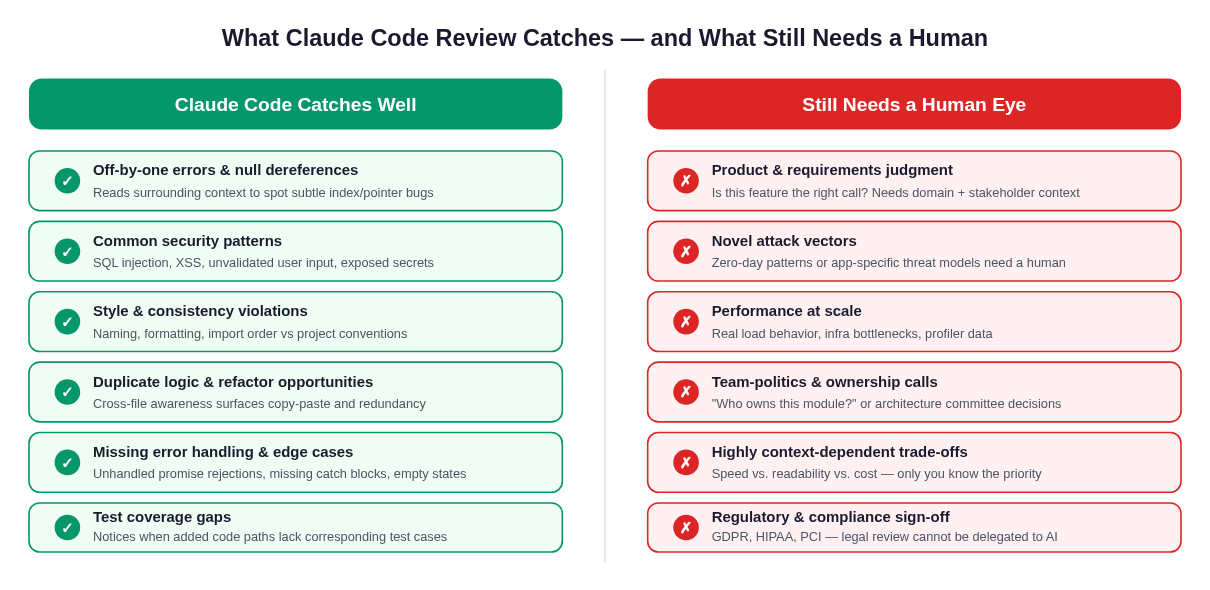 Claude Code excels at mechanical correctness, security patterns, and consistency, while product judgment, novel threats, and compliance sign-off remain human responsibilities.
Claude Code catches reliably:
- Off-by-one errors, null/undefined dereferences, and type mismatches that are visible in the diff and its immediate context
- Known security patterns: SQL injection, XSS, CSRF gaps, insecure direct object references, missing input validation, secrets in code
- Style and convention violations against the rules defined in your
CLAUDE.mdand config files - Duplicate logic: the agent's cross-file awareness means it notices when a function you just added already exists in a utility module two directories away
- Missing error handling: unhandled promise rejections, bare
exceptclauses, functions that can returnNoneorundefinedwithout the caller expecting it - Test coverage gaps for the specific code paths added in the diff
Claude Code does not replace human judgment on:
- Product and requirements decisions. Whether the feature should exist, whether the UX makes sense, whether the API contract is the right abstraction, these require business context no agent has.
- Novel security threats. The agent knows about known vulnerability classes; it does not invent threat models specific to your application's deployment environment or business logic.
- Performance at scale. Static analysis cannot substitute for profiler output, load test results, or understanding of actual traffic patterns.
- Regulatory compliance. GDPR, HIPAA, PCI-DSS, and similar require human sign-off and often legal review. AI review cannot substitute for it.
- Team dynamics and architecture governance. "Does this belong in this module?" or "Should we take on this dependency?" require organizational context.
The healthy framing: Claude Code review eliminates the boring part of code review (catching mechanical errors, enforcing conventions, flagging known-bad patterns) so your human reviewers can spend their limited attention on judgment calls that actually need human judgment.
Integrating Claude Code Review into a Team Pipeline
Getting a team to actually use agentic review consistently requires treating it as a first-class part of your workflow, not an optional extra.
The Three-Layer Model
A well-functioning team pipeline has three layers:
- Local pre-commit: Developer runs
/reviewbefore pushing. The hook setup described above automates this. Findings at this layer are the cheapest to fix. - CI gate: The GitHub Actions workflow posts Claude Code findings as a PR comment before any human reviewer is assigned. Human reviewers are assigned only after the CI review passes (no critical findings).
- Human review focus: Human reviewers use Claude Code's comment as a triage guide. Their job is to evaluate judgment items (architecture fit, product correctness, performance trade-offs), not to re-read every line for typos.
Sharing CLAUDE.md Conventions
Your CLAUDE.md is the configuration layer for the agent's review behavior. Treat it like code: commit it, version it, review changes to it in PRs. When the team agrees that Claude Code should stop flagging a particular pattern (because you have a linter for it), update CLAUDE.md and the change applies to every future review.
Calibrating Severity Thresholds
Teams often find the default severity calibration too noisy early on. Add explicit instructions to CLAUDE.md to control it:
## Review Severity Rules
- Only flag console.log as a warning if it is in a non-test, non-debug file.
- Import ordering is never a finding; Prettier handles it.
- Treat any hardcoded credential as critical regardless of context.
- Performance suggestions are informational only unless they affect O(n²) loops.
After a few weeks of use, most teams find the noise level drops significantly once the agent's attention is tuned to the patterns that actually matter in their codebase.
Handling False Positives
Claude Code will occasionally flag something incorrectly. The right response is not to dismiss the review wholesale; it is to add a project-specific instruction to CLAUDE.md that handles the pattern. Over time this creates an increasingly accurate, project-specific review configuration that reflects your team's actual standards.
Running Claude Code Review Without a Local Install
Everything described so far assumes you have Claude Code installed and running in your terminal. For many teams (especially those on locked-down corporate machines, Windows environments without WSL, or developers who want to review from a browser tab), local installation is a friction point.
Happycapy runs Claude Code in a secure cloud sandbox directly in your browser. You get the full agentic review capability (including cross-file context loading, CLAUDE.md support, and the /review command) without installing anything. This is particularly useful for:
- Code review on pull requests from a browser without pulling the branch locally
- Teams onboarding to Claude Code review who want a shared, consistent environment before rolling out local installs
- Locked-down machines where installing global npm packages requires IT approval
- Reviewing unfamiliar repositories where you want the agent's context-loading without cloning the whole repo
If you are curious how Claude Code compares to alternatives in terms of agentic capability, see Claude Code vs. GitHub Copilot and Claude Code vs. Cursor. And if you want to understand how Happycapy runs Claude Code in a browser context, Claude Code on the web covers the architecture.
Frequently Asked Questions
Q: Does Claude Code review work on any language?
Yes. Claude Code is not language-specific; it reads any text-based diff and applies reasoning about the code it contains. It tends to be most precise on Python, TypeScript, JavaScript, Go, and Rust (languages with large training representation), but it produces useful findings on Ruby, Java, C#, and most other mainstream languages. For domain-specific languages or unusual frameworks, adding context in CLAUDE.md sharpens the output significantly.
Q: How does /review differ from just asking Claude in a chat to look at my diff?
The key difference is agentic tool use and repository context. In a chat, Claude sees only what you paste. Claude Code's /review command lets the agent open files, follow imports, check tests, and read your project conventions, producing findings grounded in the actual codebase rather than the excerpt. For large or interconnected changes, this difference is substantial.
Q: Will Claude Code review catch security vulnerabilities?
It reliably catches well-known vulnerability classes: SQL injection, XSS, CSRF gaps, insecure direct object references, hardcoded secrets, missing input sanitization. It is less reliable on novel, application-specific attack vectors or vulnerabilities that require understanding your deployment environment. Treat it as a thorough first-pass security scan, not a penetration test.
Q: How do I stop the review from flagging things my linter already handles?
Add explicit exclusions to your CLAUDE.md: "Do not flag import ordering; isort handles this." or "Do not flag trailing whitespace; Prettier enforces it." Most teams build this list over two to three weeks of use and find the signal-to-noise ratio improves dramatically.
Q: Can I use Claude Code review in a monorepo with multiple languages?
Yes. You can scope the review with a path argument or a git diff range that covers only the subdirectory you changed. You can also maintain language-specific review sections in your CLAUDE.md that the agent reads as part of its context loading.
Q: What happens if the diff is very large, say, a 3,000-line PR?
For very large diffs, consider a two-pass approach: first ask for critical and warning findings only (no suggestions), triage those, then ask for full analysis on specific files or subsystems. For extremely large refactors, splitting the PR is the better fix, both for human and AI reviewability.
Q: Is the review output deterministic? Will I get the same findings twice?
No, like all large language model outputs, there is variation between runs. For high-stakes reviews, running the command twice and comparing findings is a reasonable practice. Most critical findings appear consistently; minor suggestions vary more. Using a lower temperature (if configurable for your workflow) or more prescriptive prompts reduces variance.
Q: How does Claude Code review interact with existing linters and static analysis tools?
It complements them, not replaces them. Your linters catch enforced style rules mechanically and fast; Claude Code adds semantic understanding: it can evaluate whether a function does the right thing, which no linter can. The ideal pipeline runs both: linters in pre-commit hooks (fast, deterministic), Claude Code review in CI (slower, semantic). The /review command is aware of your linter configuration and avoids duplicating findings your tools already produce.
Q: Can I customize the format of the review output for posting to Slack or a ticket?
Yes. You can prompt the agent to output findings in a specific format: JSON, markdown, or a template that matches your team's PR comment style. Pair this with the hook system and a small shell script, and you have a fully automated review pipeline that posts structured findings wherever your team tracks them.
Related: Claude Code hooks deep-dive. Automate pre-commit checks, linting, and custom workflows beyond review.