AI Family Photo Generator

Upload a separate photo for each family member, describe the setting and mood you want, and get back an AI-generated portrait that brings everyone into one scene — even if you can never get everyone in the same room at once. Free to start.

How it works

1

Upload one photo per person

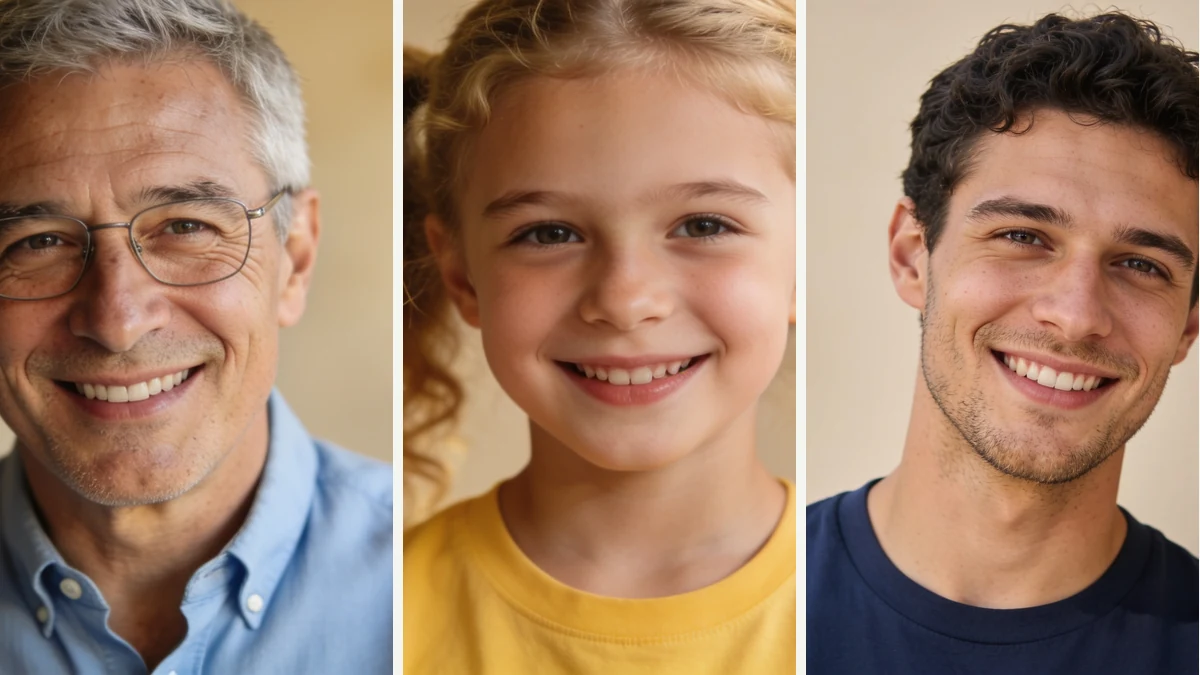
Each family member submits their own clear, well-lit, front-facing photo, taken separately at any time.

2

Describe the setting

Tell the agent the scene, color palette, or outfit style you want everyone to share — a park in autumn, a studio backdrop, a porch at golden hour.

3

The agent combines everyone

The image model generates a new scene placing everyone from their individual photos together, styled according to your description.

4

Download your family portrait

Review the result and download it. For larger families, a couple of attempts may help everyone come through clearly.

Who is this for

Families spread across different places

Get everyone into one photo even when family members live apart or can never coordinate schedules for a real photoshoot.

Holiday card and invitation planners

Generate a themed family portrait for a holiday card, reunion invitation, or milestone announcement.

Anyone missing a recent group photo

Combine individual photos from different years into one up-to-date portrait when a real group photo doesn't exist.

Six prompt-engineering tips that move the needle

Small changes in how you write a prompt make the biggest difference in output.

01

Use one clean individual photo per person

Avoid submitting photos where someone is already in a group, wearing sunglasses, or at an extreme angle — the model has less to work with in those cases.

02

Start with smaller groups

Two to four people tend to render more consistently than six or more in a single generation.

03

Describe a shared color palette

'Coordinated neutral tones' or 'white and beige outfits' helps everyone look like part of the same scene.

04

Keep the setting description focused

One clear location and lighting condition works better than combining several different backdrops in one request.

05

Try again if one person's likeness is off

Accuracy varies by source photo quality — a clearer, closer-cropped photo for that person usually improves the result.

06

Generate a couple of versions for big families

For larger groups, a second attempt can help get more faces looking recognizable at once.

What to expect

For a small group (2-4 people) with clear individual photos and a simple setting request, the tool typically returns a combined portrait within a couple of minutes. Likeness accuracy varies by person — closer-cropped, well-lit photos tend to render more recognizably than distant or dim ones. Larger groups or very specific outfit-matching requests may need a few attempts to get everyone looking right at once.

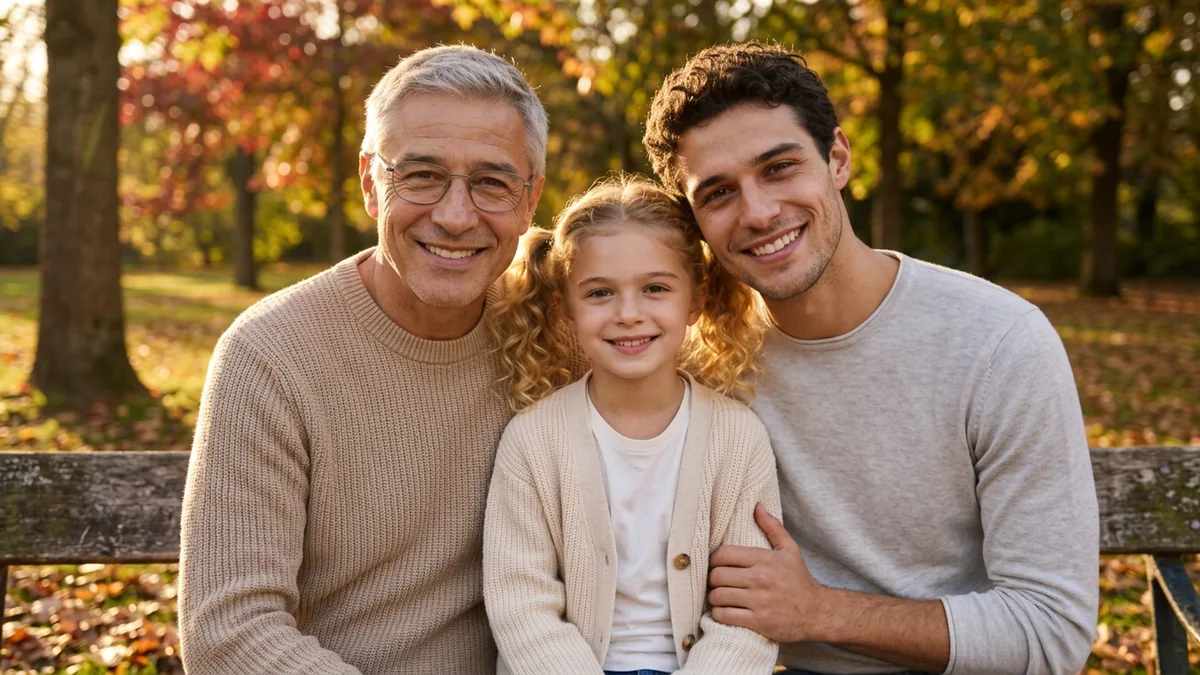
Example: Three individual front-facing photos were submitted with the prompt 'Combine these photos into a warm outdoor family portrait in a park during autumn, everyone in coordinated neutral tones.' The result placed all three people together on a park path with autumn leaves, in similar beige and cream tones; two of the three faces were clearly recognizable, while the third (from a slightly lower-resolution source photo) was a looser match.

Good to know

  • Likeness accuracy varies by person and source photo quality — some family members may render more recognizably than others in the same image.
  • Larger groups (six or more) are harder to place consistently than two to four people.
  • The result is a generated composite, not an actual group photo, and shouldn't be presented as one taken at a real event.

Frequently asked questions

What does an AI family photo generator do?

It takes one photo per family member and generates a new image placing everyone together in a single scene, styled according to your description. It's a composite created by an image model, not an actual group photo.
Does everyone need to be available for a real photo session?

No — each person can submit their own individual photo, taken separately, at different times. The tool combines them into one scene, which is useful when family members live apart or schedules never align.

How many people can be combined into one photo?

The tool can generally handle a handful of individual photos in one request. Larger groups (six or more) increase the chance of inconsistent likeness or placement, so it works best with smaller groups or a few generations for a large family.

Will everyone look like themselves in the result?

The model tries to preserve each person's face from their individual photo, but accuracy varies by person and photo quality. Clear, front-facing, well-lit individual photos give the most recognizable results for everyone involved.

What kind of photos should each person submit?

A recent, well-lit, front-facing photo with the face fully visible works best. Avoid photos where the person is already in a group, wearing sunglasses, or at an extreme angle.

Can we specify matching outfits or a specific setting?

Yes — describe the setting, color palette, or outfit style you want (e.g. 'coordinated neutral tones in a park'), and the model applies that direction to the whole scene.

Can this replace a professional family photographer?

No — it's a way to get everyone into one image when a real photo isn't possible, or to preview a style before a real session. For formal portraits or once-in-a-lifetime events, a professional photographer will capture the moment more reliably.

Ready to create?

Sign up free and put AI agents to work across your tasks, from quick jobs to complete end-to-end workflows, right in your browser, no setup needed.

Get started for free