Seedream 4.5: ByteDance's Unified AI Image Generator, Explained
ByteDance's image model for high-fidelity generation, legible text rendering, and unified editing, without the API setup.
Seedream 4.5: ByteDance's Unified AI Image Generator, Explained
Most image models still botch the one thing designers need most (readable text inside the picture), which is exactly where Seedream 4.5 has earned its reputation. It's an AI image generation and editing model from ByteDance (the company behind TikTok), distributed internationally through its cloud platform, BytePlus. Beyond legible in-image text, it produces photorealistic output at high resolutions and handles both fresh generation and edits through a single unified architecture: the combination that has made it a genuinely practical choice for professional workflows rather than just a demo-reel novelty. (Full disclosure up front: it's the model we use to generate the cover images on this very blog.)
Who Makes Seedream 4.5?
Seedream 4.5 is a product of ByteDance's AI research team. ByteDance is best known internationally as the parent company of TikTok, but it operates a substantial AI infrastructure business under the BytePlus brand, which provides API access to a range of machine learning models (including Seedream) for developers, enterprises, and creative professionals outside China.
The Seedream line sits within BytePlus's ModelArk platform, which surfaces foundation models via REST APIs. You can find the official BytePlus product page at byteplus.com and the developer documentation (including the Seedream 4.0 to 4.5 prompt guide) at docs.byteplus.com. The broader Seedream research is published under the seed.bytedance.com domain, though the primary API surface for external developers flows through BytePlus.
ByteDance's scale is worth noting as context: the company has invested heavily in training data quality, large-scale model infrastructure, and multilingual content understanding, and all of that downstream investment surfaces in what Seedream 4.5 can do compared to models from organizations with narrower training pipelines.
What Seedream 4.5 Is Designed to Do
At a high level, BytePlus describes Seedream 4.5 as achieving "all-round improvement through the overall scaling of the model": it accurately identifies main subjects in multi-image editing, strictly preserves reference image details, and substantially improves typography and dense text rendering. Those three areas (compositional accuracy, reference fidelity, and text rendering) define where the model most visibly advances over earlier Seedream versions.
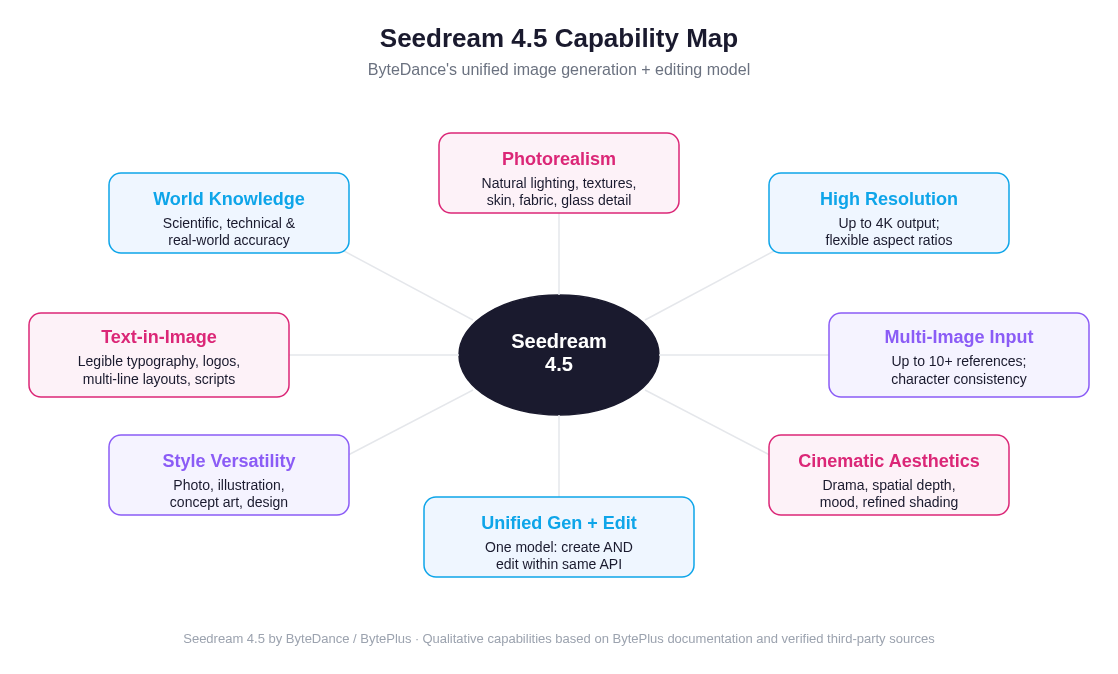 Seedream 4.5's core capabilities, spanning photorealism, legible text rendering, 4K output, and a unified generation-plus-editing architecture
Photorealism and Visual Quality
Seedream 4.5 is engineered for photorealistic output. According to verified third-party documentation and BytePlus's own materials, the model produces images with natural lighting, realistic material textures (skin, fabric, glass) and refined shading that holds up even in complex or low-light scenes. The result is that generated images tend to look polished rather than artificial, even when prompts are moderate in specificity.
This isn't magic or a vague claim; it reflects deliberate training choices toward cinematic aesthetics, strong spatial reasoning, and realistic physical proportions. The model also carries what BytePlus describes as "rich world knowledge": it can render scientifically accurate scenes (a mathematical proof on a blackboard, correct anatomy in a medical illustration) without requiring explicit manual correction.
Text-in-Image Rendering
One of the most practically valuable things about Seedream 4.5 is how well it renders text inside generated images, and this is genuinely unusual in the image generation landscape. Most models, including early versions of popular alternatives, produce garbled, misspelled, or visually degraded text when asked to include typography. Seedream 4.5 handles multi-line layouts, various font styles, non-Latin scripts, and small-point text with notably higher fidelity.
This makes it directly applicable to marketing materials, product packaging mockups, poster design, UI wireframes, and social media graphics where readable text is not optional. You do not need a separate text-composition step in your workflow for many use cases.
High-Resolution Output
Seedream 4.5 supports output at resolutions up to 4K (as described by BytePlus and corroborated by multiple API documentation sources including Runware and fal.ai). At the platform-default settings available through third-party API providers, standard generation runs at up to 2048×2048 pixels, a useful starting point for professional work that can be scaled. The model supports flexible aspect ratios including 1:1, 16:9, 9:16, 4:3, 3:4, 2:3, 3:2, and ultra-wide formats.
Note on specifications: The 4K resolution upper bound is stated in BytePlus documentation and documented by third-party API providers. Exact per-dimension pixel limits may vary by platform and quality tier. Always consult the BytePlus ModelArk documentation or your specific API provider for current technical constraints.
Unified Architecture: Generation and Editing in One Model
Earlier AI image workflows often required two separate models: one for text-to-image generation and another for image editing tasks (inpainting, object removal, reference-based editing). Seedream 4.5 handles both within a single architecture. This means you can generate a base image and then instruct the same model to refine, edit, or recompose it, without switching endpoints or re-engineering your integration.
The editing capabilities include preserving facial structure, lighting, color tone, and pose from reference images while applying prompt-directed changes. The result, per BytePlus documentation, is high-fidelity retouching that reads as intentional and professional rather than artificially processed.
Multi-Image Composition
Seedream 4.5 supports multiple reference images in a single request. The precise ceiling varies by platform (BytePlus documentation and third-party API providers reference figures in the range of 10 to 14 reference images per call). This enables complex compositional workflows: maintaining character consistency across a scene, copying specific design elements between source images, or generating layout-heavy designs that draw from multiple visual references.
For content teams building consistent brand identities, game developers managing character sheets, or e-commerce teams producing product variant shots, multi-image support is a workflow accelerant rather than a novelty.
How Seedream 4.5 Compares to Other Image Models
It is useful to position Seedream 4.5 against the broader landscape of image generation models, not to rank them with fabricated benchmarks, but to understand the conceptual trade-offs.
If you have read our breakdown of GPT Image 2, you will notice some structural parallels: both models compete in the professional-grade tier, both have invested meaningfully in text rendering (a historically weak point across the category), and both are accessible via API. The key differentiators with Seedream 4.5 are its ByteDance provenance, its emphasis on the unified generation-plus-editing architecture, and its particularly strong performance on multilingual and dense text scenarios.
Compared to Midjourney, Seedream 4.5 offers API access and programmatic integration. Midjourney's workflow remains primarily Discord-based, which limits automation and production use cases. Seedream's style output is more configurable through prompt structure and less dependent on a proprietary aesthetic vocabulary.
Compared to Stable Diffusion variants, Seedream 4.5 delivers strong out-of-the-box results without requiring infrastructure management, LoRA fine-tuning, or checkpoint assembly. The open-source flexibility of SD-based workflows is genuinely valuable for some teams; for others, managed API access with consistently high quality is a better fit.
Compared to Flux-based models, which are known for fast generation and good photorealism, Seedream 4.5 competes closely on quality while offering more robust text rendering. Neither dominates the other universally. The right choice depends on your specific output goals and workflow requirements.
Use Cases Where Seedream 4.5 Excels
Understanding a model's strengths practically helps you decide when to reach for it:
Marketing and advertising materials. Typography-heavy content (posters, ad banners, product announcements, event promotions) is where Seedream 4.5's text rendering turns from a feature into a workflow advantage. You can generate production-viable drafts in one pass without a separate design composition step.
E-commerce product visualization. The model handles reference-based editing well, making it practical for product catalog automation: generate a hero product shot, then apply color or context variations while preserving the product's material fidelity and proportions.
Character and brand consistency. Multi-image input support enables maintaining visual identity across a range of outputs: a character in different poses, a brand mascot in different scenes, a product in different environments. This is valuable for game development, branded content, and visual storytelling projects.
Concept art and mood boards. The cinematic aesthetic quality and strong spatial understanding make Seedream 4.5 well-suited for professional concept generation: interior design visualization, environment concepts, and branded mood boards that need to look polished at the draft stage.
Social media graphics. The combination of flexible aspect ratios, strong text rendering, and fast generation makes it practical for social content production at volume.
Prompt Craft: Getting the Best Results from Seedream 4.5
According to BytePlus's documented prompt guide and corroborated third-party sources, effective Seedream 4.5 prompts follow a consistent structural logic.
The Basic Prompt Structure
Lead with your subject, then layer in style, composition, lighting, and technical parameters. The model places greater emphasis on concepts mentioned earlier in the prompt, so your primary focus should come first:
[Subject + action/pose] [Setting/background] [Style] [Lighting] [Camera/technical details] [Mood/atmosphere]Example: A professional chef plating a dish in a modern kitchen, side-on angle, documentary photography style, soft tungsten lighting, shot on 50mm, shallow depth of field, warm and focused atmosphere
Prompt Length
Target 30 to 100 words. Too brief and you leave the model underspecified; too verbose and competing instructions can create inconsistency. This is a genuine sweet spot, not just a rule of thumb.
Text Rendering Tips
When you need legible text in the image:
- Always enclose the exact desired text in quotation marks:
with the text "SUMMER SALE 2026"rather than just describing it loosely - Keep text short: 1 to 10 words is reliable; 3 to 5 words is optimal for consistent rendering
- Specify visual style: bold sans-serif, neon sign, hand-lettered, embossed, etc.
- Specify placement: centered at top, on a banner, along the bottom edge
- Request 2K or 4K quality output when text legibility is critical; resolution directly affects typography fidelity
Lighting and Atmosphere
Seedream 4.5 responds particularly well to explicit lighting description. Named lighting setups produce more consistent results than vague mood words:
- "golden hour" or "magic hour" for warm, directional outdoor light
- "softbox lighting" or "studio three-point lighting" for controlled product or portrait contexts
- "dramatic side lighting" for cinematic character work
- "overcast diffuse light" for even, shadow-reduced outdoor scenes
- "bioluminescent" or "neon glow" for stylized and fantastical contexts
Technical Modifiers for Photorealism
For photographic realism, include camera-style descriptors: 85mm lens, f/1.4 aperture, shallow depth of field, bokeh background, shot on full-frame, high resolution, photorealistic. These are not magic words; they function as instruction weights that push the model toward photographic output styles versus illustrative or painterly ones.
Style Vocabulary
The model handles a wide register of style descriptors:
- Photographic: portrait photography, macro photography, aerial view, documentary
- Artistic: oil painting, watercolor, pencil sketch, digital art, concept art
- Aesthetic registers: cinematic, minimalist, editorial, brutalist, vaporwave
Mixing style vocabulary from incompatible registers ("photorealistic cartoon character") tends to produce incoherence. Pick a consistent aesthetic direction and commit to it in the prompt.
Iterative Refinement
Because Seedream 4.5 supports both generation and editing in a unified architecture, the most productive workflow is often iterative: generate a strong base, identify what needs adjustment, then edit with a targeted instruction rather than rewriting the full prompt from scratch.
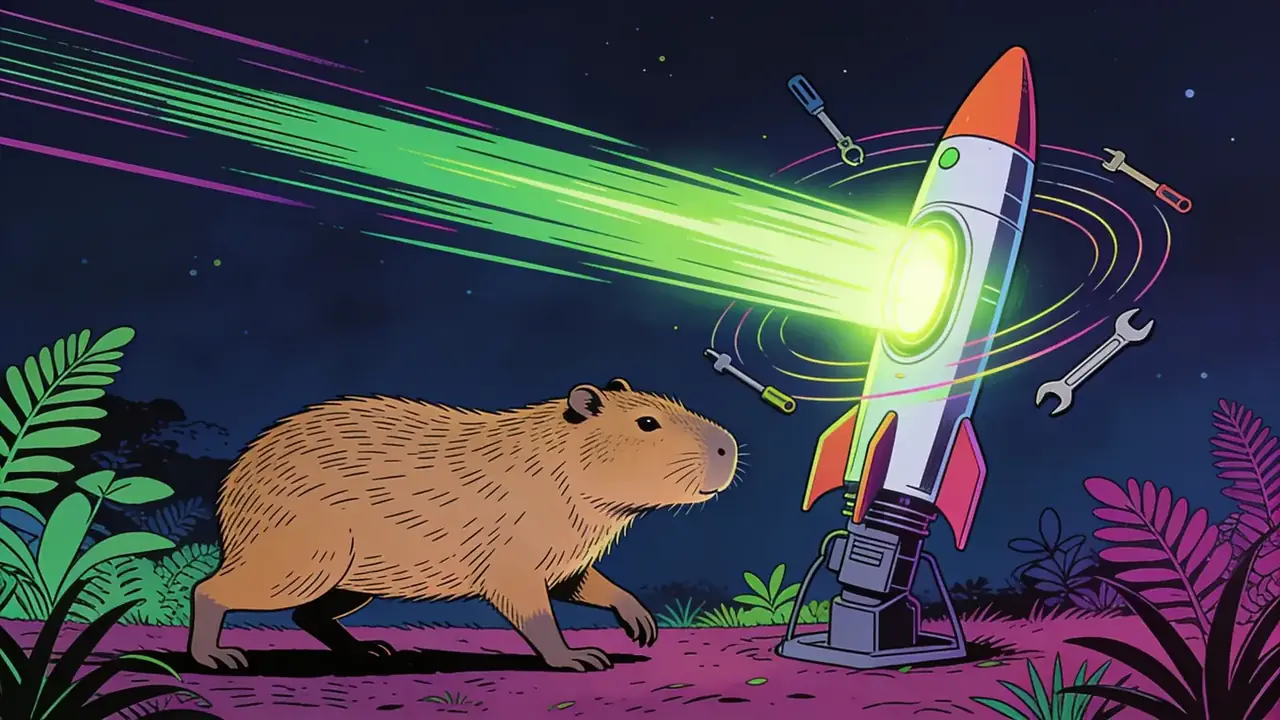
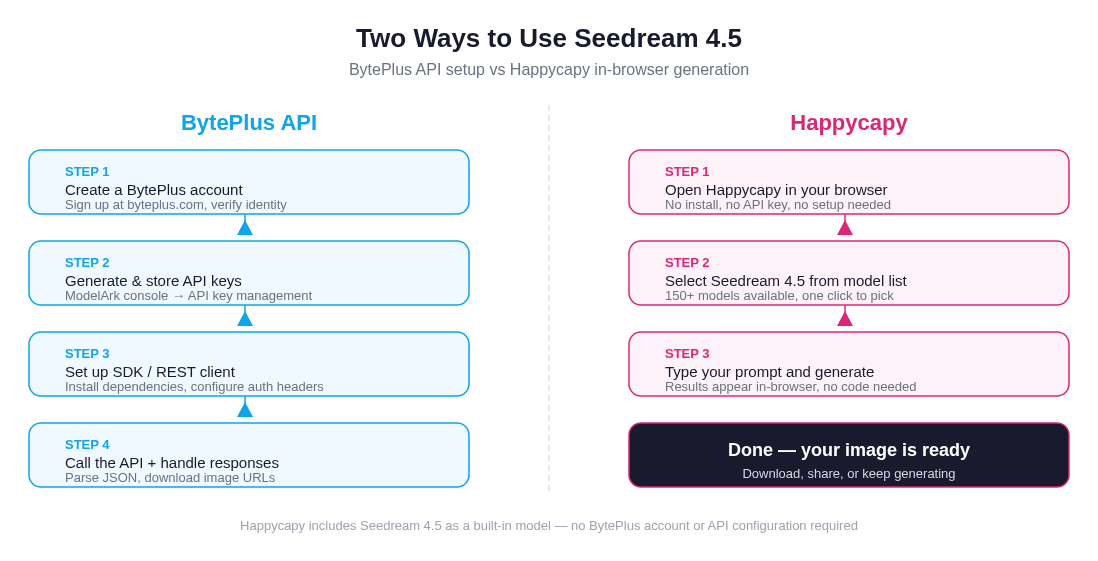 Getting to your first Seedream 4.5 image: the BytePlus API path requires account setup, key management, and SDK configuration; on Happycapy, you select the model and type a prompt
How to Access Seedream 4.5
There are two main access paths, and understanding both helps you pick the right one for your situation.
Via BytePlus API
BytePlus exposes Seedream 4.5 through its ModelArk platform. The process involves creating a BytePlus account, generating API credentials through the console, configuring an SDK or REST client, and calling the endpoint directly. This is the route for developers building Seedream into production applications, automation pipelines, or custom tooling. If you need programmatic access at scale, the BytePlus ModelArk documentation is the authoritative reference.
The typical API request accepts a text prompt and optional parameters including size, number of images, quality tier, seed value for reproducibility, and negative prompt. Output returns as image URLs or base64-encoded data depending on platform configuration.
This path has genuine overhead: you need to navigate BytePlus's registration flow (which may involve identity verification for enterprise tiers), manage API keys securely, handle asynchronous responses, and absorb per-image costs that vary by provider and quality tier.
On Happycapy
Seedream 4.5 is one of the built-in models on Happycapy. It is, in fact, the model used to generate our own blog cover images. You do not need a BytePlus account, API keys, or any developer setup. Open the app, select Seedream 4.5 from the model list (which includes 150+ options), type your prompt, and generate.
The output is delivered in-browser. You can iterate, compare models, try different prompts, and download results without writing a line of code or managing infrastructure. For designers, content creators, marketers, and anyone who wants to explore Seedream 4.5's capabilities before committing to a production API integration, this is the practical starting point.
Try Seedream 4.5 free at happycapy.ai: no BytePlus account, no API key, the same model that rendered this post's cover.
Caveats and Honest Limitations
No model is universally the right choice. A few things worth knowing:
Text rendering has a length ceiling. Short, well-specified text is rendered reliably. Long paragraphs or dense multi-column layouts are not the model's strength, and as with all AI image generators, you should verify text accuracy in output before using it in production.
Heavy stylization may not be the strongest suit. Seedream 4.5 is optimized toward fidelity and realism. If you are pursuing highly stylized, uncensored, or experimental visual outputs, models specifically tuned for those use cases (certain Stable Diffusion variants, for example) may serve you better.
Complex compositions can produce artifacts. Multi-object scenes with many spatial relationships, or image editing tasks with conflicting instructions, can occasionally result in cropping issues or blurring in peripheral areas. Iterative refinement addresses most of these cases.
Non-Latin script quality varies. While Seedream 4.5 handles non-Latin scripts better than most competing models, performance is most consistent with English and common Latin-alphabet languages. Complex scripts and right-to-left text may require additional prompt iteration.
Specification note: Resolution figures cited here (up to 4K) are drawn from BytePlus documentation and corroborated third-party API documentation. Exact per-dimension limits and quality tier availability may vary by provider and may change over time. Treat these as directional rather than contractual figures.
Seedream 4.5 in an Image Generation Workflow
The unified generation-plus-editing architecture changes how you should think about the model in a production workflow. Rather than treating image generation as a single-shot task, Seedream 4.5 supports a layered approach:
- Generate a base image from a detailed prompt, establishing the core composition, subject, and mood.
- Identify specific elements that need refinement: lighting adjustment, text modification, object repositioning.
- Issue targeted edit instructions using the editing endpoint, referencing the original image as input.
- Iterate on details without rebuilding the entire composition, preserving what works.
This workflow is particularly valuable for campaigns or projects that require visual consistency across multiple deliverables. You establish a visual language in the first generation, then edit to produce variations rather than starting from scratch each time.
For teams already using the harness engineering patterns to orchestrate AI tasks programmatically, the Seedream 4.5 API fits naturally into an agent-driven content pipeline: prompts generated by language models, passed to Seedream for visual rendering, outputs stored and evaluated, refinements applied automatically based on feedback loops.
Frequently Asked Questions
What is Seedream 4.5? Seedream 4.5 is an AI image generation and editing model developed by ByteDance and distributed via BytePlus. It handles both text-to-image generation and image editing in a single unified architecture, with particular strengths in photorealistic output, legible text rendering, and high-resolution generation.
Who made Seedream 4.5? ByteDance built Seedream 4.5. It is available to international developers and businesses through BytePlus, ByteDance's cloud services platform. BytePlus documentation and the ModelArk API console are the authoritative sources for technical specifications.
What makes Seedream 4.5 different from other image models? Three things stand out: its unified generation-plus-editing architecture (no model switching required), its notably strong text-in-image rendering (legible typography, logos, non-Latin scripts), and its photorealistic quality at resolutions up to 4K. It also supports multi-image reference inputs, making it practical for character consistency and brand continuity workflows.
How good is Seedream 4.5 at rendering text in images? Markedly better than most image models. It can render multi-line layouts, various font styles, and accurately spelled short text (1 to 10 words). For best results, enclose the exact desired text in quotes in your prompt, specify visual style and placement, and use higher output resolution settings when text legibility is critical.
Does Seedream 4.5 require a BytePlus account? To use it through the BytePlus API directly, yes: you need an account, API credentials, and SDK or REST client setup. On Happycapy, Seedream 4.5 is a built-in model that requires no BytePlus account or API key. You select it from the model list and generate immediately.
What resolutions does Seedream 4.5 support? According to BytePlus documentation and corroborated third-party API sources, Seedream 4.5 supports output up to 4K resolution, with standard generation commonly at up to 2048×2048 pixels. It supports flexible aspect ratios (1:1, 16:9, 9:16, 4:3, and others). Exact limits may vary by provider and quality tier.
How does Seedream 4.5 compare to GPT Image 2? Both compete in the professional-grade image generation tier and have invested in text rendering. The practical differences come down to provenance and workflow: GPT Image 2 is OpenAI's product with tight integration into the OpenAI ecosystem, while Seedream 4.5 is ByteDance/BytePlus's product with a distinct unified generation-editing architecture. See our GPT Image 2 breakdown for a detailed look at that model's strengths.
Can I try Seedream 4.5 without writing code? Yes. Happycapy includes Seedream 4.5 as one of its 150+ built-in models. You can generate images in-browser with no API setup, no code, and no BytePlus account required.
What are the best use cases for Seedream 4.5? Poster and marketing materials with legible text, e-commerce product visualization (including multi-reference editing for variant shots), character consistency across scenes, concept art and mood boards, and social media graphics. It is particularly well-suited for any workflow that benefits from combining generation and editing in a single model.
Seedream 4.5 represents a mature point in ByteDance's image model development. It does not chase novelty for its own sake, but instead doubles down on the practical requirements of professional visual workflows: fidelity, editability, text accuracy, and resolution. For teams evaluating where to route their image generation work, it deserves a direct trial rather than a secondhand assessment.