
What Is an MCP Server? The Plug That Connects AI Agents to Everything
An MCP server exposes tools, data, and actions to AI agents through one open standard. What it is, the M×N problem it solves, the client-server architecture, and how to use it with no setup.
An MCP server is a small program that exposes tools, data, or actions to an AI agent through a shared standard, the Model Context Protocol, so the agent can use your database, your file system, your GitHub, or any other system without a custom integration for each one. If an AI model is the brain, MCP servers are the hands and senses you plug into it. This guide explains what an MCP server actually is, the problem it solves, how the client-server architecture works, what a server exposes, and how to use the whole thing without standing up servers yourself.
The Short Answer
The Model Context Protocol (MCP) is an open standard, introduced and open-sourced by Anthropic, for connecting AI applications to external tools and data. An MCP server is the piece that provides a capability (say, "search these docs" or "run this query"), and an MCP client (inside the AI app) is the piece that consumes it. Because both sides speak the same protocol, any MCP-compatible agent can use any MCP server: no bespoke glue required. The official analogy is apt: MCP is like USB-C for AI: one standard port instead of a different cable for every device.
The Problem MCP Solves
Before MCP, every time you wanted an AI agent to use a tool (Slack, Postgres, Google Drive, a ticketing system), someone had to build a one-off integration for that specific agent and that specific tool. With M AI applications and N tools, you faced an M × N explosion of custom connectors, each maintained separately, each breaking in its own way.
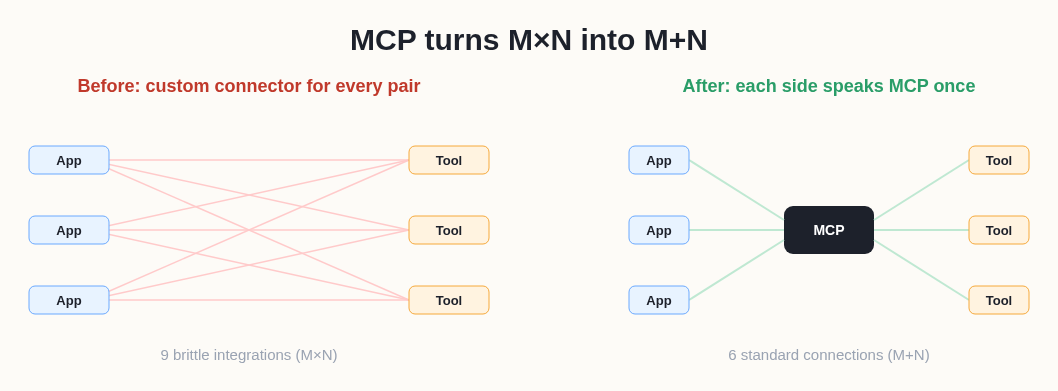 MCP turns an M×N integration mess into M+N: implement the protocol once on each side.
MCP collapses that to M + N: each AI app implements an MCP client once, each tool implements an MCP server once, and everything interoperates. Build an MCP server for your internal API a single time, and every MCP-compatible agent, now and in the future, can use it. That's the structural win, and it's why MCP adoption spread fast across the AI tooling ecosystem.
How an MCP Server Works: Client and Server
MCP follows a clean client-server model with three roles:
- Host: the AI application the user interacts with (a chat app, an IDE, an agent platform). The host manages everything.
- Client: lives inside the host; each client holds a dedicated connection to one MCP server.
- Server: a separate program that exposes specific capabilities (tools, data, prompts) over the protocol.
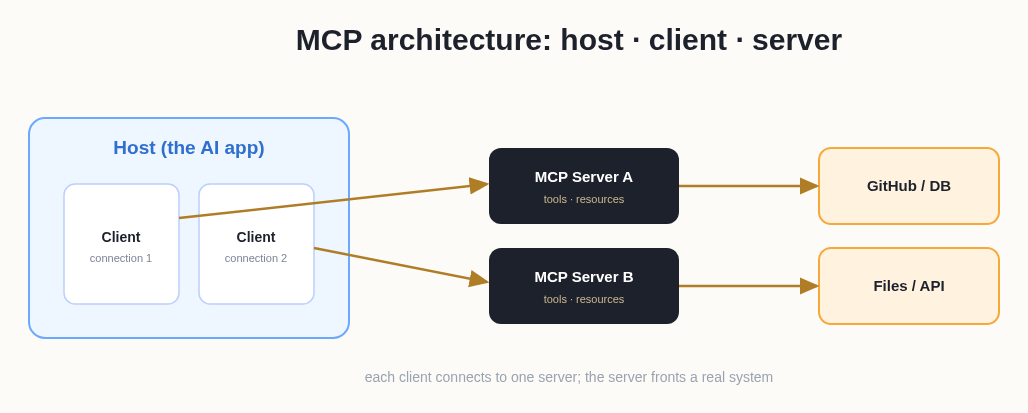 The host runs clients; each client connects to one MCP server, which fronts a tool or data source.
When the agent needs to do something (look up an order, read a file, call an API), the host's client asks the relevant MCP server, the server does the work against the underlying system, and the result flows back into the model's context. Servers communicate over standard transports (local stdio for servers on your machine, or HTTP for remote ones), which is why an MCP server can run locally next to your tools or remotely as a shared service.
What an MCP Server Exposes
An MCP server can offer three kinds of capability, and understanding them tells you what MCP is for:
- Tools: actions the model can invoke: run a query, send a message, create a file, call an API. This is the part people mean most often when they say "give the agent a tool."
- Resources: data and context the server makes available for the model to read: documents, database rows, file contents.
- Prompts: reusable prompt templates or workflows the server provides, so common tasks are one step instead of re-typed instructions.
Together, those three let an MCP server turn an isolated model into one that can read real data and take real actions in a specific system, exactly what an agent needs.
Why MCP Servers Matter for AI Agents
MCP is foundational to agentic AI because an agent is only useful if it can act, and acting means using tools. MCP standardizes the tool layer so an agent's capabilities become modular: want your agent to manage GitHub issues? Connect a GitHub MCP server. Need it to query your warehouse? Add a database MCP server. The agent's reach grows by plugging in servers, not by rewriting the agent.
This is the tool component of harness engineering, the system around the model that turns it into a working agent. MCP is how the "tools" part of that harness gets standardized and shared, instead of every team reinventing connectors.
Real Examples of MCP Servers
To make it concrete, common MCP servers expose things like:
- Developer tools: GitHub/GitLab (issues, PRs), a filesystem, a terminal, a browser.
- Data sources: Postgres or other databases, Google Drive, internal knowledge bases.
- SaaS systems: Slack, ticketing, CRMs, calendars.
- Search & retrieval: web search, vector stores, documentation.
Each is an MCP server that any compatible agent can use the moment it's connected, which is why the ecosystem of ready-made servers matters as much as the protocol itself.
MCP vs Plugins and Bare Function Calling
If you've used AI tools before, MCP can sound like older ideas: plugins, or a model's built-in function calling. The difference is standardization and portability. Function calling lets a single model invoke functions you define for that one app. Vendor "plugins" were tied to a specific platform. MCP is an open, vendor-neutral protocol, so a server you build works across every MCP-compatible host (Anthropic's tools, IDEs, agent platforms, and more), not just one vendor's ecosystem.
The two aren't rivals; they're layers. Function calling is how a model expresses "I want to call this tool"; MCP is the standard interface through which that tool is discovered, described, and connected in the first place. An agent uses function-calling-style reasoning to decide what to do, and MCP to actually reach the tool that does it. What MCP adds is that the tool only has to be built once, and then it's available to everyone, forever.
A Day in the Life: An Agent Using MCP Servers
Picture an agent asked to "triage today's new bugs." With MCP servers connected, the flow looks like this: the agent calls a GitHub MCP server's issue-listing tool to pull new reports (an action), reads the linked logs through a filesystem or observability server (resources), queries a database server to check how many users are affected (another action), and posts a prioritized summary to a Slack server (a final action). Four different systems, one agent, zero custom integrations: each capability arrived through a standard MCP server the agent could discover and call.
Now swap GitHub for Linear, or Slack for Teams: the agent doesn't change at all; you just connect a different server. That swap-a-server-not-the-agent property is exactly the composability MCP was designed to deliver, and it's why "what MCP servers are connected?" is becoming as important a question as "which model is it?"
Building an MCP Server vs Using One
There are two relationships you can have with MCP. Building a server means implementing the protocol to expose your own system, worth doing when you have an internal API or data source you want every agent to reach. You write it once, and any MCP client can use it thereafter. Using servers means connecting existing ones (and there's a large, fast-growing ecosystem of ready-made servers for popular tools) to an agent that needs those capabilities.
Most people are on the using side. You don't need to author servers; you need an agent that already has useful ones wired up. That distinction matters for the next section, because it's the difference between an infrastructure project and simply getting work done.
Common MCP Misconceptions
- "MCP is an Anthropic-only thing." It originated at Anthropic but is an open standard adopted across the ecosystem. That's the entire point.
- "MCP is just RAG / a vector database." No. RAG retrieves documents; MCP is a general protocol for tools and data and prompts, including taking actions, not just fetching text.
- "I need MCP to use any AI tool." Only if you want to connect external systems. For a managed agent that already has its tools wired in, MCP is working under the hood whether or not you ever touch it.
How to Use MCP Without Running Servers Yourself
Here's the catch for most people: to use MCP directly, you typically configure clients and connect (or host) servers: real setup, especially for remote servers, auth, and keeping them running. That's fine for developers building custom stacks, but it's overhead if you just want an agent that can already do things.
That's where a managed agent platform comes in. Happycapy is an agent-native computer that runs in your browser with the tools and connections already wired into its harness, so you get the capability MCP enables (an agent that can act across tools, files, and the web) without standing up servers, managing transports, or wiring auth yourself. You describe what you want, and the agent uses its tools to do it inside a secure sandbox.
In other words: MCP is the standard that lets agents plug into everything; Happycapy is a place where the plugging-in is already done for you. If you've been reading about MCP because you want an agent that actually uses tools, not because you want to run server infrastructure, start free at happycapy.ai and put a tool-using agent to work today.
Frequently Asked Questions
Q: What is an MCP server in simple terms?
It's a small program that exposes a specific capability (a tool, a data source, or a prompt) to AI agents through the Model Context Protocol. Any MCP-compatible agent can connect to it and use that capability without a custom integration. Think of it as a standard plug that lets an AI use one more system.
Q: What is the Model Context Protocol (MCP)?
MCP is an open standard, introduced and open-sourced by Anthropic, for connecting AI applications to external tools and data. It's often described as "USB-C for AI": one standard interface instead of a unique connector for every tool.
Q: What's the difference between an MCP client and an MCP server?
The server provides a capability (it fronts a tool or data source); the client consumes it from inside the AI application (the host). Each client maintains a connection to one server, and because both speak MCP, any client can talk to any server.
Q: What can an MCP server expose?
Three things: tools (actions the model can call), resources (data the model can read), and prompts (reusable templates/workflows). Together they let a model read real data and take real actions in a specific system.
Q: Why do AI agents need MCP?
Agents are only useful when they can act, and acting means using tools. MCP standardizes the tool layer, so an agent's abilities grow by connecting servers rather than by rewriting custom integrations, turning the M×N integration problem into M+N.
Q: Do I have to run MCP servers myself to use tool-enabled agents?
No. Building or hosting MCP servers is for teams assembling custom stacks. If you just want an agent that already uses tools, a managed platform like Happycapy provides that out of the box: the tool layer is wired into its harness, so there's no server setup on your side.