What Is Harness Engineering? Building Reliable AI Agent Harnesses (2026)
Agent = Model + Harness. A practical guide to what a harness is, its seven components, how it relates to prompt and context engineering, the real harnesses compared, and how to evaluate one.
Every AI agent is a model plus a harness, and in 2026 it's usually the harness, not the model, that decides whether the agent actually works. The harness is everything wrapped around the model (the control loop, tools, memory, sandbox, and context management) that turns raw intelligence into useful work, captured by the one-line equation Agent = Model + Harness. Harness engineering is the discipline of building that surrounding system well. This guide defines it, shows how it relates to prompt and context engineering, breaks down the anatomy of a harness, compares the real harnesses people use today, and explains how to evaluate one.
Why Harness Engineering Matters Now
Harness engineering matters because the model has stopped being the bottleneck. The system around it is. As frontier models converge on similar raw capability, the difference between an agent that ships work and one that stalls is almost entirely in the harness: how it manages state, recovers from errors, calls tools, and stays on task over long runs.
Practitioners keep arriving at the same lesson. Engineers who strip back over-engineered agent stacks routinely find that "the model was never the problem; the system and infrastructure around it were." This is why the same model can feel brilliant inside one product and useless inside another: identical intelligence, very different harness.
There's also a deeper trend driving the term's rise: model and harness are increasingly trained together. Labs now post-train models against specific harness features (a particular file-editing tool, a specific planning loop) so the two co-evolve. That coupling makes harness design a first-class engineering discipline rather than glue code, and it's why "harness engineering" went from niche jargon to a named practice in 2026.
What Is an Agent Harness?
An agent harness is everything in an AI agent that is not the model itself. A useful way to put it: if you're not the model, you're the harness. The model is a function that turns text into text; on its own it cannot keep durable state, run code, see real-time information, or set up its own environment. The harness supplies all of that.
Concretely, a harness is what lets a model:
- take actions in the world (run a command, edit a file, call an API)
- remember things beyond a single response
- recover when a step fails
- keep working across many steps toward a goal
Without a harness, you have a chatbot. With one, you have an agent.
Prompt vs Context vs Harness Engineering
The three terms form a nested hierarchy, each one wrapping the previous: prompt engineering optimizes a single instruction, context engineering manages everything the model sees, and harness engineering builds the whole system the model runs inside. They are not competing ideas. They are concentric layers.
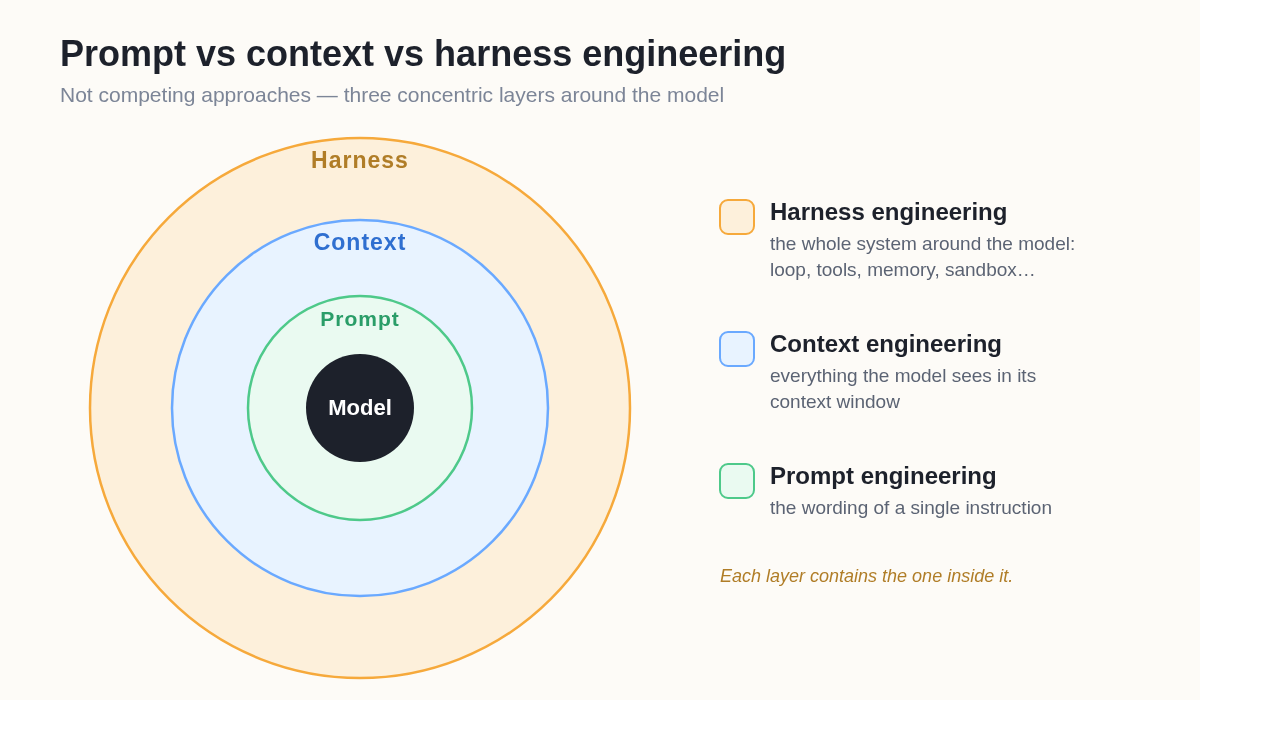 Prompt, context, and harness engineering are concentric layers, not competing approaches.
| Layer | Scope | Question it answers |
|---|---|---|
| Prompt engineering | One instruction | How do I phrase this request? |
| Context engineering | Everything in the context window | What information should the model see right now? |
| Harness engineering | The whole system around the model | What tools, loop, memory, and environment does the agent need to operate reliably? |
Prompt engineering lives inside context engineering, which lives inside harness engineering. If you're building an autonomous agent, you're doing all three, but the harness is the layer that determines whether it survives contact with a real, multi-step task.
The Anatomy of an Agent Harness
Most production harnesses are assembled from the same seven components. You can reason about any agent (Claude Code, a custom LangChain build, or a managed platform) by asking how it handles each one.
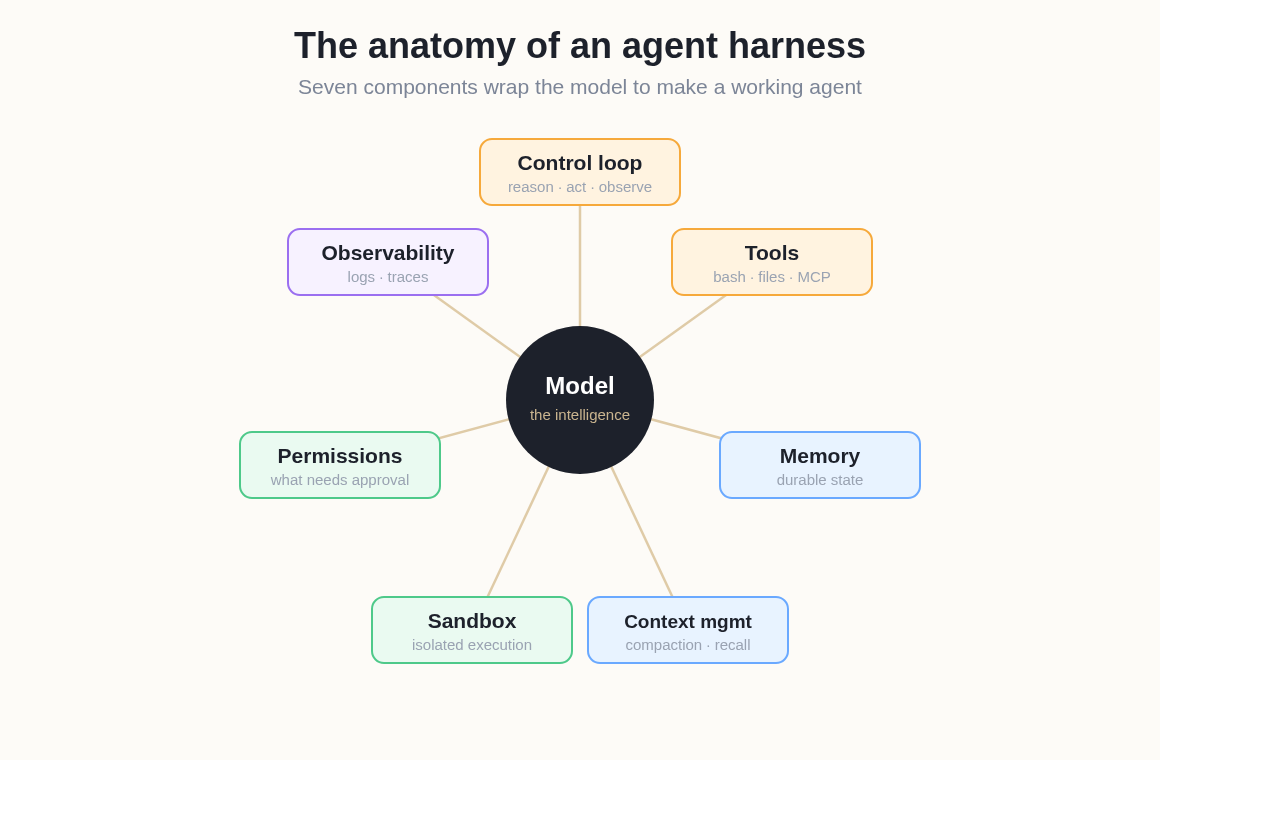 The seven components that wrap a model to make a working agent.
- Control loop: the planning-and-acting cycle (often a ReAct-style loop: reason, act, observe, repeat) that drives the agent forward and decides when it's done.
- Tools: the actions the agent can take. Bash and a filesystem are the highest-leverage general-purpose tools; specialized tools and MCP servers extend reach.
- Memory: durable storage outside the context window: files, a memory store, or a simple
AGENTS.md/CLAUDE.mdthe agent reads and writes. - Context management: compaction, summarization, and progressive disclosure that keep the window focused and fight context rot. (This is where harness engineering contains context engineering.)
- Sandbox: the isolated environment where the agent's actions run, so a mistake or a malicious instruction can't damage the host machine.
- Permissions: what the agent is allowed to do without asking, and where a human must approve.
- Observability: logs, traces, and the ability to watch what the agent did and why, so you can debug and improve the harness.
A well-engineered harness isn't the one with the most components. It's the one where these pieces are coherent and reinforce each other.
Real Agent Harnesses, Compared
The fastest way to understand harness engineering is to see how shipping products make different harness choices. The table below compares popular agent harnesses on the decisions that matter most to users.
| Harness | Primary interface | Setup | Execution environment | Best for |
|---|---|---|---|---|
| Claude Code | Terminal / CLI (plus IDE, web) | Install + configure locally | Your machine or a sandbox | Developers comfortable in a terminal |
| OpenAI Codex | CLI + cloud | Install / cloud account | Sandboxed cloud or local | Developers in the OpenAI ecosystem |
| OpenClaw | Open-source agent runtime | Self-host / local setup | Your own infrastructure | Technical users who want full control |
| Happycapy | Visual GUI in the browser | None, runs in your browser | Managed cloud sandbox | Everyone, non-technical and technical |
The pattern: more control usually means more setup and more responsibility for the harness, while managed harnesses trade some control for zero-setup reliability. Which is "best" depends entirely on who's using it and how much harness work they want to own.
How to Evaluate a Harness
You evaluate a harness by how reliably and cheaply it turns a goal into completed work with minimal human babysitting. The leading guides describe harness components but rarely say how to judge one. These are the metrics that close that gap:
- Task success rate: the share of tasks completed correctly end to end. The headline metric; run it against a fixed task suite.
- Intervention rate (autonomy): how often a human has to step in per task. A better harness needs fewer interruptions to reach the same result.
- Recovery rate: when a step fails, how often the harness detects and corrects it on its own instead of stalling or compounding the error.
- Safety containment: can the agent's actions damage anything outside its sandbox? A harness that can wreck the host has failed regardless of task score.
- Observability: can you see what happened and why? If you can't trace a failure, you can't improve the harness.
- Cost and latency per task: the practical ceiling. Aggressive verification and exploration raise quality but cost tokens and time; this keeps the trade-off honest.
Think of it as CI for agents: a benchmark of representative tasks that re-runs on every harness change, so a tweak that lifts one metric can't silently wreck another (a faster loop that quietly drops the success rate is a regression, not a win).
Build vs Buy: Should You Engineer Your Own Harness?
Build a harness when your workflow is unusual enough that no existing one fits; buy (or adopt) a managed one when you want reliable agent work without owning all seven components yourself. Building gives you total control and is the right call for novel, deeply integrated systems, but you then own the control loop, the sandbox, the observability, and the security, and you maintain them as models change.
For most teams and individuals, the goal isn't to engineer a harness. It's to get work done by one. That's the case for a managed harness.
Happycapy is a managed agent harness you use from the browser: it runs Claude Code and 150+ models inside a cloud sandbox, wires up tools and a filesystem, manages context and memory, and exposes the work through a visual desktop where you can watch the agent and step in when needed. In harness terms, all seven components are engineered and maintained for you. You describe the task, and the harness handles the rest. It's the "buy" path for people who want agent results without becoming harness engineers.
Security: Sandboxing the Harness
The most important security decision in a harness is the sandbox, because an agent that can run commands can also run harmful ones, whether from its own mistake or from a prompt-injection attack hidden in a web page or file it reads. Harnesses fall on a spectrum from soft sandboxing (the agent runs with guardrails but on a trusted machine) to hard sandboxing (the agent runs in a fully isolated environment with no access to the host or sensitive data).
Treat any content the agent retrieves (web pages, documents, tool output) as untrusted input, and run execution in an isolated sandbox rather than directly on your own machine. This is exactly why browser-based, cloud-sandboxed harnesses are appealing for everyday use: the isolation is the default, not something the user has to configure.
Getting Started with Harness Engineering
Whether you build or buy, the same principles apply:
- Start from the behavior you want. Work backwards from "what should the agent reliably do" to the harness features that make it possible.
- Give it a real loop and real tools. Bash plus a filesystem covers an enormous range of tasks before you reach for anything exotic.
- Put state outside the model. Use files and memory so progress survives the context window.
- Isolate execution. Sandbox first; it's the cheapest insurance against expensive mistakes.
- Measure it. Track success rate, intervention rate, and recovery rate against a fixed task suite.
For a broader catalog of harness patterns, tools, and evals, the community-maintained awesome-harness-engineering list is a useful map. And if you'd rather not maintain a harness at all, on Happycapy the seven components above come pre-wired, so you put an agent to work from a browser tab instead of owning the control loop, sandbox, and observability yourself.
Frequently Asked Questions
Q: What is harness engineering in AI?
Harness engineering is the practice of designing everything around an AI model (the control loop, tools, memory, sandbox, context management, permissions, and observability) that turns a raw model into a reliable agent. It's captured by the equation Agent = Model + Harness.
Q: What is the difference between a model and a harness?
The model is the intelligence, a function that turns text into text. The harness is everything else: the code and infrastructure that lets the model take actions, remember things, recover from errors, and work over many steps. As the saying goes, "if you're not the model, you're the harness."
Q: How is harness engineering different from context engineering?
They're nested layers. Context engineering manages what the model sees in its context window; harness engineering builds the entire system the model runs inside, which includes context management as one of its components. Harness engineering is the outermost layer, wrapping both context and prompt engineering.
Q: Do I need to build my own agent harness?
Not usually. Building your own makes sense for unusual, deeply integrated workflows, but it means owning the loop, sandbox, security, and observability yourself. Most people are better served by a managed harness (like a browser-based, sandboxed platform) that engineers those components for them.
Q: How do you measure if a harness is good?
Track task success rate, intervention rate (how often a human must step in), recovery rate (how often it self-corrects), safety containment, observability, and cost/latency per task, run against a fixed suite of tasks so you can compare before and after each change.