Gemini Omni Flash: Google's Video Model You Edit by Talking to It
Google's any-to-any model that generates 720p video with synchronized audio, and lets you edit it by talking across turns.
Gemini Omni Flash: Google's Video Model You Edit by Talking to It
Gemini Omni Flash is Google DeepMind's first any-to-any multimodal video generation model, not a voice interface, not a chatbot upgrade, and emphatically not the same thing as OpenAI's "omni" architecture. Before we go any further, let's get that confusion out of the way, because it shapes everything about how you should think about this model.
When OpenAI released GPT-4o, they called it "omni" to signal real-time voice + vision input in a single model. Google's use of "Omni" means something structurally different: it describes a new model family designed to accept any input modality (text, images, audio, video) and generate any output modality in a single forward pass, starting with video, with image and audio generation outputs coming later on the roadmap. Google's Omni is a generative architecture. OpenAI's "omni" was a perception story. These are not the same concept.
That framing matters because Gemini Omni Flash's actual superpower isn't voice interaction; it's conversational, stateful video editing across multiple turns. You can generate a clip, tell it to change the lighting, ask it to extend the scene, swap a character's outfit, and adjust the camera angle, across a continuous session where the model remembers what it built. That capability, plus integrated synchronized audio and AI Avatar generation, makes it something genuinely new in the video generation landscape.
What "Omni" Actually Means at Google
Google DeepMind announced the Omni family at Google I/O on May 19, 2026, with developer/API general availability launching June 30, 2026. The Omni architecture is built on the principle that a single model should process all modalities natively, not through chained specialist models with adapters bolted on, but in one unified representation space.
At launch, the "any output" side of that equation starts specifically with video. The model outputs MP4 clips at 720p, 24fps, in 16:9, 9:16, or 1:1 aspect ratios, between 4 and 10 seconds in length, with synchronized audio generated in the same pass. Image output and standalone audio output are on the roadmap but not live.
"Flash" is the speed and cost tier, consistent with Google's naming across the Gemini family. A Gemini Omni Pro is planned, which will presumably push into higher resolution and longer duration territory. For now, Omni Flash is the model available via the Gemini API (public preview model string: gemini-omni-flash-preview), Google AI Studio, Flow, YouTube, the Gemini app, and (for practitioners who want to run it alongside 150+ other media models without touching Google Cloud IAM) Happycapy.
Input Modalities: What Works Now, What Doesn't
The official documentation describes a rich input schema, and it's worth being precise here because some inputs are accepted by the API but not functional at launch:
Working at launch:
- Text prompts (full support)
- Images: up to 7 reference images for character/product consistency or style transfer
- Audio as a voice reference for AI Avatars (face/voice replication)
Accepted by schema, NOT working at launch:
- Video references as input
- Generic audio input (non-Avatar use cases)
This is a meaningful caveat. "Video-reference-to-video editing" sounds like a core use case, and the schema technically accepts it, but if you send a video reference expecting the model to restyle or extend it, you'll get unpredictable results. The reliable path today is: use reference images for visual consistency, use text for scene direction, and use the multi-turn editing flow for iteration. Video input is a known limitation that will presumably close as Omni matures.
The Defining Feature: Conversational Multi-Turn Editing
Every other video generation model (Veo 3.1, Seedance 2.0, Sora 2 (before its consumer discontinuation), Runway, Kling) operates on a prompt-per-clip model. You write a prompt, you get a clip. You don't like it, you write a new prompt, you get a new clip. Iteration is a series of disconnected generation events.
Gemini Omni Flash breaks that model. Using the previous_interaction_id parameter in the Gemini API, it maintains stateful context across turns. You generate a clip, the model holds it in memory, and subsequent instructions modify it, not from scratch, but as edits on top of the existing result.
In practice, a workflow looks like:
- "Generate a 6-second clip of a woman in a café reading a letter, warm morning light, shallow depth of field."
- "Change the café to a rooftop terrace with city skyline."
- "Now zoom out slightly and add ambient street noise."
- "The woman's jacket should be dark navy, not grey."
Each turn preserves what came before and applies the delta. This is, functionally, what working with a human video editor feels like, except each round-trip costs roughly $0.10-$1.00 depending on clip length, and it responds in seconds.
The honest caveat: drift sets in around turn 4 to 5. The model reliably maintains coherence through approximately four editing turns; by turn five, character consistency, lighting continuity, and spatial relationships start to break down. For complex sequences, the practitioner pattern that's emerged is: generate a high-fidelity base in Seedance 2.0 or Veo 3.1, then bring it into an Omni Flash editing session for refinement, treating Omni Flash as a precision finishing tool rather than the primary generative engine. We'll come back to this.
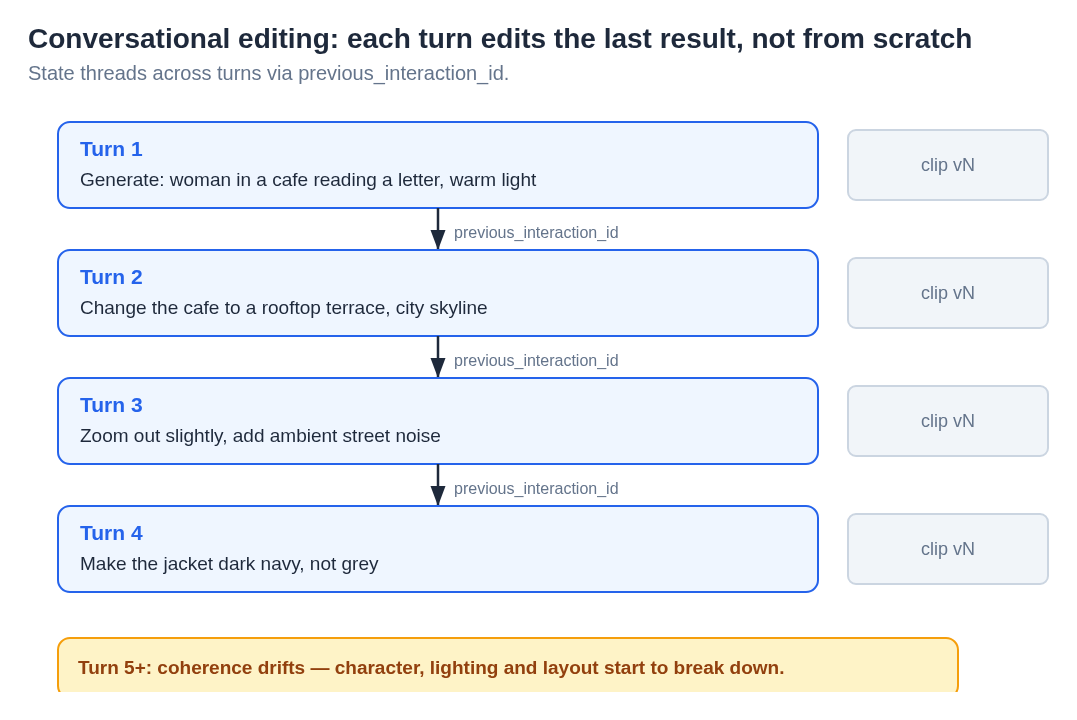
Diagram: How stateful multi-turn editing works in Gemini Omni Flash. Each turn issues an instruction; the model threads context through previous_interaction_id to apply targeted edits without regenerating from scratch.
Audio: The Other Differentiator Most People Are Sleeping On
Every video generated by Gemini Omni Flash includes synchronized audio, rendered in the same inference pass. This isn't a post-processing step or a separate audio model being stitched to a silent clip. The model generates video and sound together, using physics-modeled sound simulation.
What this means in practice: if your prompt describes waves crashing on a shore, you get wave sounds. A café scene generates ambient chatter and coffee-machine noise. A character speaking generates lip-synced dialogue. Synchronization is tight (comfortably under a second), and for clips under six to seven seconds, the quality holds. Beyond that, lip-sync drift becomes noticeable, which reinforces the 4 to 10 second sweet spot the model is currently optimized for.
For content creators who have been stitching video + stock audio + post-processing in three separate tools, getting all of that in one generation call is genuinely valuable. It's not always perfect, but it's a strong starting point that removes an entire layer of production overhead.
AI Avatars: The Sleeper Use Case
Gemini Omni Flash includes a distinct capability called AI Avatars: given a reference image of a face and a voice sample (for voice cloning), it generates a photorealistic video of that avatar speaking. This is the one use case where audio-as-input actually works at launch: specifically as a voice reference for the Avatar.
For marketing teams, e-learning producers, and customer communications at scale, the Avatar feature is immediately actionable. Generate a branded spokesperson video, localize it by swapping voice clone + text prompt, re-run it in thirty seconds. Adobe Firefly, Invideo, and WPP are among the early enterprise adopters specifically citing Avatars as a primary workflow integration.
There are important guardrails: the content policy blocks real names and likenesses of non-consenting individuals, aging simulations, fight scenes, and anything that could reasonably constitute a deepfake of a real person. Speech editing (modifying what someone appears to say retroactively) is withheld entirely, as a deliberate deepfake-prevention choice. Every output carries a non-disableable SynthID watermark (imperceptible to human viewers, machine-readable) plus C2PA Content Credentials. This is a more comprehensive provenance stack than any other video model currently shipping.
Benchmarks: What Google Claims vs. What's Independently Verified
Google's internal human-rater evaluations claim Omni Flash ranks #1 on:
- Video editing preference and instruction-following
- Text-to-video quality (MovieGenBench)
- Reference-to-video consistency
- Image-to-video (tied #1, VBench I2V)
These are compelling numbers, but the honest read is that all of them are Google-internal evaluations. No independent head-to-head benchmarks have been published as of this writing. Notably, Omni Flash has not yet been submitted to the Artificial Analysis Video Arena, where Seedance 2.0 currently leads for realistic human motion and physics. Until that submission happens and third-party results come in, the benchmarks should be treated as indicative rather than definitive.
The practitioner consensus from early testers aligns with what you'd expect: strong semantic accuracy, solid audio sync, genuinely novel conversational editing, but with visible weaknesses in motion physics ("floaty" feel, insufficient weight simulation), face consistency breaking on head turns, non-Latin text failures (hiragana and high-stroke Chinese characters were especially unreliable in hands-on reviews), and the four-turn editing ceiling mentioned above.
Gemini Omni Flash vs. the Competition
Here's an honest comparison across the models you're most likely evaluating alongside Omni Flash:
| Gemini Omni Flash | Veo 3.1 | Seedance 2.0 | Sora 2 | |
|---|---|---|---|---|
| Max resolution | 720p | Up to 4K | Up to 1080p | N/A (sunset) |
| Multi-turn editing | Yes (stateful, ~4 turns) | No | No | No |
| Audio generation | Yes (in-pass, physics-modeled) | Yes | No | No |
| AI Avatars | Yes | No | No | No |
| Approx. cost/second | ~$0.10 | ~$0.40 to $0.75 | Variable | N/A (API sunset Sep 2026) |
| Best at | Workflow/editing, Avatars, audio | Cinematic quality, long-form | Realistic human motion, physics | N/A |
| Weaknesses | 720p ceiling, motion physics, 4-turn drift | No stateful editing, pricier | No conversational editing, no audio | Discontinued |
vs. Veo 3.1: Veo is the right choice when cinematic quality is the primary deliverable and you're not planning to iterate conversationally. Cinematographers and high-end commercial production should start there. Omni Flash wins when you need iteration speed, integrated audio, or the Avatar capability, and when 720p is acceptable for the use case (which, for YouTube Shorts, social content, and product demos, it usually is).
vs. Seedance 2.0: Seedance currently leads on independent leaderboard scores for human motion realism. If you're generating footage of people moving (walking, dancing, athletic motion), Seedance's physics simulation still has an edge. The emergent workflow: generate your base clip in Seedance, then refine it conversationally in Omni Flash. You get the motion quality of a specialist model plus the editing flexibility of Omni's multi-turn interface.
vs. Sora 2: Less relevant now. OpenAI's consumer Sora app was discontinued in April 2026, and the API is sunset scheduled for September 2026. Sora is not a viable long-term choice.
This comparison also puts Omni Flash's pricing in context. At roughly $0.10 per second ($1.50/M input tokens, $17.50/M video output tokens), a 10-second clip costs approximately $1.00. That's 4 to 7x cheaper than Veo 3.1. Multi-turn editing does mean running multiple generation passes, so a four-turn editing session on a 10-second clip could run $4.00, still reasonable for professional production, but worth factoring into volume estimates.
Where Omni Flash Actually Fits in a Real Production Workflow
The mistake to avoid is treating Omni Flash as a replacement for every video model you use. It's not the highest-fidelity option at launch, and it wasn't designed to be. The design thesis is: editing video should feel like talking to a collaborator, not submitting a new ticket every time you want a change.
The workflows where it wins outright, today:
1. Social content at volume. 720p is fine for TikTok, YouTube Shorts, Instagram Reels. The Avatar feature plus conversational editing means you can produce a localized short-form video series faster than any other stack. Generate → refine by talking → ship.
2. Product demo video. Reference images of a product + text direction + conversational refinement = a compelling workflow for e-commerce and SaaS teams. No separate audio production needed.
3. Prototyping and storyboarding. The low cost and fast iteration make Omni Flash ideal for visualizing concepts before committing to expensive high-resolution generation. Use it as a previsualization layer.
4. Refinement on top of specialist outputs. Generate your high-quality base in Veo 3.1 or Seedance 2.0. Import it as a reference (when video input lands) or describe what you have, then use Omni Flash's conversational layer to adjust details. This is the pattern early enterprise adopters are converging on.
The workflows where you should reach for a specialist first:
- Cinematic 4K content → Veo 3.1
- Realistic human motion / athletics → Seedance 2.0
- Long-form (>10s) with consistent characters → Veo 3.1 or wait for Omni Pro
Running Gemini Omni Flash on Happycapy (Without the Google Cloud Setup)
Getting Gemini Omni Flash running via the Gemini API directly requires a Google Cloud project, API key provisioning, understanding the public preview model string, and typically some iteration on the API schema. That's a reasonable investment for an engineering team building a dedicated workflow, but it's friction if you want to test the model quickly or run it alongside other video generators for comparison.
Happycapy hosts Gemini Omni Flash as one of 150+ models (including Veo 3.1, Seedance 2.0, image generation models like Seedream 4.5, and others) in a browser-based cloud sandbox. No Google Cloud account required. No separate API key per provider. You can run a Gemini Omni Flash generation, compare it against a Seedance 2.0 output on the same prompt, and build a multi-model workflow that uses each model where it's strongest, all in one interface.
For teams exploring agentic AI workflows around video production, the ability to chain model calls (generate in Seedance, refine in Omni Flash, synthesize a report or caption in a language model) without stitching together separate API integrations is a meaningful time-saver.
The Honest Verdict
Gemini Omni Flash is not the sharpest-looking video model you can run today. If you're comparing raw frame quality at equivalent resolution, Seedance 2.0 wins on motion physics, and Veo 3.1 wins on cinematic polish. That's a real limitation, and the 720p ceiling, four-turn editing drift, and non-Latin text failures are genuine friction points for some workflows.
But those comparisons miss what Omni Flash is actually trying to do. The model is making a bet that workflow fluency matters more than marginal fidelity gains, and that bet holds up more often than not in real production environments. The ability to say "darken the background," get a result, say "now shift the color grade warmer," and get another result (in a continuous session, at $0.10/second) is a fundamentally different relationship with video generation than anything else currently available.
The Omni family is clearly a multi-year architecture play at Google DeepMind. Omni Pro is coming. Video input (currently accepted but non-functional) will close. Resolution will scale. The conversational editing model will get more turns before drift. What you're evaluating today is the first model in a family, one that already earns its place in a multi-model stack, even if it doesn't yet replace specialists.
For practitioners: run it in parallel, not in isolation. Use it where its workflow advantages are real, use specialists where fidelity is paramount. The stack is Seedance 2.0 + Veo 3.1 for generation quality, Omni Flash for conversational refinement and Avatars. That combination is stronger than any single model today.
For a deeper look at how Google's multimodal architecture compares to image-generation models like GPT Image 2, or for context on what MCP server integrations look like in a video production pipeline, those resources are worth a read.
Access Gemini Omni Flash alongside the full model library, no Google Cloud setup, no per-provider API keys:
FAQ
What is Gemini Omni Flash?
Gemini Omni Flash is the first model in Google DeepMind's new "Omni" model family, designed to accept any input modality (text, images, audio, video) and generate any output modality in a single model. At launch, it outputs video with synchronized audio. Its defining feature is conversational multi-turn editing: you can generate a video clip and then refine it across multiple natural-language instruction turns, with the model maintaining stateful context between each edit. It became available via the Gemini API on June 30, 2026.
How is Gemini Omni Flash different from GPT-4o "omni"?
The naming is confusing but the architectures are fundamentally different. When OpenAI called GPT-4o "omni," they meant it could perceive multiple modalities simultaneously (voice + vision) as input. Google's "Omni" refers to a generative architecture: a single model that both perceives and generates across modalities. Gemini Omni Flash doesn't just process multimodal inputs; it generates multimodal outputs (video and audio together). The Google Omni family is a generative multimodal system; OpenAI's omni branding was about perceptual input.
Gemini Omni Flash vs Veo 3: which is better?
They're optimized for different things. Veo 3.1 produces higher-resolution, more cinematic output (up to 4K vs. Omni Flash's 720p) and is the better choice for polished, high-fidelity video production. Gemini Omni Flash wins on workflow: it's the only video model with stateful multi-turn editing, it includes AI Avatar generation, it produces audio in the same inference pass, and it costs approximately 4 to 7x less per second than Veo 3.1. For social content, product demos, and iterative prototyping, Omni Flash is the better tool. For cinematic or broadcast-quality output, Veo 3.1 is the right choice.
Is Gemini Omni Flash free?
Not via API. API pricing is $1.50/M input tokens and $17.50/M video output tokens, approximately $0.10 per second of 720p video, or roughly $1.00 for a 10-second clip. There is no free API tier. However, Gemini Omni Flash is available at no cost for eligible users on YouTube Shorts and YouTube Create (18+), and through Google AI Plus, Pro, and Ultra consumer subscriptions. Enterprise access is available via the Gemini Enterprise Agent Platform.
What resolution does Gemini Omni Flash generate?
720p at launch, at 24fps. Supported aspect ratios are 16:9, 9:16, and 1:1. Clip duration is 4 to 10 seconds. Higher resolutions (1080p and above) are on the roadmap, likely tied to the forthcoming Gemini Omni Pro tier, but are not available at launch.
What is Gemini Omni Flash pricing?
Input tokens: $1.50 per million. Video output tokens: $17.50 per million. In practical terms, this works out to approximately $0.10 per second of generated 720p video, or about $1.00 for a full 10-second clip. Multi-turn editing sessions involve multiple generation calls, so a four-turn refinement session on a 10-second clip would cost approximately $4.00. Full pricing details are published at ai.google.dev/gemini-api/docs/pricing.
What's the difference between Gemini Omni and Gemini Flash?
Gemini Flash is a line of fast, cost-efficient text-and-vision language models, the Flash tier within the standard Gemini family. Gemini Omni is a separate, new model family built on a different architecture designed for any-to-any multimodal generation, starting with video output. "Gemini Omni Flash" combines the Omni architecture with the Flash speed/cost tier, positioning it as the accessible entry point into the Omni family. These are architecturally distinct model lines, not the same model at different sizes. A Gemini Omni Pro (higher fidelity, likely higher resolution) is on the roadmap separately from the Gemini Flash text models.
Sources
- Google Blog: Gemini Omni announcement
- Google AI Developers: Gemini Omni API documentation
- Google DeepMind: Gemini Omni model page
- Gemini API pricing
- Google Blog: Gemini Omni Flash / Nano / Banana 2 Lite
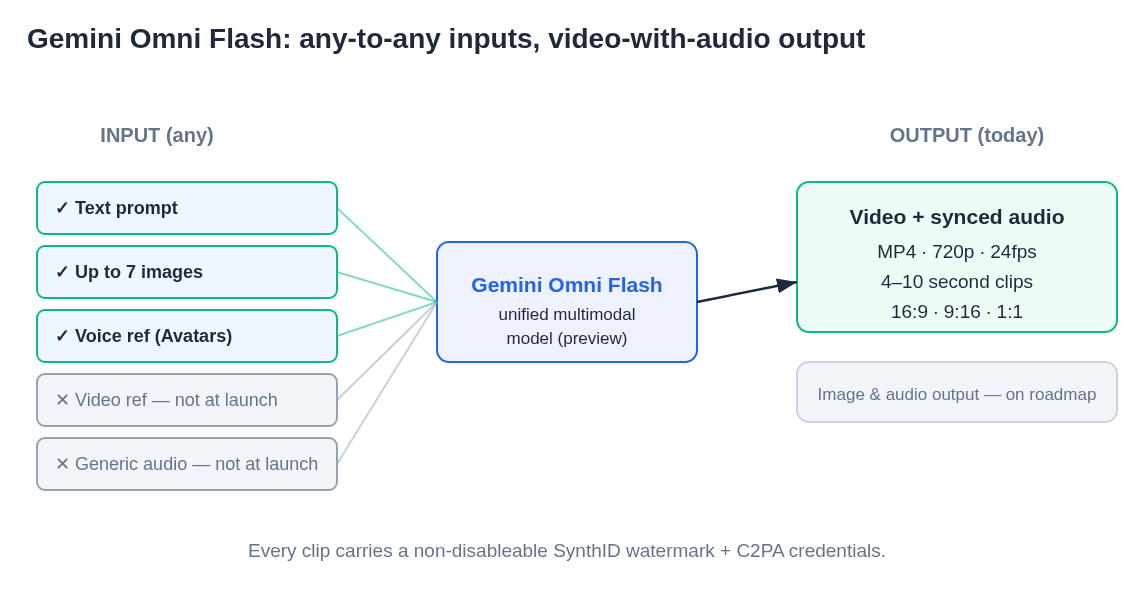
Diagram: Gemini Omni Flash's architecture at a glance, unified input processing across text, images, and audio reference, with synchronized video+audio output at 720p, 24fps, in 16:9 / 9:16 / 1:1 formats, 4 to 10 seconds per clip.