
The Best AI Agent for Coding: A Buyer's Guide to Autonomous Agents That Actually Finish the Job
Delegate a goal. Get a pull request. The full guide to autonomous coding agents, not autocomplete.
The best AI agent for coding is not the one that finishes your sentence; it is the one that finishes your task. You give it a goal: "add OAuth to the backend, write tests, and update the docs." You come back to a pull request. That is the category this guide covers: autonomous coding agents that plan, edit multiple files, execute code in a sandbox, read errors, and fix them, without you holding the cursor. This is a fundamentally different tool from an AI-powered code editor, and choosing the right one depends on factors most roundups skip.
Not what you're looking for? If you want an AI assistant that lives in your IDE and enhances the coding you are already doing, see our companion pieces: Top AI-Powered Code Editors 2026 and Top Agentic AI Coding Tools. This guide is about the agents that replace a coding work session, not the ones that annotate one.
What an Autonomous Coding Agent Actually Does
Before picking a winner, it helps to be precise about what this category means, because "AI coding tool" now covers everything from autocomplete to fully autonomous software engineers, and most comparison content conflates them.
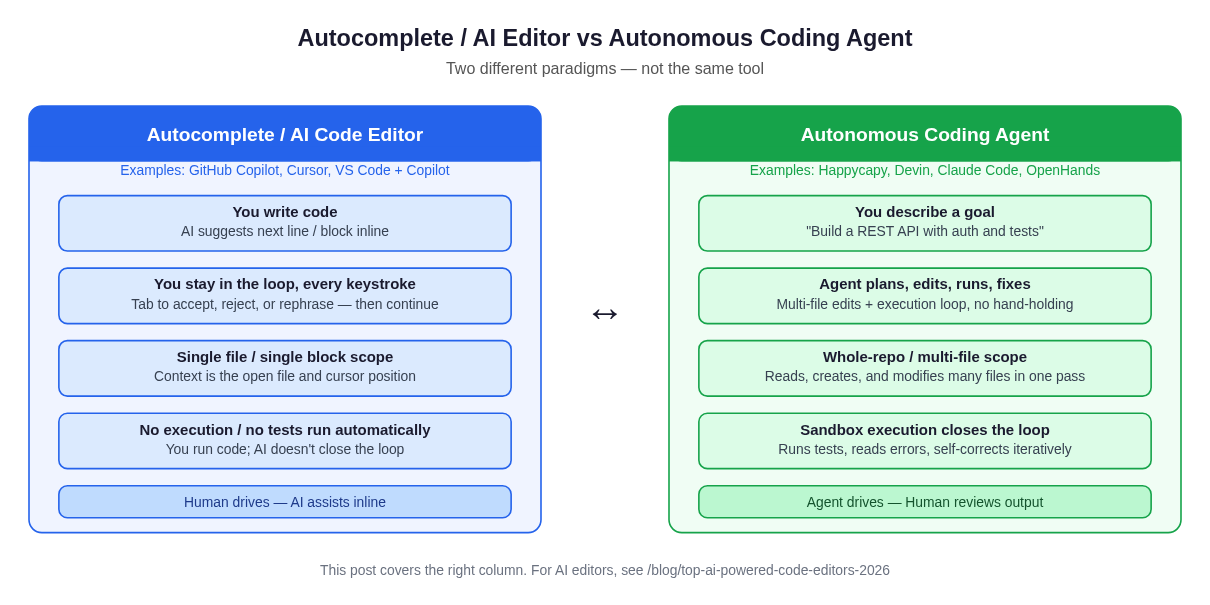 Figure 1: The paradigm split: an AI editor assists your keystrokes; an autonomous agent completes your goal end-to-end.
An autocomplete / AI editor (GitHub Copilot, Cursor, Zed AI) works inside your IDE. You write code; it suggests the next block. It is reactive, single-file in scope most of the time, and produces no output unless you run the code yourself. You drive at every step.
An autonomous coding agent inverts the model. You describe an outcome. The agent:
- Reads the repo and forms a plan
- Edits multiple files in sequence
- Executes code in a sandboxed environment: installs packages, runs tests, reads terminal output
- Observes failures, revises its plan, and iterates until tests pass or it asks for clarification
- Presents a diff or pull request for your review
The loop from goal to working code closes inside the agent, not inside your head. This is not incremental assistance; it is delegation.
The distinction matters practically. If you need to implement a feature with five files changed and a database migration, an editor assistant will save you keystrokes but you still own the session. An autonomous agent can finish that task while you do something else, or while you sleep.
The Six Criteria That Separate Good Agents from Great Ones
Not all autonomous agents are equal. Here are the six dimensions worth evaluating.
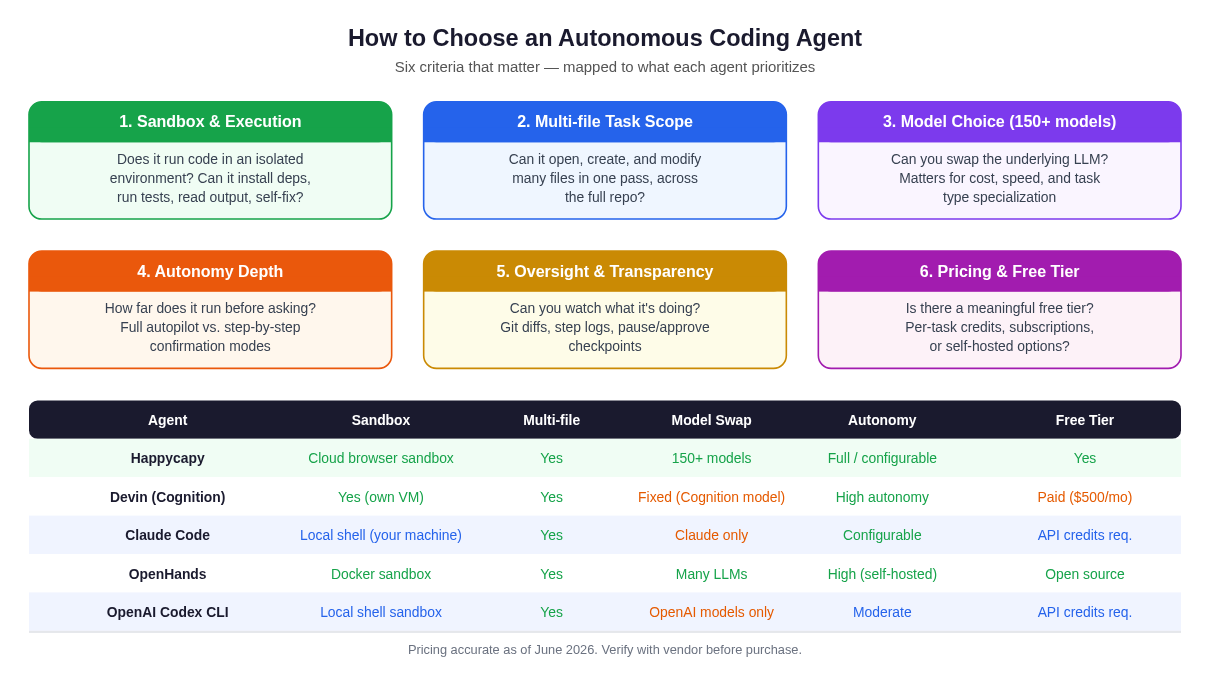 Figure 2: Selection criteria mapped to agent capabilities: what matters when you delegate an end-to-end coding task.
1. Sandbox and Execution Capability
An agent that cannot run code is just a very confident text editor. The sandbox is what makes the loop autonomous: run → read output → fix → repeat. Evaluate whether the sandbox is persistent across steps, whether it can install packages, access the filesystem, run a dev server, and whether you can inspect what happened. Cloud-hosted sandboxes (browser-based, no local setup) lower the barrier to entry significantly.
2. Multi-file Task Scope and Context Window Use
Real tasks cross file boundaries: a route handler, its model, its test file, its migration, its documentation. Agents vary enormously in how they navigate a large repo: do they rely on keyword search, embeddings, or a rich tool-use loop that reads and writes at will? A large context window alone is insufficient if the agent does not know which files to read.
3. Model Choice and Flexibility
The underlying language model determines code quality, reasoning depth, and cost-per-task. Agents that lock you into a single model family limit your ability to optimize. Some tasks benefit from the highest-capability frontier model; others can run cheaply on a smaller model. Agents that support 150+ models let you tune the tradeoff per task.
4. Autonomy Depth and Interruption Handling
"Autonomous" is a spectrum. Some agents run fully on autopilot until done. Others pause at each step and confirm with you. The right mode depends on the task and your risk tolerance: full autonomy on a greenfield feature, supervised mode on production code you cannot break. The best agents support both, with configurable checkpoints.
5. Oversight, Transparency, and Auditability
When an agent modifies twelve files, you need to review the diff. Does the agent produce clean, reviewable git diffs? Can you inspect step-by-step logs to understand why it made each decision? Is there a way to pause mid-run, course-correct, or roll back? Oversight tooling is the difference between a tool you can trust in production workflows and one you can only use on throwaway branches.
6. Pricing and Free Tier Access
Agent pricing ranges from open-source (self-hosted, cost of inference only) to $500/month subscriptions. Meaningful free tiers matter for evaluation and for developers who cannot justify a premium subscription for occasional use. Per-task pricing models are often more honest than opaque "agent compute units."
The Contenders: Honest Pros and Cons
Happycapy: Best for Browser-Native, Model-Flexible Autonomous Coding
Happycapy is an agent-native computer: a browser-based platform where you delegate coding goals to autonomous agents that execute end-to-end inside a cloud sandbox, with no local installation required. The architecture is built around the agent loop (plan, edit, run, test, fix) and exposes all 150+ supported models so you can choose the best model for each task or budget.
What makes it distinct: The browser sandbox removes setup friction entirely. You open a browser tab, describe a task, and the agent works in a cloud environment that can install packages, run tests, and produce code you can pull directly. The multi-model support (over 150 models) means you are not locked into one vendor's inference pricing or capability ceiling. The free tier is real and functional, not capped to a single test run.
For teams evaluating autonomous coding without committing to a $500/month enterprise tool, and for developers who want flexibility to mix frontier models (Claude, GPT-4o, Gemini, open-weights) for different task types, Happycapy is worth putting first in your evaluation queue.
Honest caveats: As a newer platform, it has a smaller community and ecosystem than tools that have been around for years. If your workflow requires deep IDE integration or a PR-bot that hooks into GitHub Actions natively, you will need to evaluate the integration story carefully.
Best for: Solo developers, small teams, anyone who wants browser-native autonomous coding without infrastructure overhead, and developers who want model flexibility.
Devin: Best for Fully Autonomous Enterprise-Scale Tasks
Devin, built by Cognition AI, was the first product to publicly demonstrate a fully autonomous software engineer completing end-to-end SWE-bench tasks. It has a persistent virtual machine, a web browser, and a full development environment. It can open URLs, read documentation, install tools, and run arbitrarily long workflows.
Strengths: Among the most capable agents available for complex, multi-session tasks. The VM-level sandbox is robust. The product has matured significantly since its 2024 launch and is increasingly used for real engineering work at companies. The oversight interface gives you session recordings.
Honest caveats: Devin is not cheap. The team plan starts at $500/month (as of June 2026, verify at devin.ai/pricing). The underlying model is Cognition's own, not swappable. For a solo developer or early-stage startup, the cost is hard to justify unless autonomous coding is a core workflow. There is no meaningful free tier. Additionally, Windsurf, which was previously an IDE product from Codeium, was acquired by Cognition and now redirects to devin.ai. Note that these are distinct products and use cases.
Best for: Engineering teams with a budget for autonomous agent infrastructure, and tasks that genuinely require hours of unattended execution.
Claude Code: Best for Developers Who Want Terminal-Level Control
Claude Code (by Anthropic) is an autonomous coding agent that runs in your terminal, with full access to your local filesystem and shell. It is not an IDE plugin; it is an agentic tool that reads your repo, plans, edits files, and runs commands. We have written a detailed look at how it works in our Claude Code web guide, and how it compares to editor-based tools in Claude Code vs Cursor.
Strengths: Claude Code's reasoning quality is exceptional. Claude 3.7 Sonnet and Claude 4 Opus are among the most capable models for code reasoning. The agentic loop is tight and transparent: you can see every shell command it runs. The Anthropic safety layer (permission prompts, sandboxed execution options) is well-designed. The harness is configurable for teams with specific workflows. See harness engineering guide for how to tune the agent pipeline. Claude Code also now runs in a browser context via Happycapy, which removes the local-install requirement.
Honest caveats: Claude Code requires Anthropic API credits; there is no flat subscription that bundles inference. For heavy use, costs accumulate quickly, and you need to manage your context budget carefully. It is also locked to Anthropic's model family; you cannot swap to GPT-4o or an open-weights model mid-task.
Best for: Developers comfortable with the terminal, Anthropic API subscribers who want the highest reasoning quality, and teams building custom agent workflows using Claude Code's SDK.
OpenHands (All-Hands AI): Best Open-Source Autonomous Agent
OpenHands (formerly OpenDevin), maintained by All-Hands AI, is the leading open-source autonomous coding agent. It runs inside a Docker container sandbox, supports most major LLMs through LiteLLM, and has a web UI. The GitHub repo has attracted significant community contributions and benchmark results on SWE-bench.
Strengths: Fully open source under MIT: you can inspect the code, self-host on your own infrastructure, and bring your own models. The community is active and ships features rapidly. For security-sensitive teams that cannot send code to a cloud provider, self-hosted OpenHands is one of the few serious options. Model support is broad: Claude, GPT-4o, Gemini, Mistral, and local models via Ollama.
Honest caveats: Self-hosting has real operational overhead. The out-of-the-box experience is more complex than cloud-hosted alternatives. Some benchmark numbers that circulate online are on cherry-picked easy subsets. Be cautious of marketing claims. Quality also varies by the underlying model you configure.
Best for: Developers who want full control, security-conscious teams, organizations with model vendor restrictions, and contributors who want to build on top of an open platform.
GitHub: github.com/All-Hands-AI/OpenHands
OpenAI Codex CLI: Best for OpenAI-Ecosystem Developers
OpenAI's Codex CLI is a command-line coding agent that runs locally in a sandboxed shell environment. It reads your repo, executes commands, and iterates, similar in surface to Claude Code, but using OpenAI models (GPT-4o, o3, o4-mini). It supports a "full auto" mode for unattended operation and a "suggest" mode for step-by-step review.
Strengths: Tight integration with the OpenAI model family, including reasoning models (o3, o4-mini) that excel at debugging. The sandboxing is well-designed for local use. If your team is already on OpenAI API credits, there is no additional vendor relationship to manage.
Honest caveats: Like Claude Code, it requires API credits rather than a flat subscription for inference. It is locked to OpenAI models. The CLI-first approach means it is developer-facing by default; product managers or non-technical stakeholders cannot easily observe or initiate tasks. Context about pricing and availability can shift; verify at platform.openai.com/docs/codex.
Best for: OpenAI API subscribers, developers who want access to o-series reasoning models for debugging, teams already invested in the OpenAI ecosystem.
SWE-agent: Best for Research and Benchmark-Oriented Use
SWE-agent, from Princeton NLP, is a research-oriented autonomous coding agent designed specifically around the SWE-bench benchmark (resolving real GitHub issues in open-source repos). It is open source and primarily used for understanding the limits of agent systems on software engineering tasks.
Strengths: Excellent for researchers, educators, and developers who want to understand agent behavior deeply. The paper and codebase are transparent. It performs well on SWE-bench, which involves reading an issue, locating the relevant code, and implementing a fix.
Honest caveats: SWE-agent is a research tool that has been adapted for practical use, not a product designed for daily developer workflows. Setup requires familiarity with Python environments and agent configuration. For professional use, the commercial tools above offer a substantially smoother experience.
GitHub: github.com/princeton-nlp/SWE-agent
Full Comparison Table
| Agent | Sandbox | Multi-file | Model Flexibility | Autonomy | Free / Open |
|---|---|---|---|---|---|
| Happycapy | Cloud browser sandbox | Yes | 150+ models | Full / configurable | Free tier |
| Devin | Persistent VM | Yes | Fixed (Cognition) | High | $500/mo plan |
| Claude Code | Local shell | Yes | Claude only | Configurable | API credits |
| OpenHands | Docker (self-hosted) | Yes | Many LLMs | High (self-hosted) | Open source (MIT) |
| OpenAI Codex CLI | Local shell sandbox | Yes | OpenAI models | Moderate | API credits |
| SWE-agent | Docker (local) | Yes | Many LLMs | Research-tuned | Open source |
Pricing and model availability verified June 2026. Confirm with vendors before purchase.
How to Decide: A Practical Decision Guide
You want zero setup and browser-native access → Happycapy. Open a tab, delegate the task. No Docker, no terminal config, no API key wrangling to get started. The free tier lets you evaluate before committing.
You have an engineering team and a budget for serious autonomy → Devin. The persistent VM and long-session capability make it suitable for multi-hour autonomous work sessions. Verify current pricing at devin.ai.
You prefer terminal-level control and Anthropic's model quality → Claude Code. If you trust the Claude reasoning stack and want to see every shell command the agent runs, Claude Code is the tightest loop. Consider pairing it with Happycapy's browser interface if you want cloud execution without local setup.
You have security requirements and want full control → OpenHands self-hosted. Self-hosting with Docker means your code never leaves your infrastructure. Model flexibility is broad.
You are already on the OpenAI API → OpenAI Codex CLI. The o-series reasoning models are genuinely useful for debugging and refactoring tasks that require multi-step reasoning.
You are researching agent systems or building on top of one → SWE-agent. The research pedigree and transparent codebase are unmatched.
Important Caveats Before You Commit
Autonomous does not mean infallible. All agents in this list hallucinate code, misread requirements, and produce bugs. The loop closes faster than with a human, but your review and approval gate is essential. Plan to read diffs, run your own test suite, and treat agent output as a very competent first draft.
Benchmark numbers are marketing. SWE-bench scores and "resolved X% of issues" claims vary enormously based on the subset, the difficulty tier, and whether the test setup matches production conditions. Do not select an agent based on a benchmark number alone. Run a pilot on a real task from your backlog.
Context limits matter on long files. Even with a 200k-token context window, agents make choices about what to read and what to ignore. On very large monorepos, you may need to give the agent explicit pointers to the relevant subsystem.
Cost per task accumulates. For agents billed by API credits (Claude Code, Codex CLI), a complex multi-file task can consume significant tokens. Benchmark your typical task cost before assuming an agent is affordable at scale. Cloud-hosted agents with flat pricing (Happycapy, Devin) can be more predictable for budgeting.
Model quality is the ceiling. An agent's output quality is bounded by the reasoning capability of the underlying LLM. This is why model flexibility (criterion 3) matters: the best agent framework paired with a weak model will underperform a simpler framework with a frontier model. Platforms that let you swap models give you the ability to improve as model quality improves.
Frequently Asked Questions
What is the difference between an autonomous coding agent and GitHub Copilot?
GitHub Copilot is an inline autocomplete assistant that suggests code as you type, inside your IDE. An autonomous coding agent receives a task description, plans a solution, edits multiple files, executes code in a sandbox, reads the output, and iterates, without your involvement at each step. They solve different problems. Copilot accelerates your coding sessions; an autonomous agent replaces a coding session.
Can autonomous coding agents work on large codebases?
Yes, with caveats. The best agents use tool-use loops (read file, search codebase, list directory) to navigate large repos without trying to fit everything in the context window at once. For very large monorepos, providing the agent with a clear scope ("work only in the /auth module") produces better results than asking it to explore the whole codebase.
Is Devin still the best AI coding agent?
Devin was a landmark product in 2024 and remains one of the most capable agents for sustained autonomous work. But the landscape has expanded significantly. For developers who want model flexibility, a free tier, or browser-native execution without a $500/month commitment, alternatives like Happycapy and OpenHands are genuinely competitive on many task types.
Do autonomous coding agents write tests?
The best ones do, if you ask them to, or if the task spec implies it. Agents like Happycapy, Devin, and OpenHands can run existing test suites and write new tests as part of the task loop. Specifying test coverage in your task description ("write unit tests for every new function") produces more consistent results than hoping the agent decides to do it.
What happened to Windsurf? Is it an autonomous agent?
Windsurf was an AI code editor built by Codeium; it was an IDE product, not an autonomous coding agent. Cognition (makers of Devin) acquired Codeium and now windsurf.com redirects to devin.ai. If you are evaluating "autonomous agents" specifically, Devin is the relevant Cognition product. Windsurf as an editor is covered in our AI-powered code editors roundup.
Can I run an autonomous coding agent on my own hardware?
Yes. OpenHands and SWE-agent are both self-hostable and run inside Docker containers. You bring your own LLM API keys (or point to a local model via Ollama). Claude Code runs in your local terminal without any cloud dependency beyond the Anthropic API for inference. Self-hosting trades convenience for control and is the right choice for security-sensitive environments.
How do I evaluate an autonomous coding agent before paying?
Run it on a real task from your actual backlog, not a toy "hello world" project. Pick a task with three to five files in scope, some existing test coverage, and a clear acceptance criterion. Measure: did it produce code that passes tests? Did the diff make sense? How many tokens did it consume? Use Happycapy's free tier, OpenHands' open-source build, or the Codex CLI on a small API credit load for this evaluation. A task that takes you an hour is the right size.
Are these agents safe to run on production code?
With appropriate safeguards. Best practice: work on a feature branch, not main. Use agents with configurable permission modes that require confirmation before destructive operations. Review every diff before merging. For production systems with strict audit requirements, self-hosted OpenHands or Claude Code with an approved-commands allowlist (see the harness engineering guide) gives you the most control over what the agent is permitted to do.
What makes a coding agent "autonomous" vs just "agentic"?
The word "agentic" is often used loosely for any AI tool that takes more than one action. Truly autonomous agents close the feedback loop themselves: they run code, read the error, decide what to fix, edit the file, run again, without a human in each iteration. The degree of autonomy varies: some agents pause for confirmation at checkpoints; others run unattended. The important distinction from a workflow perspective is whether you are still the one closing the loop (in which case it is an agentic assistant) or the agent is (in which case it is autonomous).
The Bottom Line
The best AI agent for coding depends on what you are optimizing for. If you want the lowest-friction entry point and the widest model choice, Happycapy is the natural first stop: browser-native, free tier, 150+ models, and the same autonomous end-to-end loop as the enterprise tools. If you need sustained multi-hour autonomy with a budget for it, Devin is the benchmark. If you want terminal-level control with Anthropic's reasoning quality, Claude Code is unmatched, and pairs well with Happycapy for cloud execution. If you have security requirements that preclude cloud-hosted agents, OpenHands self-hosted is the open-source answer.
Whichever you choose: delegate a real task, review the diff carefully, and treat the agent as a very capable collaborator, not an infallible one.
How to Test an Autonomous Coding Agent Before You Commit
Most purchasing decisions for autonomous coding agents are made on the basis of demos, benchmark leaderboards, or word-of-mouth. None of those tell you what you actually need to know: can this agent handle a realistic task from your codebase without turning a small problem into a bigger one? Here is a structured evaluation protocol you can run in an afternoon.
1. Pick a real task, not a toy
Choose something from your actual backlog: a bug that requires touching three to five files, a small feature with an obvious test requirement, or a refactor with a clear before/after. The task should have existing test coverage so you have an automated verdict. Avoid both extremes: a one-liner fix tells you nothing, and a week-long epic will exhaust your evaluation budget before you learn anything useful.
Good evaluation task template: "There is a bug in the /auth/refresh endpoint. When the token is expired, it returns a 500 instead of a 401. Fix it and add a test that asserts the correct status code."
2. Watch the planning step
Before the agent touches any file, it should produce a plan: which files it will read, what it believes the root cause is, what changes it intends to make. Read this plan. If it is vague ("I'll look at the codebase and fix the issue") that is a warning sign. A good plan names specific files, identifies the likely failure point, and lists discrete steps.
3. Inspect the diff before you approve
Never merge an autonomous agent's output without reading the full diff. Check three things: (a) are the changes scoped to what was asked, or did the agent "helpfully" refactor unrelated code? (b) does the logic match the plan? (c) did it actually write the test, or just describe it? Scope creep (agents that touch far more than asked) is a common failure mode on more complex tasks.
4. Measure cost-per-task, not just quality
For agents billed on API credits (such as Claude Code or OpenAI Codex CLI), record the token consumption on your pilot task. A well-scoped bug fix that costs a few cents in inference is very different from the same task consuming several dollars because the agent read the entire codebase repeatedly. Tools that expose per-step logs (including the harness engineering guide patterns for Claude Code) let you diagnose and prune expensive loops.
For subscription-billed agents, frame the cost question differently: how many tasks of this type would you run per month, and does the subscription math pencil out against your actual delegation frequency?
5. Deliberately trigger a failure
After a successful run, try a version of the task where the requirements are ambiguous or the test suite is not set up correctly. Does the agent ask a clarifying question, make a reasonable assumption and document it, or silently produce wrong code with confident commit messages? How an agent handles uncertainty is more predictive of production reliability than how it handles clean-room demos.
For more context on how to wire evaluation tasks into a repeatable workflow, see top agentic AI coding tools and the full setup guide at Claude Code web. If you are comparing agent-first tools to AI-enhanced editors, Claude Code vs Cursor covers that distinction in detail.
Frequently Asked Questions
What is the best AI agent for coding?
There is no single best agent; the right choice depends on your constraints. For browser-native use with no local setup and access to many models, Happycapy is worth evaluating first. For sustained multi-hour autonomous execution with a dedicated environment, Devin is a common enterprise-tier pick. For terminal-level control with Anthropic's reasoning quality, Claude Code is the tightest loop. For full control without sending code to a cloud provider, a self-hosted open-source agent like OpenHands is the answer. The fastest way to find your answer is to run a real task from your backlog on one or two candidates, not to read another comparison.
Are AI coding agents worth it?
For the right tasks, yes. Autonomous coding agents earn their cost when the work is well-scoped, has clear acceptance criteria, and involves repetitive or mechanical changes across many files: bug fixes with defined test expectations, boilerplate generation, dependency upgrades, adding error handling, or writing test coverage for existing functions. They are less reliable on tasks that require deep product judgment, unstated constraints from institutional knowledge, or creative architectural decisions. The honest framing: an autonomous coding agent is a very fast first-draft collaborator, not a replacement for an engineer who understands your system.
Can an AI agent write code on its own?
Yes, that is exactly what this category of tool does. An autonomous coding agent receives a goal in natural language, reads the relevant parts of your repository, writes and edits code across multiple files, executes the code in a sandboxed environment, reads error output, revises its approach, and repeats until the task passes or it asks for clarification. The loop from goal to working, tested code closes inside the agent. What it cannot do reliably without human input: resolve genuinely ambiguous requirements, make architectural tradeoffs with long-term consequences, or know about undocumented constraints in your system. Treat its output as a pull request from a thorough but context-limited contractor. Read the diff before you ship it.