AI Agent vs Chatbot: The Definitive Difference (and When to Use Each)
One responds. The other acts. Exactly how to tell the difference, and choose the right one for the job.
AI Agent vs Chatbot: The Definitive Difference (and When to Use Each)
A chatbot is a conversational program that responds to user input: it receives a message and returns an answer, usually without taking any action in the world. An AI agent is an autonomous system that pursues a goal by perceiving its environment, forming a plan, executing multi-step actions with tools, and observing the results in a loop. It does not just reply, it acts. The core distinction: a chatbot responds; an AI agent operates.
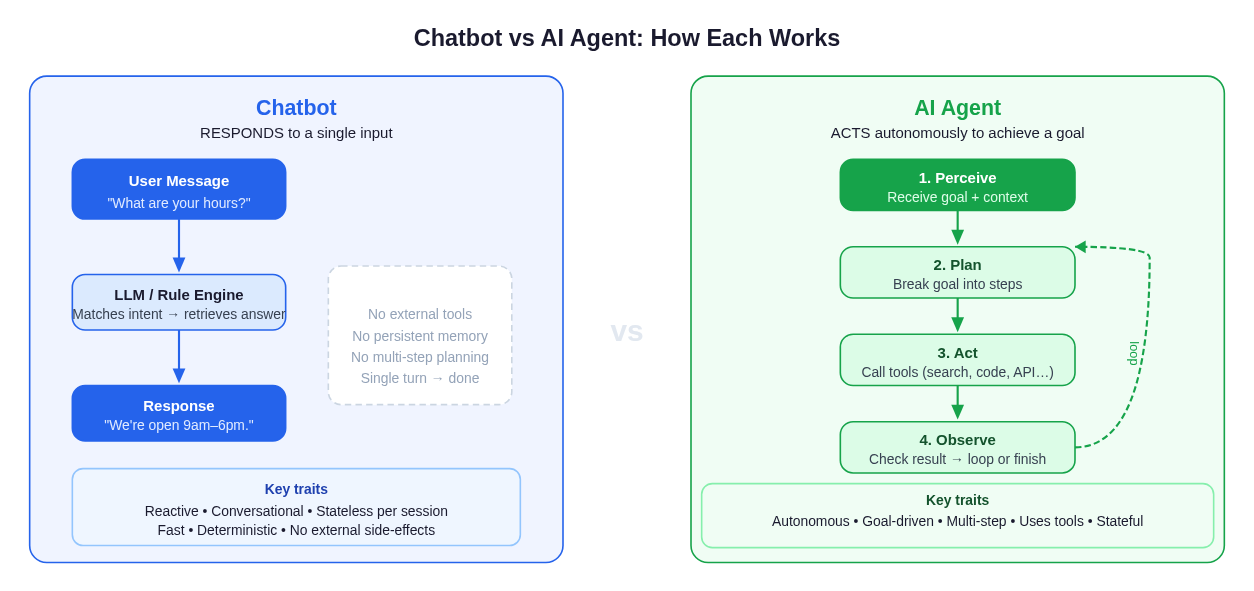 A chatbot processes one message and returns one response. An AI agent loops through perception, planning, action, and observation until a goal is complete.
Precise Definitions
What Is a Chatbot?
A chatbot is software designed to simulate conversation with a human user, typically through text or voice. It takes an input (a question, a command, a menu selection) and returns an output: an answer, a recommendation, a follow-up question. Traditional rule-based chatbots matched keywords to pre-written replies. Modern large-language-model (LLM) chatbots generate fluent, contextual text, but the underlying model is still fundamentally reactive: it processes input and produces output. The loop ends there.
Chatbots can be highly sophisticated. GPT-4o in a standard chat interface, a customer support widget that handles returns, or a conversational FAQ system on a SaaS product, these are all chatbots. They are powerful for answering questions, walking users through guided flows, and providing information at scale. But they do not book the flight, run the code, or send the email. They tell you how.
Key characteristics of a chatbot:
- Reactive: waits for user input, then responds.
- Single-turn or multi-turn conversation: maintains dialogue context, but each response is an endpoint, not a step toward a goal.
- No external tool use by default: the model generates text; it does not call external APIs, write files, or run code on its own.
- Stateless between conversations (unless explicitly given memory): each session typically starts fresh.
- Fast and deterministic: optimized for low latency; results are predictable.
What Is an AI Agent?
An AI agent is a system that autonomously pursues a goal by cycling through a perceive → plan → act → observe loop. It receives a high-level objective ("research this topic and summarize the key findings", "find the bug in this codebase and open a pull request", "book the cheapest flight to Berlin in November"), then decides how to accomplish it, breaking the goal into steps, calling external tools (web search, code execution, APIs, file systems, browsers), observing the results of each action, and iterating until the task is done or it determines it cannot proceed.
The defining quality of an AI agent is agency: it makes decisions about what to do next without being told step by step. This requires a planning layer (often the LLM itself, reasoning over a scratchpad), a tool-use layer (function calling, API integrations), and a state/memory layer (tracking what has been done and what remains).
Key characteristics of an AI agent:
- Autonomous: initiates actions based on a goal, not just a prompt.
- Multi-step: decomposes a task into sequential or parallel actions.
- Tool-equipped: can browse the web, run code, query databases, call APIs, read/write files, control software.
- Stateful: maintains context across steps within a task and, increasingly, across tasks.
- Goal-oriented: success is defined by task completion, not by producing a response.
- Adaptive: observes results of prior actions and adjusts the next step accordingly.
IBM, in its overview of AI agents, describes them as systems that use AI to plan and execute tasks and make decisions autonomously to achieve a goal, a framing that separates them from purely conversational systems.
The Core Differences, Explained
1. Autonomy
A chatbot's autonomy is bounded by the conversation: it decides what words to say next. An AI agent's autonomy extends to the real world: it decides what to do next. An agent can search the web, write and execute code, fill out a form, send a message, or spin up a sub-agent, all without additional human prompting during the task run. Autonomy is not a binary switch, but a spectrum: the further a system can go without requiring human confirmation at each step, the more "agentic" it is.
2. Tool Use
Chatbots, in their default form, generate text. AI agents act through tools. The difference shows up concretely when you give the same task to each:
- Chatbot: "What's the weather in Tokyo?" → generates a text response based on training data (potentially stale, potentially wrong).
- AI Agent: "What's the weather in Tokyo?" → calls a weather API, retrieves real-time data, returns a current, accurate answer with the source.
This may look like a minor upgrade, but the architectural implications are profound. Once an agent can call tools, it can affect external systems: update a database, create a calendar event, deploy code to production. That power requires different governance, safety constraints, and monitoring than a text-generation system.
3. Memory and State
Most chatbots hold the conversation in a context window and forget it when the session ends. AI agents maintain multiple layers of state:
- Working memory: the in-context scratchpad for the current task (what steps have been taken, what outputs have been observed).
- Episodic memory: a record of past tasks and outcomes, which can inform future behavior.
- External storage: databases or vector stores the agent reads and writes to persist information beyond any single context window.
This persistence is what lets an agent learn from prior runs, coordinate across longer time horizons, and operate more like a software process than a chatbot session.
4. Goal Orientation vs Response Orientation
A chatbot is optimized to give a good answer to the next message. An AI agent is optimized to complete an objective. This is a subtle but important architectural difference. A chatbot's objective function is essentially "produce a helpful response to this input." An agent's objective function is "accomplish this goal efficiently and correctly." The agent will take five suboptimal conversational turns if that path reliably gets the task done; a chatbot would generate five polished sentences and stop.
5. Error Handling and Iteration
When a chatbot gives a wrong answer, a human corrects it and the chatbot tries again. When an AI agent encounters an error mid-task (an API call fails, a page doesn't load, a code snippet throws an exception), the agent can detect the failure, diagnose the cause, adapt its plan, and retry, all without human intervention. This self-correction loop is what makes agents suitable for long-running, real-world tasks.
Comparison Table: AI Agent vs Chatbot
| Dimension | Chatbot | AI Agent |
|---|---|---|
| Primary function | Responds to messages | Accomplishes goals |
| Interaction model | Reactive (input → output) | Autonomous (perceive → plan → act → observe) |
| Tool use | Rarely / never by default | Core capability |
| Multi-step execution | No | Yes |
| Memory | Context window only | Multi-layer (working, episodic, external) |
| Error recovery | Human re-prompts | Self-corrects within task |
| Latency | Low (single inference) | Higher (multiple calls, tool round-trips) |
| Cost per query | Low | Higher (multiple LLM calls + tool calls) |
| Best for | Q&A, guidance, conversation | Research, automation, complex workflows |
| Side effects | None by default | Can take real-world actions |
| Governance complexity | Lower | Higher (actions need guardrails) |
Real Examples
Chatbot Examples
Customer support widget: A user asks "How do I reset my password?" The chatbot matches the intent, returns the four-step reset procedure, and closes the ticket. It does not access the user's account, trigger a reset email, or verify the account exists.
GPT-4o in standard chat: You ask it to explain a concept, debug a piece of code conceptually, or draft an email. It generates high-quality text. Unless you have plugins or tool use enabled, it does not actually send the email or run the code.
IVR / voice assistant with LLM backend: "What are your business hours?" The system matches the question and reads back the hours. Sophisticated, but still fundamentally a response machine.
In-app product assistant: Many SaaS products embed a chatbot that can answer "how do I do X in this product?" by retrieving documentation. It answers. It does not perform the action in the product on your behalf.
AI Agent Examples
Research agent: You give the agent a topic: "Summarize the competitive landscape for project management software in 2026." The agent breaks this into sub-tasks: search for competitors, visit their pricing pages, read recent news, compare features, synthesize a report. Each step calls tools (web search, browser scraping, summarization), and the loop continues until the report is complete.
Software engineering agent: You describe a bug. The agent reads the codebase, identifies the root cause, writes a fix, runs the test suite, observes that two tests now fail, revises the fix, reruns tests, and opens a pull request. No step-by-step instructions required.
Data pipeline agent: Given "pull last month's sales data, clean it, generate a chart, and email it to the marketing team," the agent queries the database, runs the cleaning script, calls a charting library, and sends the email via SMTP. This task touches four distinct systems; a chatbot cannot do it.
Browser automation agent: The agent navigates to a travel site, searches for flights matching your criteria, compares options, fills in the booking form, and presents you with the confirmation, or flags if it needs your credit card number to proceed.
For a deeper look at how agents are being deployed across organizations, see AI agents in business: real use cases and implementation.
The Overlap: When a Chatbot Has a Chat Interface
The boundary between chatbots and agents is blurring in practice, and it is worth being precise about where the overlap lies.
Agents can have conversational interfaces. Happycapy, for example, accepts a natural-language goal (you type it like a message) but what runs under the hood is an autonomous agent loop, not a single-turn response. The chat interface is the input mechanism; what happens after is agent execution. The presence of a text box does not make something a chatbot.
Chatbots can call tools when given plugins. ChatGPT with browsing enabled, or a custom GPT with function calling, is doing something agent-like: it retrieves external data before responding. But most plugin-enabled chatbots still stop at "respond": they don't loop autonomously to complete a multi-step objective. The degree to which the system can chain tool calls, adapt its plan mid-run, and operate without per-step human confirmation is what determines how far it sits on the agent end of the spectrum.
The spectrum: at one end, a pure rule-based chatbot (keyword → canned response). At the other, a fully autonomous agent running for hours with dozens of tool calls and no human in the loop. Most real products sit somewhere in between.
For more on how "agentic" behavior is defined and measured, see Agentic AI vs AI agents: what's the difference? and Agentic AI vs generative AI.
Decision Guide: Which Do You Need?
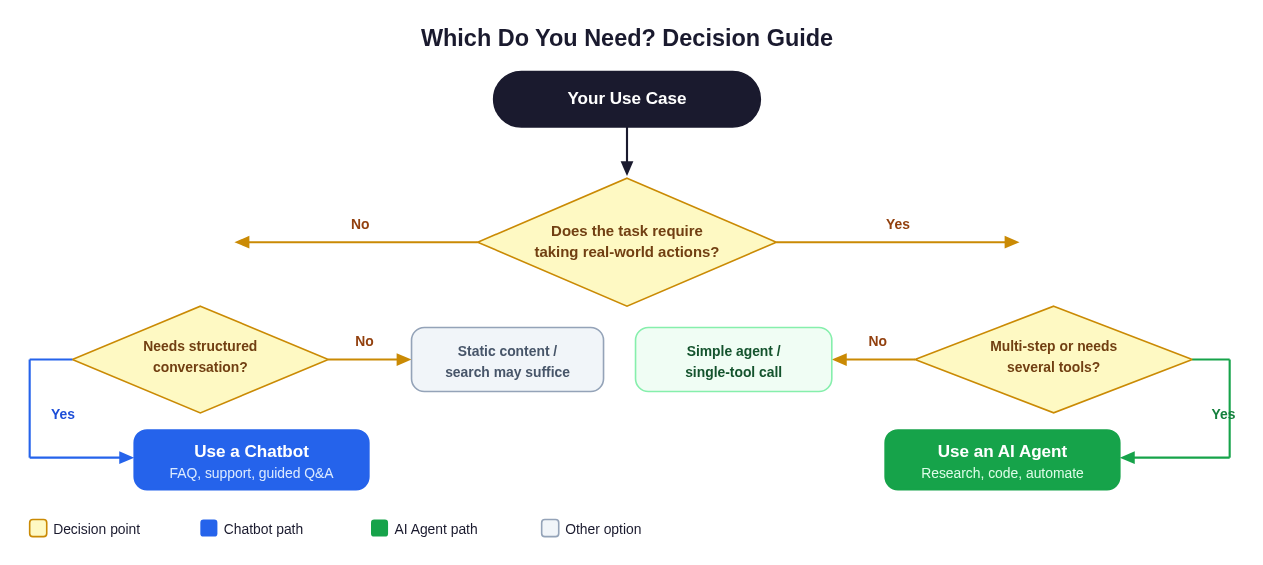 Start with what your task actually requires. If it needs to act, not just answer, you need an agent.
Choose a chatbot when:
- The task is primarily informational: answering questions, explaining concepts, summarizing provided content.
- You need high throughput at low cost: chatbots are fast and cheap per query.
- The interaction is conversational and bounded: customer support, onboarding flows, FAQ deflection, product guidance.
- You need deterministic, auditable responses with no external side effects.
- Latency is critical: users expect sub-second responses.
- The risk of taking wrong actions is higher than the risk of giving incomplete answers.
Choose an AI agent when:
- The task requires taking actions: booking, filing, sending, executing, modifying.
- The work spans multiple steps that depend on each other's results.
- You need to integrate several tools or data sources in one workflow.
- The goal is defined by an outcome ("generate a competitive analysis") rather than a response ("tell me about competitors").
- You want the system to handle errors and adapt without constant human oversight.
- You are automating a process that currently requires a human to switch between multiple applications.
The hybrid: agent with conversational checkpoints
A growing pattern is the supervised agent: an agent that handles autonomous multi-step execution but pauses to ask for human confirmation at key decision points: before taking irreversible actions (sending an email, making a purchase, deleting data), or when confidence is low. This gets you the power of agentic automation with the safety of a human in the loop where it matters. Happycapy's sandbox model works this way: you start a task in natural language, the agent executes autonomously, and you can inspect or redirect mid-task.
Cost and complexity considerations
Agents are not always the right choice. They cost more per task (multiple LLM inference calls plus tool round-trips), take longer to execute, and introduce new failure modes (wrong tool selection, cascading errors, hallucinated URLs). For a simple FAQ bot serving 100,000 queries a day, agent-level overhead is wasteful. For a complex workflow that currently requires four hours of human work and five different tools, an agent that handles it in two minutes pays back its cost immediately.
A useful heuristic: if a competent human could complete the task by answering one question from memory, use a chatbot. If completing the task would require the human to open several applications, make several decisions, and take several real-world actions, use an agent.
Caveats and Nuances
"AI agent" is used loosely. Many products marketed as "AI agents" are essentially chatbots with one or two tool calls bolted on. Genuine agentic behavior requires autonomous multi-step planning, error recovery, and stateful execution, not just the ability to fetch the weather before responding.
Chatbots can be highly sophisticated. A retrieval-augmented generation (RAG) chatbot with access to a large internal knowledge base, a tool to look up order status, and a well-engineered system prompt can handle a large share of enterprise support cases. Do not underestimate what a well-built chatbot can do within the conversational domain.
Safety and governance requirements differ. Because agents take actions with real-world consequences, they require guardrails that chatbots do not: confirmation steps before irreversible actions, rate limiting on tool calls, sandboxed execution environments, audit logs of every action taken. Building a production agent requires treating it more like software infrastructure than a chatbot configuration.
LLMs are both. The underlying model (GPT-4, Claude, Gemini) is the same whether it is powering a chatbot or an agent. The difference lies in the surrounding system: the prompt architecture, tool integrations, state management, and loop control that the application layer adds around the model.
FAQ
Q: Is ChatGPT a chatbot or an AI agent? A: In its standard interface, ChatGPT is a chatbot. It responds to messages. With the Code Interpreter and browsing tools enabled, it takes on limited agentic behaviors (it can execute code, search the web), but it does not run autonomous multi-step loops without user guidance at each turn. The operator-configured custom GPTs with extensive function calling can approach agent-like behavior, but most everyday use of ChatGPT is firmly in chatbot territory.
Q: Can an AI agent replace a chatbot for customer support? A: For most customer support use cases, you probably want a sophisticated chatbot with a few tool integrations (order lookup, account status), not a fully autonomous agent. Agents are best when the task requires complex multi-step execution. Customer support is primarily about answering questions and executing simple, bounded actions, a domain where chatbots excel. Agents become relevant for complex service requests like "research all open tickets for this customer, identify the pattern, and draft a proposed resolution across all of them."
Q: What makes something "agentic"? A: Autonomy, tool use, multi-step execution, and goal-orientation. A system is more agentic the further it can run toward a goal without requiring human input at every step. See Agentic AI vs AI agents for a detailed treatment of this spectrum.
Q: Do AI agents always need an LLM? A: No, classical software agents (rule-based, reinforcement learning, symbolic AI) predate LLMs by decades. But modern AI agents almost always use an LLM as the reasoning and planning core, with tool-calling APIs enabling actions. The LLM is what makes natural-language goal specification and flexible plan generation practical.
Q: How much does it cost to run an AI agent vs a chatbot? A: Meaningfully more. A typical chatbot interaction costs a fraction of a cent in inference. An agent task might involve five to fifty LLM calls plus external API calls, driving costs up by one to two orders of magnitude. This is acceptable when the agent is replacing significant human labor, but it changes the economics for high-volume, simple queries.
Q: Is a virtual assistant (Siri, Alexa) a chatbot or an agent? A: Mostly chatbot, with narrow agentic actions. They respond conversationally and can execute specific, pre-defined actions (play music, set a timer, control a smart home device). They do not exhibit autonomous multi-step planning toward an open-ended goal. More capable versions are getting closer to agents, but the architecture is still primarily reactive.
Q: Can I build an agent on top of a chatbot API? A: Yes, most LLM APIs support function/tool calling, which is the foundation of agent systems. You build the planning loop, state management, and tool integrations yourself (or use an agent framework), and the LLM API provides the reasoning core. The chatbot API becomes a component inside the agent architecture.
Q: What is the biggest risk of AI agents compared to chatbots? A: Unintended real-world actions. A chatbot that produces a wrong answer can be corrected in the next message. An agent that makes a wrong decision midway through a task might have already sent an email, deleted a file, or made a purchase. This irreversibility requirement drives the need for confirmation gates, sandboxed execution, and comprehensive audit trails that chatbots simply do not require.
Q: What should I look for in an AI agent platform? A: Secure sandboxed execution (so tool actions cannot escape a controlled environment), broad model support (not locked to one LLM), real tool integrations (browser, code runner, APIs), observability (logs, traces, step-by-step inspection), and support for human-in-the-loop checkpoints. These are the capabilities that separate a genuine agent platform from a chatbot with a couple of plugins.
Build the Difference Yourself
The fastest way to understand this distinction viscerally is to give the same task to a chatbot and to an AI agent and watch what happens.
Ask a chatbot to "research the top five competitors of Notion, check their current pricing, and produce a comparison table." It will generate a plausible-sounding table from training data: some entries will be outdated, some fabricated. The chatbot cannot verify what it produces because it cannot actually visit those websites.
Give the same task to an AI agent running in a live environment. It will open a browser, navigate to each competitor's pricing page, read the current numbers, note the date, and assemble a table from real data it just retrieved. When one page requires a login, it flags that. When a price has changed since training, it captures the current figure.
That gap, between generating a response and completing a goal, is what Happycapy is built to operate in. Happycapy runs a real agent loop inside a secure cloud sandbox: browser control, code execution, 150+ models, and real tool integrations, all accessible from a natural-language interface. It is not a chatbot wrapper. You give it a goal; it acts.
Can a Chatbot Become an AI Agent? The Spectrum in Practice
The short answer: a chatbot can grow toward agent-like behavior by gaining more capabilities, but at some point the architecture changes enough that calling it a "chatbot" is misleading. Understanding the upgrade path clarifies the real difference.
Stage 1: Pure chatbot. A rule-based widget that matches keywords to canned replies. Zero autonomy, zero tools, zero memory beyond the current session. Fast, cheap, deterministic.
Stage 2: LLM-powered chatbot. The same conversation pattern, but backed by a large language model that generates fluent, contextual responses. Still reactive. Still a single-turn endpoint. This is where most "AI-powered" customer support bots and product assistants sit today.
Stage 3: Chatbot with tools. The LLM can call one or two external functions (look up an order status, retrieve a knowledge article, check account balance) before responding. The response is still the goal; the tool call is just enrichment. ChatGPT with browsing enabled mostly lives here.
Stage 4: Supervised agent. The system can chain multiple tool calls, maintain task state across turns, and pursue a sub-goal before returning to the user. A human remains in the loop for key decisions, but the system is no longer purely reactive. Agentic behavior has emerged.
Stage 5: Autonomous agent. The system receives an open-ended goal, decomposes it into a dynamic plan, executes dozens of tool calls across multiple systems, recovers from errors mid-run, and delivers a completed outcome, all without per-step human guidance. This is what Happycapy runs when you start a task: a full perceive-plan-act-observe loop inside a secure cloud sandbox, not a chatbot with extra steps.
The practical implication: when evaluating a product marketed as an "AI agent," ask whether it genuinely runs a multi-step loop toward a goal, or whether it fires a tool call and then returns a response. The former is an agent; the latter is an enriched chatbot. Many products in 2025 to 2026 occupy Stage 3 and call it agentic.
For a deeper look at where the "agentic" label actually applies, see Agentic AI vs AI agents: what's the difference? and Agentic AI vs generative AI.
Chatbot vs AI Agent in Practice: Customer Support Side-by-Side
Customer support is the clearest domain for seeing the difference, because both tools are heavily deployed there and the contrast is concrete.
Scenario: A customer emails to say they were charged twice for the same order.
| Step | Chatbot approach | AI agent approach |
|---|---|---|
| 1. Understand the issue | Identifies "billing dispute" intent; returns scripted "we're looking into it" reply. | Parses the email, identifies order ID and duplicate charge amounts. |
| 2. Investigate | Cannot access order system; escalates or asks customer to contact billing. | Queries the order database, retrieves both charge records, confirms the duplicate. |
| 3. Cross-reference | N/A (no tool access). | Checks refund policy rules, verifies the customer's account is in good standing, identifies the correct refund amount. |
| 4. Act | Returns a message with a support phone number. | Initiates the refund via payment API, logs the resolution in CRM, updates the ticket status. |
| 5. Confirm | Asks the customer to follow up if the issue isn't resolved. | Sends the customer a confirmation with the refund amount and expected processing time. |
The chatbot handled the conversation. The agent resolved the issue. For straightforward FAQs and guided flows, a chatbot is faster and cheaper. For tasks that require reading internal systems, applying business logic, and taking a consequential action, the agent is doing the work a human support agent would otherwise do.
This is the core of how AI agents are deployed in business operations today: not as a replacement for all chatbot interactions, but as the right tool for the tasks that require judgment, integration, and action.
AI Agent vs Chatbot: More Questions
Q: What is the difference between an AI agent and a chatbot? A: A chatbot receives a message and returns a response. Its job ends at the reply. An AI agent receives a goal and takes action to achieve it, cycling through perception, planning, tool use, and observation until the task is complete. The simplest one-line version: a chatbot responds; an AI agent acts. The structural difference is the loop: an agent keeps running, calling tools and adjusting its plan, until the objective is met. A chatbot does not loop; it replies once and waits.
Q: Is ChatGPT an AI agent or a chatbot? A: In standard use, ChatGPT is a chatbot. It takes a message and produces a response. When operator-configured tools like Code Interpreter, web browsing, or custom function calling are active, it exhibits limited agentic behavior within a turn. But the system does not autonomously chain multi-step tool calls toward an open-ended goal without user guidance at each turn. Most everyday ChatGPT use, and nearly all consumer-facing deployments, is firmly chatbot-pattern behavior. A genuinely agentic system would take your goal, plan its own steps, execute them, handle errors mid-run, and return a completed result rather than a conversational response.
Q: Can a chatbot be an AI agent? A: Only if it gains the full stack of agentic capabilities: autonomous multi-step planning, real tool execution (not just retrieval before responding), stateful memory across steps, and goal-oriented loop control. Adding one or two tool calls to a chatbot makes it a more capable chatbot, not an agent. The distinction becomes an agent when the system can receive an open-ended goal and run, without step-by-step human prompting, until that goal is achieved or it determines it cannot proceed. That architectural shift, not any single feature, is what makes an AI agent genuinely different from a chatbot.