Photographers and small businesses
Clean up your own product or portfolio photos before final delivery.
Remove a watermark or logo from a photo — describe it, get a clean copy back. Powered by paid AI image models — no free tier.
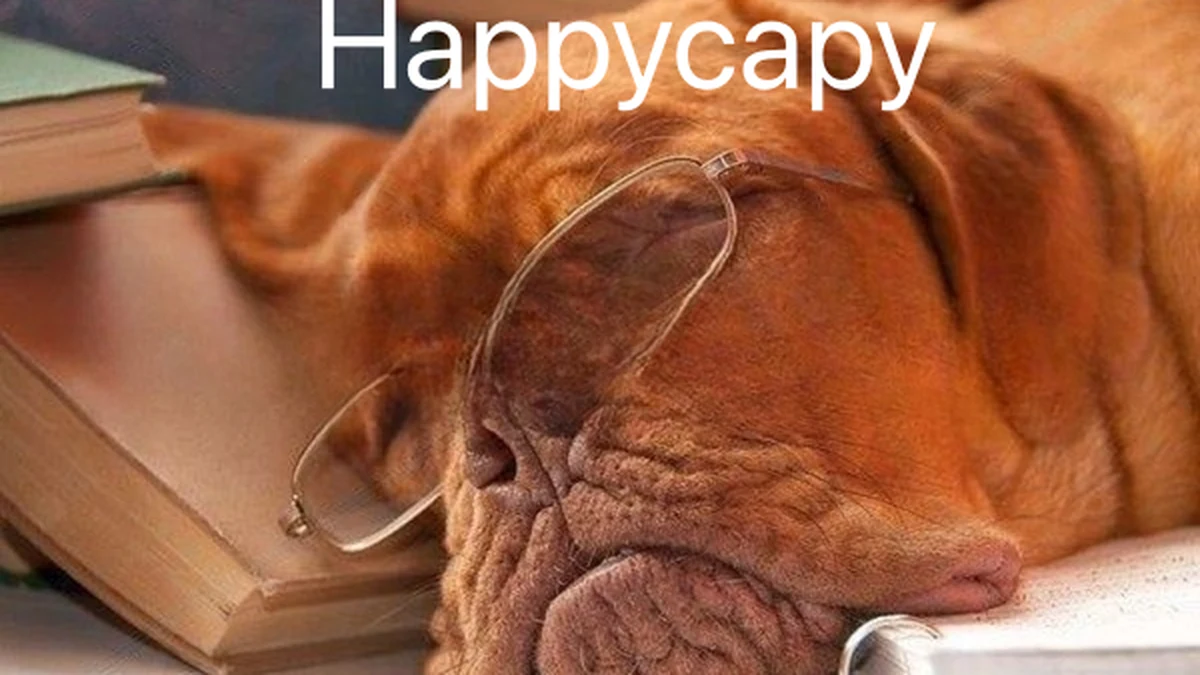
The original photo with a large text watermark across the top.

The same photo with the watermark gone and everything else — the dog, books, and glasses — unchanged.
Describe the watermark's position and appearance to get a clean copy of your photo back.
Provide the image with the watermark or logo you want removed.
Clean up your own product or portfolio photos before final delivery.
Remove an old date or camera watermark from personal photos.
Remove a preview watermark from an image you've since purchased the rights to.
'Bottom-right, semi-transparent' helps target the watermark precisely.
A watermark over plain sky or a wall reconstructs better than one over a busy scene.
Results are less reliable the more important detail the watermark covers.
Removing watermarks from copyrighted third-party images without permission may breach copyright law.
Describe the watermark type once for a set of similar images.
Point out any remaining faint mark for a cleanup pass.
Review output quality, follow-up checks, and download expectations for photo watermark removal.
For a watermark on a relatively plain background — a corner logo on sky or a plain wall — the tool typically returns a clean result within a minute, with the area underneath reconstructed convincingly. Watermarks over busy, highly detailed backgrounds or important subject matter (like faces) are harder to remove seamlessly and may leave a subtle trace or a slightly different texture in that spot.
Example: A user uploaded a product photo with a semi-transparent stock-agency watermark diagonally across the image and asked for it removed. The result showed the watermark gone with the product and plain background reconstructed cleanly, with no visible trace remaining.
You describe the watermark, logo, or stamp on your photo — where it is, what it looks like — and the tool removes it while reconstructing the area underneath as naturally as possible.
Sign up free and put AI agents to work across your tasks, from quick jobs to complete end-to-end workflows, right in your browser, no setup needed.
Get started for free