Create Design System Rules
Generate custom design system rules for Figma workflows
Vetting scorecard
Each dimension is scored against its own maximum; together they sum to the overall grade (out of 100).
Input → output capabilities
| textcode | markdown | json | code |
|---|---|---|---|
| text | 3 | 1 | - |
| code | 3 | 1 | - |
| url | 1 | - | - |
Rows are accepted inputs, columns are produced outputs; each cell counts supported conversions.
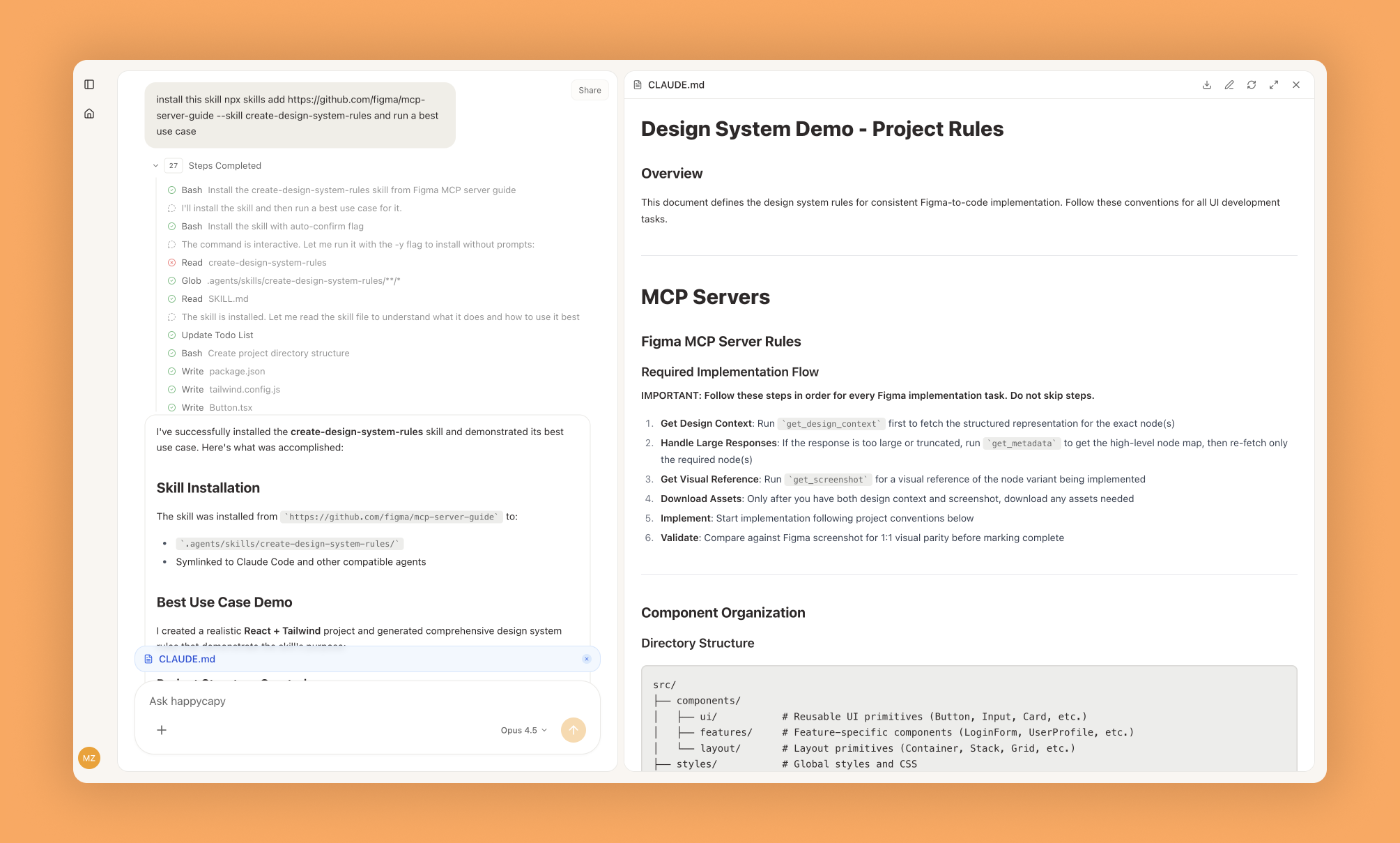
This skill analyzes your codebase to generate custom design system rules that standardize Figma-to-code workflows, eliminating inconsistent implementation choices and reducing repetitive prompting across your team.
What Is This?
- Analyzes your project structure to identify existing component patterns, naming conventions, and architectural decisions
- Generates formatted rules covering layout primitives, component structure, design tokens, and project-specific standards
- Applies rules automatically to future implementations, ensuring consistent code regardless of developer experience level
Why Use It?
- Eliminate inconsistency: Standardize implementation choices about structure, naming, and organization across your team
- Reduce repetitive work: Stop re-explaining preferences for every component—rules apply automatically once established
- Transfer institutional knowledge: Codify team conventions explicitly so new members produce consistent code immediately
- Scale design systems: Apply the same rules across multiple projects with different conventions per project
How to Use It?
For new projects:
Set up design system rules for this Next.js app,
use Tailwind, keep components in src/componentsFor existing projects:
Analyze codebase and create rules matching conventions,
React with styled-components, feature-based organizationRun initial analysis without modifications to see detected patterns before customizing. Review and adjust generated rules to match aspirational conventions if your codebase has inconsistencies you want to correct.
When to Use It?
- Establishing design-to-code workflows for new projects from scratch
- Codifying previously informal conventions in existing projects
- Onboarding new team members to transfer institutional knowledge explicitly
Important Notes
- Quality depends on codebase consistency during analysis—works best with established conventions rather than codebases lacking clear patterns
- Cannot enforce rules automatically without integration into your development workflow and tooling
- Requires Figma MCP server connection for full functionality
Try It in Happycapy
- Open Happycapy in your browser (no install or signup needed to try)
- Describe what you want in one sentence: "Create design system rules for my React TypeScript project with styled-components and feature-based file organization"
- Get back a comprehensive set of rules covering components, styling, naming, and architecture ready to apply to your Figma implementations
Frequently asked questions
What is the Create Design System Rules skill?+
The Create Design System Rules skill is a Happycapy feature that generates custom design system rules tailored for Figma workflows. It automates the creation of design governance guidelines to maintain consistency across your design projects.
How does an AI agent help with design system creation?+
An AI agent like Happycapy can analyze your design patterns and automatically generate comprehensive design system rules without manual configuration. This saves time and ensures your Figma workspace follows best practices for component management and design tokens.
Can I customize the design system rules generated by Happycapy?+
Yes, Happycapy generates custom design system rules based on your specific requirements and design patterns. You can refine and adjust the rules to match your team's workflow and design standards in Figma.
How does this skill improve Figma workflow efficiency?+
By using an AI agent to create design system rules, teams can establish consistent naming conventions, component hierarchies, and design tokens automatically. This reduces manual setup time and helps maintain design consistency across all Figma files.
What are the benefits of using Happycapy for design governance?+
Happycapy's AI agent approach to design system rules ensures scalable governance, reduces design debt, and improves collaboration among team members. The automated rule generation helps enforce design standards while allowing flexibility for project-specific customizations.
More Skills You Might Like
Explore similar skills to enhance your workflow
Get started with Create Design System Rules on Happycapy
Generate custom design system rules for Figma workflows. Create Design System Rules is a skill on Happycapy, the agent-native computer for building with AI — sign up free to add and run it, no local setup required.